“How many Kafka events will Flink process per second?”

April 11th, 2026

I’m often asked this. The specific question varies, but it’s typically some variation of asking how quickly a single CPU of Flink processes events from a Kafka topic.

Why “per CPU”? Maybe because enterprise software is typically charged per CPU? Maybe because I tend to talk to people who run everything in Kubernetes, who think of running software in terms of requests / limits? Not sure, but the question tends to be framed from the perspective of asking how much processing they can expect to get from a CPU.

I try to avoid doing the engineer thing of answering “it depends“… but… it really does depend!

That is the motivation behind this post: to give me something I can point at as an illustration of the degree to which Flink’s performance varies (and a taste of the range of interrelated factors that influence it).


Read the rest of this entry »

Paying for image hosting

April 6th, 2026

I don’t take my blog very seriously. It’s a place where I leave myself reminders of things I figured out how to do, or share things I’ve done that won’t fit in a tweet Bluesky post. But even so, I get annoyed that my blog has often been offline.

My site’s host provider has a monthly bandwidth limit. When I hit that limit, my site is taken offline, replaced with an error page saying that I’ve exceeded my quota.

I’ll write a blog post that includes images, and if too many people look at the page too many times, the whole site goes offline for the rest of the month. (To be fair, it’s never a single post that does that – I don’t get that many hits! More often it’s when I’ve written a few posts in a month, and the last one pushes me over the line). Normally I end up offline for just a day a two, but it has been over a week before.

Last month, I finally decided to do something about it. I started looking at moving the images I use in blog posts somewhere else that wouldn’t count against my bandwidth limit. My blog isn’t serious enough for me to be willing to spend a lot on it, but I don’t mind paying something to make the worry about image bandwidth go away.

I searched for image hosting services, and started reading about services such as postimages.org ($14.99 a month), imgbb.com ($12.99 a month), sirv ($19 a month), and imagekit.io ($9 a month). Every service I found felt too limited, too expensive, or both.

Read the rest of this entry »

Another break in Devon

April 4th, 2026

Like last year, we went to Devon for a week before Easter. And like last year, I used it as a chance to walk, forget work, and catch up on books, games, and movies.

I played…

I read…

I watched…

Read the rest of this entry »

Extending Flink SQL

March 29th, 2026

In this post, I’ll share examples of how writing user-defined functions (UDFs) extends what is possible using built-in Flink SQL functions alone.

I’ll share examples of how UDFs can:

Read the rest of this entry »

Talking at TechCon about AI and EDA

March 22nd, 2026

IBM TechCon is an annual online technical event for engineers, creators, and integration specialists.

One of our sessions for this year was AI patterns in event-driven architectures:

You already have Kafka topics sending valuable event data through your systems. You’ve heard about the increasing adoption and promise of AI technologies. But how do these worlds overlap?

We’ll explain the ways that you can take your Kafka topics and use them not just for integration and analytics, but also to drive AI and ML — things like real-time anomaly detection, prediction models, personalization, decision pipelines, and more.

In this session, we’ll explain the four main patterns for how your existing Kafka topics (and the streams of events on them) can be leveraged as the foundation for AI/ML. We’ll show multiple technology approaches to implement each pattern – rather than convince you to use any single specific tool, help you understand the high level patterns, and how can you get started with them.


session recording on video.ibm.com

This was adapted from a talk I gave at Current last year.

I got to go to a fancy convention centre in New Orleans for that talk, but I gave this one from a poorly-lit meeting room in my office… so in that respect at least, this one was less fun! 😉

But it’s a topic I find super interesting, so I am always pleased to have another chance to share my thoughts.

Talking at TechCon about metrics and monitoring

March 21st, 2026

IBM TechCon is an annual online technical event for engineers, creators, and integration specialists.

One of our sessions for this year was an introduction to Monitoring your Event Driven Architecture:

This session will give you an insight into the life of an Event Automation administrator, responsible for a busy event-driven system where teams have been creating a variety of Kafka topics, integrations, stream processing apps, connectors, and much more. We’ll highlight the importance of metrics and monitoring for event driven architectures and introduce you to the tools that are available to help.

We’ll do this by showing you an event-driven environment where things have gotten out of hand. In our fictional scenario, users are being impacted by things like poorly configured topics, poorly written applications, poorly managed connectors, poorly configured stream processors…

In this session, we’ll walk you through to bring control to the chaos. We’ll step through how to get an insight into what is happening, find out where the problems are, and put controls in place to mitigate their impact.


session recording on video.ibm.com

It was an introduction for beginners, that you could sum up as a 40-minute plea for people to monitor their Kafka clusters and applications! Essentially, we set up a handful of naive and broken applications, and walked through how metrics and monitoring show you where the problems are hiding.

Watch it to be persuaded that metrics are important.

Or to watch how Matt had to jump in and help me when an Apple Magic Mouse decide it didn’t like scrolling any more, and I needed to get to things at the bottom of web pages!

Or just to marvel at how glamourous our offices are. 😉

Deploying Apache Flink jobs into Kubernetes

March 20th, 2026

IBM TechCon is an annual online technical event for engineers, creators, and integration specialists.

One of our sessions for this year was Deploying an Apache Flink job into production:

You’ve maybe seen the low-code canvas in Event Processing or the simple expressiveness of Flink SQL, and how easy they make it to author event stream processing. A business user who understands the data in the event stream can easily describe the patterns they’re interested in or the insights they want to look for. But what comes next?

In this session, we’ll walk through the ops tasks involved in taking that event processing flow, and deploying it into Kubernetes as a Flink application ready for production.

We’ll outline the steps that are needed and describe the main decisions you need to make. This includes the sorts of values you will want to monitor to make sure that your Flink application continues to run correctly.


session recording on YouTube

It was a live walk-through of the steps involved in deploying Flink jobs in Kubernetes. I used Event Processing to create the Flink job that I used for the demos, because low-code UI’s are easier to follow in a presentation, but most of what I showed is applicable however you’ve created your Flink job – and was a high-level introduction to using the Flink Kubernetes Operator.

Processing JSON with Kafka Connect

February 18th, 2026

In this post, I’ll share examples of how to process JSON data in a Kafka Connect pipeline, and explain the schema format that Kafka uses to describe JSON events. 

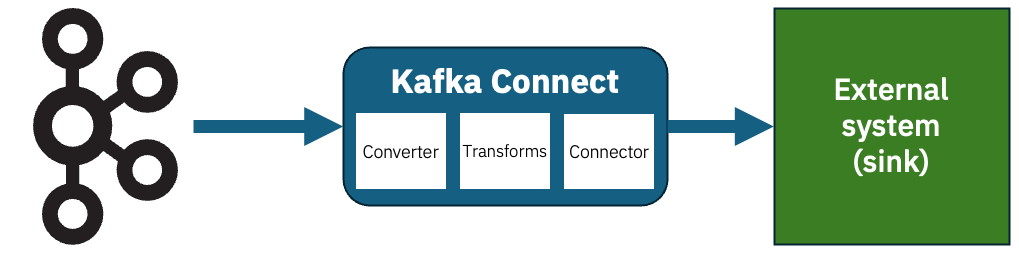
Using sink connectors

Kafka Connect sink connectors let you send the events on your Kafka topics to external systems. I’ve talked about this before, but to recap the structure looks a bit like this:

Imagine that you have this JSON event on a Kafka topic. 

{
    "id": 12345678,
    "message": "Hello World",
    "isDemo": true
}

How should you configure Kafka Connect to send that somewhere? 

It depends…

Read the rest of this entry »