Archive for the ‘tech’ Category

HackDay – hack attempt 1 – a wiki sync

Saturday, October 27th, 2007

Yesterday was IBM’s fourth HackDay. My first project attempt of the day was to try and ‘hack’ our internal wiki.

Background
We have an internally hosted wiki software on the intranet. Anyone is free to create a new wiki, and these wikis are used to manage anything from work projects and teams to community projects.
The idea
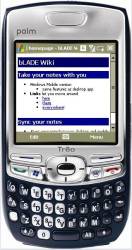
The plan was to write something that would let you have a local copy of a wiki – a copy which lets you read and edit an intranet wiki while offline (or with only Internet access). The idea was to have the ability to sync this local wiki to the intranet-hosted the next time you are on the intranet.

Why?
The thought was that sales or service IBMers who work at customer sites might not always have access to the intranet.

And even with Intranet access, I thought that some tasks – such as looking something up quickly – might be better-suited to the quicker access you could get from a locally-hosted mirror.

(more…)

mobileCampLondon

Sunday, September 30th, 2007

I’m back. Home after a weekend of hacking and mobile tech geek-ery – this was BarCamp weekend, at mobileCampLondon. I would’ve written a post on it on the train home, but I was too busy playing with my new toy. I’ll have to settle with some random thoughts before bed instead 🙂

In short, I had a great time – met a lot of interesting people, heard about some very cool projects and technologies, played with some new toys, plus got free food, free beer, free wifi and free T-shirts.

(more…)

Playing with shiny new toys

Sunday, September 9th, 2007

A couple of new things to play with this weekend… the new del.icio.us and Spinvox.

I got an invite to the preview of del.icio.us v2. I don’t know why I got one – could be entirely random, or maybe they wanted to include developers who have used their API in the beta.

(more…)

Why am I still on Windows Mobile 5?

Friday, August 31st, 2007

My blog post after my first day with the T-Mobile Ameo still gets a surprising number of views, and has raised some interesting questions.

I got a good question this week that is worth a separate post: with Windows Mobile 6 out since February, what am I still doing on Windows Mobile 5?

(more…)

Finally – a chance to use dopplr!

Wednesday, July 18th, 2007

http://www.dopplr.com/traveller/dalelane

(more…)

Windows Mobile has a ‘Run…’ dialog

Thursday, July 12th, 2007

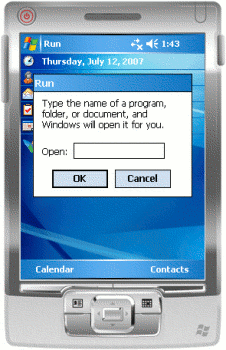
screenshot of the Run dialogThis is quite neat. I often use the “Run…” dialog on Windows (press the Windows Key + ‘R’ at the same time) as a quick way to launch apps or open documents without needing the mouse. But I never realised that Windows Mobile has the same thing too.

From here you can type in the name of a program or document in your path (e.g. iexplore to launch PIE) or give the full path of an app to run.

It also means you can give command-line arguments to programs – which is something I’ve wanted to do before.


(more…)

I.T. infrastructure for a growing charity

Friday, June 22nd, 2007

As Solent Youth Action‘s resident geek, I guess it’s inevitable that I get sucked in to anything I.T.-related.

Over the last few years, our I.T. resources have grown in an ad-hoc way – primarily driven by needing more PCs as we have grown our staff, and limited by how much money we have at the time!

In our last trustees meeting, we decided that we’ve grown to the point where we need to be more organised about our approach to I.T. Ideally, we want a roadmap which outlines not only our current I.T. needs, but identifies what we will need to meet where we see SYA growing in the future.

I wanted to bounce my ideas off friends, so thought rather than sending it round in an email it might be easier to put my ideas here, open it for comments and pass a link round.

So here goes… here are my first few ideas about what I think we need to do… please feel free to point out where I’ve said something stupid! 🙂

(more…)

Getting ActiveSync to… sync!

Tuesday, June 12th, 2007

This window is the bane of my life.

It’s the ActiveSync-couldn’t-talk-to-my-PDA-for-some-reason view, and it’s probably displayed on my screen more that anything else.

For those who haven’t had the pleasure of this quality bit of software, Microsoft ActiveSync is supposed to let you synchronise your Windows Mobile PDA with your PC. Except, it hardly ever works – most of the time you plug it in, it thinks about it for a few seconds before stopping and displaying the error window above.

So how do you get it to work?

(more…)