Archive for the ‘code’ Category

Writing PowerShell cmdlets

Wednesday, September 5th, 2007

After a conversation with someone at IBM last week about PowerShell, I picked it up again and have been having a play. I’ve been trying to write my own cmdlets, which has been an interesting experience – so I thought I’d jot down a few quick notes about what it’s been like.

First… a quick recap. Windows PowerShell is a command-line shell for system administrators. It has a number of neat features, but perhaps the most obvious is it’s object oriented approach – letting you pass objects (rather than strings) between commands in a pipe. I’ve done some work on writing PowerShell scripts before, but this time I approached it more as a developer – looking at how to extend the shell with new commands.

The .NET nature of PowerShell means you can run any .NET API at the Shell. In fact, this is what I did when I first played with PowerShell using the WebSphere MQ .NET API. It’s a quick way to get started without having to learn much about PowerShell – and I played around writing some simple scripts that were a translation of C# programs into the PowerShell syntax.

But it wasn’t really using PowerShell in the PowerShell way. What I have tried doing over the last couple of evenings is to extend PowerShell to include new commands that support WebSphere MQ administration work. I’ve been writing Cmdlets.

(If you’re not too interested in the detail of the whys or the hows of creating cmdlets but you are interested in WebSphere MQ, you might want to skip to the end of this post to see examples of what I’ve done in action…)

(more…)

TinyURL plugin for Windows Mobile

Tuesday, August 7th, 2007

I was surprised by the reaction to my del.icio.us plugin for Pocket Internet Explorer – between my blog post and the download page, I got something like 70 links and over 1,000 downloads in a couple of weeks. Wow.

If I’d known so many people would read it, I might not have made the blog post quite so moany 🙂

I got emails asking for versions of the plugin for their own favourite web service, but had to leave it for a bit because something else came up. Now I’m back, I thought I’d give one a go.

I’ve started with my next most used web service: TinyURL.

If you’re not familiar with it, TinyURL turns long web addresses into shorter, easy to share ones. It’s particularly useful when you’re trying to cram a link into a 140 character twitter update!

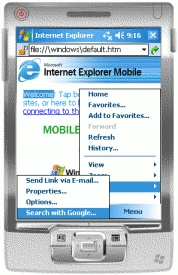
And – similarly to del.icio.us – using it on the Windows Mobile web browser is fiddly and long-winded. So here is a plugin for Pocket Internet Explorer to help.

It adds an entry to the Pocket Internet Explorer menu that gets a TinyURL for the webpage you are looking at, copying it to your clipboard so you can paste it into an SMS, email, tweet, IM message etc.

As always, anyone is welcome to give it a go – and any feedback would be gratefully received. It should run on any Windows Mobile 5/6 device, shouldn’t need any pre-reqs, and you can download it for Pocket PC (touchscreen) or Smartphone.

Read on if you are interested in a bit more ramble about how it works. 🙂

(more…)

Why doesn’t Windows Mobile have a mobile Notepad?

Saturday, August 4th, 2007

I’ve been relying on my PDA quite a bit while I’ve been travelling, and it’s frustrating when you have a file that you can’t open. MS Word on Windows Mobile is an okay text editor, but it’ll only open files with extensions like .doc .rtf .txt and so on.

I don’t want anything fancy – just the ability to view and make minor edits to text files! If I get emailed a file with an obscure extension, want to make a quick tweak to a settings or config file, view the source of something like a webpage, or anything like this, I’m basically stuck. You can’t click on them – you just get an error message that no application is associated with them. You can’t change the file extension to something MS Word will open because the Windows Mobile file explorer hides file extensions (you can rename files but not change their extensions).

My Internet access is a little limited at the moment so I’ve not had a chance to search if this has been done already – I figured it’d be easier to throw together my own version. It’s basically a TextBox control with File-Open and File-Save dialogs bolted on the front. It only took about 20 mins to write, and (as I’ve already got .NET Compact Framework 2) it’s very lightweight.

If anyone else thinks they might find it useful, you’re very welcome to give it a try. If anyone has any recommendations for lightweight Windows Mobile text editors, it’d be interesting to hear what people like.

A del.icio.us plugin for Windows Mobile (or C++ is a pain)

Wednesday, July 18th, 2007

screenshotIncreasingly, I’m doing more of my (non-work) web browsing on my PDA.

And as a big fan of using del.icio.us to store and share interesting sites that I come across, I’ve missed the tools you can get for desktop browsers (like Internet Explorer or Firefox) that let you throw your current page at your del.icio.us list.

If you’ve not used them before, the idea is to have a popup window that gets prefilled with the URL and name of the page you are looking at in your browser, lets you add a few tags, then submit it to del.icio.us when you hit ‘Save’.

So I thought I’d have a go at creating something similar for Pocket Internet Explorer – the browser you get with Windows Mobile.

To cut a long story short, I’ve put something together and it seems to work. If you have a Windows Mobile PDA and fancy giving it a try, feel free to give it a go.

(more…)

Do GPS units spit out wacky coordinates?

Monday, July 9th, 2007

I’ve mentioned before that I wrote some simple code to access the GPS device in my phone and upload the coordinates to a Google Maps mashup.

This is what it was showing when I got home yesterday evening:

google map showing me somewhere in Kazakhstan

Either my minibus driving was more eventful than I remember and I took a quick detour via Kazakhstan, or there are still a couple of problems with the code…

(more…)

Programming with Microsoft Money

Thursday, June 21st, 2007

I’ve used Microsoft Money for years – ever since I started using MS Money 97 at Uni. I can’t imagine how I’d keep on top of finances without it.

The tricky bit is having to enter transactions into the software every time you buy something – something which lends itself perfectly to a mobile solution. Rather than waiting until you next get to your computer, enter the transaction immediately by jotting a quick note on your mobile.

I bought a copy of Spb Finance. It’s almost perfect…. except that the syncing between PDA and PC sucks*. I’ve tried everything to get it to work – including working with the support guys at Spb, collecting trace and log files for them and multiple re-installs in different configurations. No joy – syncing is still unreliable, has corrupted my Money file a few times, and even when it works it has a habit of chewing up all remaining CPU cycles on the computer, making my ThinkPad run scarily hot.

So I thought I’d have a go at writing something for myself.

(more…)

AutoComplete with a .NETCF ComboBox

Sunday, June 17th, 2007

.NET Compact Framework doesn’t support auto-complete in text entry controls. I didn’t realise that until I wanted it for a Form I was throwing together tonight, but there you go.

So, in the spirit of Hack Day (which I’m still gutted to have missed!) I had a quick stab at throwing together something myself.

Read on to see what I mean, and how I did it. (And to tell me a better way to do it!)

(more…)

Working out where my PDA space has gone

Sunday, May 27th, 2007

I mentioned last week that watching Doctor Who made for a good chance to absentmindedly play with some code. I seem to have started a new habit, so thought I’d share what I was worked on this week. 🙂

One of the problems with my HTC Universal is running out of storage space when trying to install new apps. The core Windows Mobile 5 tools that you can use to work out why you’re short of space are fairly limited:

  • Search – listing all files on the device larger than 64KB (an odd size to choose – and without the ability to specify which folder(s) to search in, you end up with a very long list)
  • File Explorer – shows file sizes and lets you sort a folder’s contents by size (but going through each and every folder on the device manually is fairly tedious, and there is no way to get the size of a folder without adding together the size of the contents yourself)
  • Memory applet – showing you how much space available and how much in use (useful to identify that you have a space issue, but not any use in working out why)

You often just look around and rely on trial-and-error to free up space. (Like clearing the Pocket Internet Explorer cache then finding that you have a big chunk of space freed up.)

The aim for yesterday evening was to produce something to visualise the usage of storage space on the device.

Not a terribly original idea (basically a simplified approach to drawing a tree map), but unless my ability to use Google is getting worse, I don’t think anything like this is available for Windows Mobile at the moment.

I think it might be a useful little app, and it only took a bit of an evening to throw together. 🙂

If you’re curious, read more to see some screenshots and a quick description of what I did.
(more…)