Archive for the ‘code’ Category

A del.icio.us plugin for Windows Mobile (or C++ is a pain)

Wednesday, July 18th, 2007

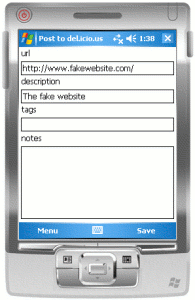
screenshotIncreasingly, I’m doing more of my (non-work) web browsing on my PDA.

And as a big fan of using del.icio.us to store and share interesting sites that I come across, I’ve missed the tools you can get for desktop browsers (like Internet Explorer or Firefox) that let you throw your current page at your del.icio.us list.

If you’ve not used them before, the idea is to have a popup window that gets prefilled with the URL and name of the page you are looking at in your browser, lets you add a few tags, then submit it to del.icio.us when you hit ‘Save’.

So I thought I’d have a go at creating something similar for Pocket Internet Explorer – the browser you get with Windows Mobile.

To cut a long story short, I’ve put something together and it seems to work. If you have a Windows Mobile PDA and fancy giving it a try, feel free to give it a go.

(more…)

Do GPS units spit out wacky coordinates?

Monday, July 9th, 2007

I’ve mentioned before that I wrote some simple code to access the GPS device in my phone and upload the coordinates to a Google Maps mashup.

This is what it was showing when I got home yesterday evening:

google map showing me somewhere in Kazakhstan

Either my minibus driving was more eventful than I remember and I took a quick detour via Kazakhstan, or there are still a couple of problems with the code…

(more…)

Programming with Microsoft Money

Thursday, June 21st, 2007

I’ve used Microsoft Money for years – ever since I started using MS Money 97 at Uni. I can’t imagine how I’d keep on top of finances without it.

The tricky bit is having to enter transactions into the software every time you buy something – something which lends itself perfectly to a mobile solution. Rather than waiting until you next get to your computer, enter the transaction immediately by jotting a quick note on your mobile.

I bought a copy of Spb Finance. It’s almost perfect…. except that the syncing between PDA and PC sucks*. I’ve tried everything to get it to work – including working with the support guys at Spb, collecting trace and log files for them and multiple re-installs in different configurations. No joy – syncing is still unreliable, has corrupted my Money file a few times, and even when it works it has a habit of chewing up all remaining CPU cycles on the computer, making my ThinkPad run scarily hot.

So I thought I’d have a go at writing something for myself.

(more…)

AutoComplete with a .NETCF ComboBox

Sunday, June 17th, 2007

.NET Compact Framework doesn’t support auto-complete in text entry controls. I didn’t realise that until I wanted it for a Form I was throwing together tonight, but there you go.

So, in the spirit of Hack Day (which I’m still gutted to have missed!) I had a quick stab at throwing together something myself.

Read on to see what I mean, and how I did it. (And to tell me a better way to do it!)

(more…)

Working out where my PDA space has gone

Sunday, May 27th, 2007

I mentioned last week that watching Doctor Who made for a good chance to absentmindedly play with some code. I seem to have started a new habit, so thought I’d share what I was worked on this week. 🙂

One of the problems with my HTC Universal is running out of storage space when trying to install new apps. The core Windows Mobile 5 tools that you can use to work out why you’re short of space are fairly limited:

  • Search – listing all files on the device larger than 64KB (an odd size to choose – and without the ability to specify which folder(s) to search in, you end up with a very long list)
  • File Explorer – shows file sizes and lets you sort a folder’s contents by size (but going through each and every folder on the device manually is fairly tedious, and there is no way to get the size of a folder without adding together the size of the contents yourself)
  • Memory applet – showing you how much space available and how much in use (useful to identify that you have a space issue, but not any use in working out why)

You often just look around and rely on trial-and-error to free up space. (Like clearing the Pocket Internet Explorer cache then finding that you have a big chunk of space freed up.)

The aim for yesterday evening was to produce something to visualise the usage of storage space on the device.

Not a terribly original idea (basically a simplified approach to drawing a tree map), but unless my ability to use Google is getting worse, I don’t think anything like this is available for Windows Mobile at the moment.

I think it might be a useful little app, and it only took a bit of an evening to throw together. 🙂

If you’re curious, read more to see some screenshots and a quick description of what I did.
(more…)

Running Windows Mobile apps from a PC using RAPI Start

Monday, May 21st, 2007

People keeping half an eye on my Wakoopa feed might have noticed that I started playing with RAPI Start this weekend.

RAPI Start is a command-line tool that lets you remotely run commands on a Windows Mobile device from a connected desktop. It’s quite neat, so I want to see what sort of things I can do with it.

Here is noddy first attempt number 1 🙂

The problem:
I get a text message while I’m sat at my desk with my mobile connected to my computer. (For a mobile device, it spends a large amount of it’s life tethered to a desktop – but that’s a discussion for another time!)

I want to reply, but writing on a mobile device is fiddly. I’m sat at a full-sized keyboard, so why can’t I just use that instead?

(more…)

Playing with Google Maps

Thursday, May 17th, 2007

Can’t sleep.

So I thought I’d go back to some of the Google Maps API stuff I last played with about a month ago.

The Google Maps code I wrote before would show my last stored location.

I thought it’d be more interesting to see a number of updates over a period of time – so went back to the code and tweaked it to show updates from the last day, week or month.

Code is a bit messy, but in my defense it is past midnight 🙂

I wanted to use the Google routing algorithm used to show directions – to link together the points that I have been to over time. Assuming that I will probably have taken the most direct route between points, then you would end up with something approximating my travelling over time.

Unfortunately, Google don’t expose their routing stuff in the API. Shame.

And on a related note, apparently if I’d used the Yahoo Maps API to do all of this, I’d be breaching their terms of service.

A friend sent me this:

You may use location data derived from GPS or other location sensing devices in connection with the Yahoo! Maps APIs, provided that such location data is not based on real-time (i.e., less than 6 hours) GPS or any other real-time location sensing device, the GPS or location sensing device that derives the location data cannot automatically (i.e. without human intervention) provide the end user’s location, and any such location data must be uploaded by an end-user (and not you) to the Yahoo! Maps APIs.

Spoilsports! (Well, I guess it’s more to do with the demands of who provides their mapping data, but pah – yay for Google)

Note: This post is a bit thin on content – sorry about that. But Twitter is down, so had to say this somewhere! 😉

Turning C# programs into PowerShell scripts

Tuesday, April 17th, 2007

I mentioned PowerShell – the new Windows command shell and scripting language – last year when I first tried it out. But other than playing with it a little, I kind of put it to one side and forgot all about it.

Yesterday I picked it up again and started playing with it again – using it to develop functions for WebSphere MQ (accessing it through the .NET DLLs that come with WMQ). The idea was to start and produce something which expands on the command line administration tools that come with WMQ – adding features that perhaps we don’t already provide.

You can see a walkthrough of what I’ve come up with so far on a post I wrote for the Hursley WMQ blog, but I thought I’d quickly draw out some of the more interesting bits that I learnt in doing it.

(It’s worth pointing out that if you’ve come to this page from Google looking for PowerShell tips and best practice, that I’m very much a beginner. As I highlight in the WMQ post, this is the product of an evening’s playing around – pretty much just trial and error and seeing what tab-complete suggests. It seems to work, but whether it’s the best way to do it… dunno 🙂 )

(more…)