Archive for the ‘tech’ Category

Electrical devices get everywhere!

Sunday, March 18th, 2007

I’ve just finished going through the weekly bills and expenses for SYA (lots of signing cheques and forms, and too much fun-with-spreadsheets!), and thought one of them was interesting enough to mention.

One of the bills was for our PAT (electrical appliance safety) testing, for devices in the office. The bill was for testing 79 devices.

Seventy-nine? This surprised me – I didn’t realise we had that many electrical items, as we’re fairly small! But when you start to try and list them, it’s amazing how we are surrounded by electrical things and often without even noticing.

HTC Advantage now on sale in UK as T-Mobile Ameo

Saturday, March 17th, 2007

I’ve been keeping an eye out for the HTC Advantage since I first heard of it. It’s so pretty 🙂

It’s now available in the UK from T-Mobile, branded as the Ameo. The colour scheme T-Mobile give it is a bit ick, but even so… I am very tempted. I’ve had the HTC Universal for over 18 months now, and love it – but perhaps if I eBay it I could help pay for a new toy?

The zen of mobile

Thursday, March 15th, 2007

I’m feeling pleased with my PDA at the moment, so wanted to take a moment to evangelise a bit. 🙂

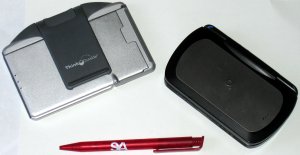
We were missing a minutes secretary at the trustees meeting for SYA this week, and I drew the short straw for filling in. It was no problem because I had my PDA and my folding bluetooth keyboard in my pockets. I took out my PDA, spun the screen round and popped it on the keyboard stand. I then switched to my wiki program and started a new page – all ready to take notes for the meeting minutes.
There is something about using wiki markup that lends itself very well to taking meeting notes. Start lines with a ‘+‘ to make a heading marking out the different topics we discussed, and start lines with ‘-‘ to make lists. Then use *bold* and _underline_ here and there to highlight decisions and actions. Simple, but more than enough to write clear and organised minutes. And the syntax is concise enough that I could do it quickly without missing what was being said by having to get the stylus out or play around with menus and options.

Part way through the meeting something came up that rang a vague bell. I switched the wiki to View mode and opened the search box. A couple of keywords later and it showed me a list of three page names. The middle one was it – clicking on it showed me all my notes on it from about a year ago, and it all came back to me. With a click on the ‘Back’ button, I was back in my meeting minutes and taking notes again.

At the end of the meeting, I used ‘Export to HTML’ to create an HTML copy of the formatted notes. I then launched Outlook and emailed the HTML copy to our administrator – all from the PDA and all before the others had finished packing away their stuff and putting their coats on.

I folded up the keyboard and PDA and put them back in my pocket. This is what mobile technology should be about. 🙂

Files on linux can get fragmented

Tuesday, March 6th, 2007

I vaguely remember someone telling me ages ago that Linux distros don’t come with a Disk Defragmentation utility (like Windows does) because files on Linux don’t get fragmented.

For some reason, I didn’t really challenge that very much at the time, and it’s remained at the back of my mind as a bit of an assumption. One of the things I’ve learned on my Linux course this week is that this isn’t true.

(more…)

Red Hat exams are secret!

Monday, March 5th, 2007

Today was day 1 of my Red Hat Linux System Administration course – a week long chance to cram for my Red Hat Certified Technician exam on Friday.

What I didn’t realise was that I have to sign a non-disclosure agreement before I take the exam – preventing me from revealing any details about what the exam is like.

Spoilsports – that ruins my idea for Friday’s post. 😉

I miss pine

Friday, March 2nd, 2007

Does anyone still use ‘pine’? We used to use it at my University, and I loved it.

For those who’ve not come across it before, Pine is a very nifty text-based email client. And (as I seem to be going through a nostalgic love for all things command-line based at the moment), I miss it.

With that in mind, for no reason in particular other than that my mind was wandering in a particularly boring meeting, I thought of creating a pine-inspired email client for myself. A bit like pine, but more task-oriented to fit in with my GTD approach to personal organisation.

(more…)

Getting Command Shell working on Windows Mobile 5

Tuesday, February 27th, 2007

Microsoft provide a command shell for Windows Mobile as a part of their Developer Power Tools package.

I fancied giving it a try tonight (for no particular reason other than that I like using the command line, and my phone has a full QWERTY keyboard) so followed the instructions to install it.

No luck – it didn’t work. No errors, it just didn’t work – nothing happened.

It took a bit of playing around with, but I’ve managed to get it running…

(more…)

Safer email and web browsing with psexec

Saturday, February 17th, 2007

When using Windows, I log on with an ‘Administrator’ account. I know that this isn’t too clever – I’d never logon as ‘root’ on my Linux box all day. And it doesn’t take much searching to find a dozen pages which advise against it as it leaves me more at risk from malware and various other problems.

But I do it because it’s just too much hassle to run as a normal user. Some apps I rely on need Admin access to run, and other limitations make me think that I need to be Administrator.

The biggest risk is with Internet-facing applications. Any malware that I pick up gets to run with my credentials – as Administrator. So as a compromise, I run Internet-facing with limited credentials. If malware slips in, at least it doesn’t get to run as Administrator. I do this with a free Sysinternals tool, psexec.

(more…)