In this post, I’ll share examples of how to process JSON data in a Kafka Connect pipeline, and explain the schema format that Kafka uses to describe JSON events.
Using sink connectors
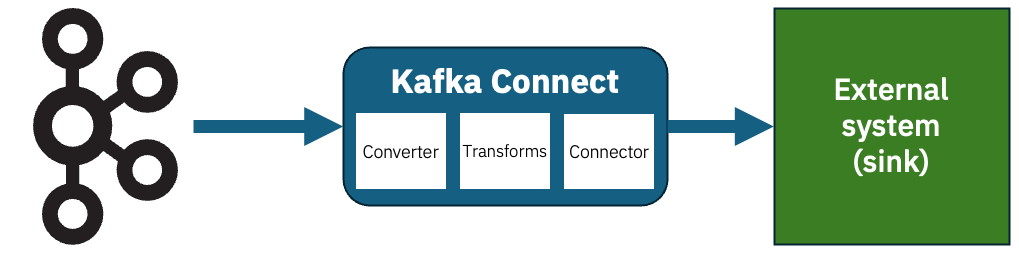
Kafka Connect sink connectors let you send the events on your Kafka topics to external systems. I’ve talked about this before, but to recap the structure looks a bit like this:
Imagine that you have this JSON event on a Kafka topic.
{
    "id": 12345678,
    "message": "Hello World",
    "isDemo": true
}
How should you configure Kafka Connect to send that somewhere?
It depends…
Unstructured sink connectors
If you’re sending the event to a sink that doesn’t require structure, you could simply send use StringConverter. The JSON event won’t be parsed or interpreted; it will just be sent as a string.
The simplest example of this is the demo file connector FileStreamSinkConnector.
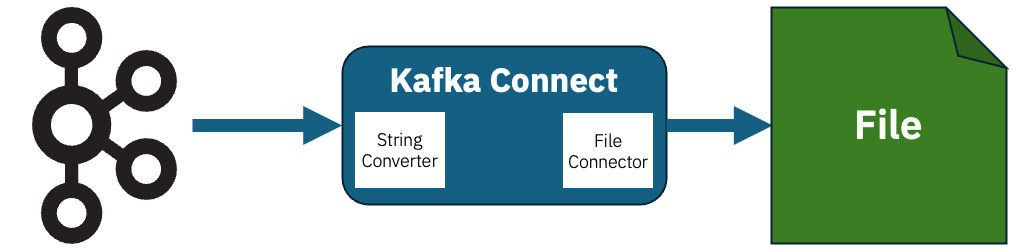
With config like this, the Connector can receive each new event from the Kafka topic and append it to a text file as a new (string) line.
value.converter=org.apache.kafka.connect.storage.StringConverter
value.converter.schemas.enable=false

connector.class=FileStreamSink
file=mydemofile.jsonl
Structured sink connectors
What if you’re sending the event to a sink that does require structured data?
An example of this would be a database connectors that inserts events into a PostgreSQL database.
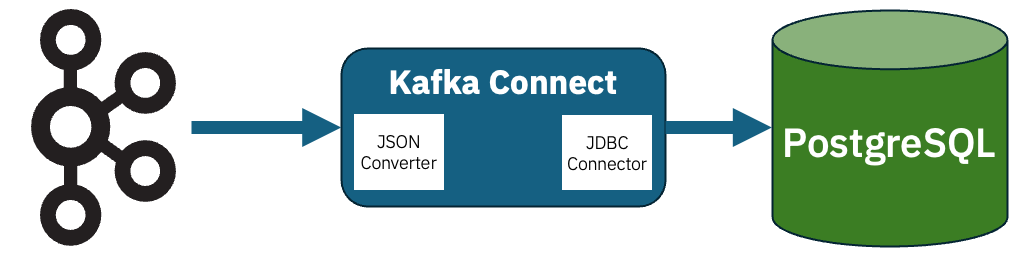
If you’re sending the event to a sink that requires structure, you can use JsonConverter.
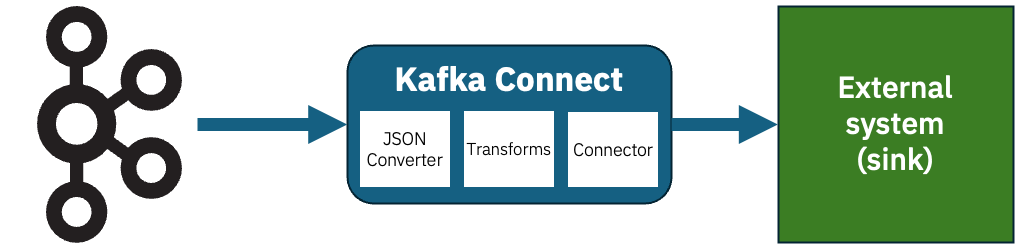
There are other things that schemas can help with. For example, even if you’re using Kafka Connect with a sink that accepts unstructured data, if you want to use any transforms to process the events first, you’ll likely need to parse the raw JSON. Single Message Transforms are less useful when they only have raw string payloads to work with.
Introducing schemas for JSON events
But to help with either of these, you need a way to tell JsonConverter about the structure of the data.
You might think that you could infer the structure from the event data, but that would just be guessing. If the structure is significant to the sink that receives the data, guesses are not enough – you won’t know about any missing optional values that have defaults, you won’t be able to distinguish between ambiguous numerical types, and so on. A schema is needed to fill in these missing gaps.
Kafka Connect uses its own JSON schema format, that is different from the IETF standard we normally mean when we say “JSON schema”.
Demo
I’ll start with a simple example, and then step back and fill in some details.
For this example, I’ll use a database sink connector as an example of the sort of connector where data structure is essential.
Imagine that you have this JSON event on a Kafka topic that the connector should insert into a PostgreSQL database.
{
    "id": "00000000-0000-0000-0000-000000000000",

    "example_integer_1": 0,
    "example_integer_2": 0,
    "example_integer_3": 0,
    "example_integer_4": 0,

    "example_decimal_1": 0.0,
    "example_decimal_2": 0.0,

    "example_boolflag": false,

    "example_bytes": "",

    "example_array_ints": [ ],

    "example_temporal_1": 0,
    "example_temporal_2": 0,
    "example_temporal_3": 0,

    "example_optional_1": "",
    "example_optional_2": ""
}
A schema can describe each of the properties:
{
    "type": "struct",
    "fields": [
        {
            "field": "id",
            "type": "string",
            "optional": false
        },
        {
            "field": "example_integer_1",
            "type": "int8",
            "optional": false
        },
        {
            "field": "example_integer_2",
            "type": "int16",
            "optional": false
        },
        {
            "field": "example_integer_3",
            "type": "int32",
            "optional": false
        },
        {
            "field": "example_integer_4",
            "type": "int64",
            "optional": false
        },
        {
            "field": "example_decimal_1",
            "type": "float",
            "optional": false
        },
        {
            "field": "example_decimal_2",
            "type": "double",
            "optional": false
        },
        {
            "field": "example_boolflag",
            "type": "boolean",
            "optional": false
        },
        {
            "field": "example_bytes",
            "type": "bytes",
            "optional": false
        },
        {
            "field": "example_array_ints",
            "type": "array",
            "items": {
                "type": "int32",
                "optional": false
            }
        },
        {
            "field": "example_temporal_1",
            "type": "int32",
            "name": "org.apache.kafka.connect.data.Date",
            "optional": false
        },
        {
            "field": "example_temporal_2",
            "type": "int32",
            "name": "org.apache.kafka.connect.data.Time",
            "optional": false
        },
        {
            "field": "example_temporal_3",
            "type": "int64",
            "name": "org.apache.kafka.connect.data.Timestamp",
            "optional": false
        },
        {
            "field": "example_optional_1",
            "type": "string",
            "optional": true
        },
        {
            "field": "example_optional_2",
            "type": "string",
            "optional": true,
            "default": "default_value_if_not_provided"
        }
    ]
}
You can set up your sink connector like this, using the JsonConverter and the location of the schema.json file.
value.converter=org.apache.kafka.connect.json.JsonConverter
value.converter.schemas.enable=true
value.converter.schema.content=${dirProvider:/Users/dalelane/demos/kafka-connect-json:schema.json}

connector.class=io.aiven.connect.jdbc.JdbcSinkConnector

#
# database connector config - not specific to the JSON converter
connection.url=jdbc:postgresql://localhost:5432/dalelane
connection.user=dalelane
# connection.password - my local dev database doesn't need a password, but your database probably does
table.name.format=public.demotable
insert.mode=upsert
auto.create=true
pk.mode=record_value
pk.fields=id
Start up Connect, and you’ll see your PostgreSQL database has a new table called demotable.
The JsonConverter has given the sink connector enough detail about the events on the topic for it to create a table with the appropriate columns.
Notice how the different column types are used, in a way that would be impossible to do from the event JSON alone.
dalelane=# \d demotable
                                         Table "public.demotable"
       Column       |            Type             | Collation | Nullable |                Default
--------------------+-----------------------------+-----------+----------+---------------------------------------
 id                 | text                        |           | not null |
 example_integer_1  | smallint                    |           | not null |
 example_integer_2  | smallint                    |           | not null |
 example_integer_3  | integer                     |           | not null |
 example_integer_4  | bigint                      |           | not null |
 example_decimal_1  | real                        |           | not null |
 example_decimal_2  | double precision            |           | not null |
 example_boolflag   | boolean                     |           | not null |
 example_bytes      | bytea                       |           | not null |
 example_array_ints | integer[]                   |           | not null |
 example_temporal_1 | date                        |           | not null |
 example_temporal_2 | time without time zone      |           | not null |
 example_temporal_3 | timestamp without time zone |           | not null |
 example_optional_1 | text                        |           |          |
 example_optional_2 | text                        |           |          | 'default_value_if_not_provided'::text
Indexes:
    "demotable_pkey" PRIMARY KEY, btree (id)
And a row representing the JSON event from the Kafka topic is there:
dalelane=# select id, example_integer_1, example_integer_2, example_integer_3, example_integer_4 from demotable;
                  id                  | example_integer_1 | example_integer_2 | example_integer_3 | example_integer_4
--------------------------------------+-------------------+-------------------+-------------------+--------------------
 00000000-0000-0000-0000-000000000000 |                 0 |                 0 |                 0 |                  0
(1 row)

dalelane=# select id, example_decimal_1, example_decimal_2 from demotable;
                  id                  | example_decimal_1 | example_decimal_2
--------------------------------------+-------------------+-------------------
 00000000-0000-0000-0000-000000000000 |                 0 |                 0
(1 row)

dalelane=# select id, example_boolflag, example_bytes, example_array_ints from demotable;
                  id                  | example_boolflag |    example_bytes     |  example_array_ints
--------------------------------------+------------------+----------------------+-----------------------
 00000000-0000-0000-0000-000000000000 | f                | \x                   | {}
(1 row)

dalelane=# select id, example_temporal_1, example_temporal_2, example_temporal_3 from demotable;
                  id                  | example_temporal_1 | example_temporal_2 | example_temporal_3
--------------------------------------+--------------------+--------------------+---------------------
 00000000-0000-0000-0000-000000000000 | 1970-01-01         | 00:00:00           | 1970-01-01 00:00:00
(1 row)

dalelane=# select id, example_optional_1, example_optional_2 from demotable;
                  id                  | example_optional_1 |      example_optional_2
--------------------------------------+--------------------+-------------------------------
 00000000-0000-0000-0000-000000000000 |                    | default_value_if_not_provided
(1 row)
To show another example, imagine you produce this second JSON event to the Kafka topic:
{
    "example_decimal_1": 3.1415927,
    "example_decimal_2": 3.141592653589793,

    "example_boolflag": true,

    "example_array_ints": [ 2, 3, 5, 7, 11, 13, 17, 19 ],

    "example_integer_4": 473892472947371246,
    "example_integer_3": 1194727881,
    "example_integer_2": 20472,
    "example_integer_1": 12,

    "example_bytes": "ZGFsZS1sYW5l",

    "example_temporal_1": 3776,
    "example_temporal_3": 1777885200000,
    "example_temporal_2": 43200000,

    "id": "9D51DCBE-E2F1-47DA-B341-DAC8369C8451"
}
The connector will insert this new event data into the DB table:
dalelane=# select id, example_integer_1, example_integer_2, example_integer_3, example_integer_4 from demotable;
                  id                  | example_integer_1 | example_integer_2 | example_integer_3 | example_integer_4
--------------------------------------+-------------------+-------------------+-------------------+--------------------
 00000000-0000-0000-0000-000000000000 |                 0 |                 0 |                 0 |                  0
 9D51DCBE-E2F1-47DA-B341-DAC8369C8451 |                12 |             20472 |        1194727881 | 473892472947371246
(2 rows)

dalelane=# select id, example_decimal_1, example_decimal_2 from demotable;
                  id                  | example_decimal_1 | example_decimal_2
--------------------------------------+-------------------+-------------------
 00000000-0000-0000-0000-000000000000 |                 0 |                 0
 9D51DCBE-E2F1-47DA-B341-DAC8369C8451 |         3.1415927 | 3.141592653589793
(2 rows)

dalelane=# select id, example_boolflag, example_bytes, example_array_ints from demotable;
                  id                  | example_boolflag |    example_bytes     |  example_array_ints
--------------------------------------+------------------+----------------------+-----------------------
 00000000-0000-0000-0000-000000000000 | f                | \x                   | {}
 9D51DCBE-E2F1-47DA-B341-DAC8369C8451 | t                | \x64616c652d6c616e65 | {2,3,5,7,11,13,17,19}
(2 rows)

dalelane=# select id, example_temporal_1, example_temporal_2, example_temporal_3 from demotable;
                  id                  | example_temporal_1 | example_temporal_2 | example_temporal_3
--------------------------------------+--------------------+--------------------+---------------------
 00000000-0000-0000-0000-000000000000 | 1970-01-01         | 00:00:00           | 1970-01-01 00:00:00
 9D51DCBE-E2F1-47DA-B341-DAC8369C8451 | 1980-05-04         | 12:00:00           | 2026-05-04 09:00:00
(2 rows)

dalelane=# select id, example_optional_1, example_optional_2 from demotable;
                  id                  | example_optional_1 |      example_optional_2
--------------------------------------+--------------------+-------------------------------
 00000000-0000-0000-0000-000000000000 |                    | default_value_if_not_provided
 9D51DCBE-E2F1-47DA-B341-DAC8369C8451 |                    | default_value_if_not_provided
(2 rows)
Notice some of the benefits the schema brought, even beyond getting this to work at all.
For example, the database engine added the correct default value for the example_optional_2 property that was missing from the Kafka event – as defined in the schema.
And notice that even though the ordering of the properties in the JSON payload was different in this second event, the correct values were inserted into the correct columns – because this is a structured event payload, not a single string.
Writing a schema for JsonConverter
The example schema above is probably enough to give you an idea, as I intentionally included a lot of different types. I’ll summarise the basics below.
Kafka Connect supports these primitive types:
int8,int16,int32,int64– signed integers of various sizesfloat,double– floating-point numbersboolean– true / falsestring– text databytes– binary data
(I’ve never found canonical documentation for this, so I refer to the code when I need to remind myself of these type names.)
There are also logical types (which are primitive types with defined semantic meaning):
Decimal– arbitrary precision decimals (details)Date– days since Unix epoch (details)Time– milliseconds since midnight (details)Timestamp– milliseconds since Unix epoch (details)
You can see examples of how to use them in context of a schema in my example schema above.
(Again, I’ve never found canonical documentation for this, but the class comments in the implementations have a good description of how to use each type. I’ve included links to the code where each comment lives in my list above.)
A complex object is represented as a struct, which is a collection of named fields, with support for optional/required fields and default values.
{
    "type": "struct",
    "fields": [
        {
            "field": "id",
            "type": "int32",
            "optional": false
        },
        {
            "field": "name",
            "type": "string",
            "optional": true,
            "default": "Adam"
        }
    ],
    "optional": false
}
Arrays look like this – which can be arrays of primitives, or arrays of structs:
{
    "type": "struct",
    "fields": [
        {
            "field": "simple",
            "type": "array",
            "items": {
                "type": "string"
            }
        },
        {
            "field": "complex",
            "type": "array",
            "items": {
                "type": "struct",
                "fields": [
                    {
                        "field": "id",
                        "type": "int32",
                        "optional": false
                    },
                    {
                        "field": "name",
                        "type": "string",
                        "optional": true
                    }
                ]
            }
        }
    ]
}
That would describe events such as:
{
    "simple": [
        "apple",
        "banana"
    ],
    "complex": [
        {
            "id": 123
        },
        {
            "id": 456,
            "name": "Bob"
        }
    ]
}
Maps in Connect perhaps don’t translate as obviously to JSON data, as Connect schemas allow you to use arbitrary complex types for both the key and value.
{
    "type": "struct",
    "fields": [
        {
            "field": "my_map",
            "type": "map",
            "keys": {
                "type": "string",
                "optional": false
            },
            "values": {
                "type": "int32",
                "optional": false
            }
        }
    ]
}
That would describe events such as:
{
    "my_map": {
        "something": 123,
        "something_else": 456
    }
}
(I’ve never found a sensible reason to use anything other than strings for map keys. YMMV.)
Comparing JsonConverter schemas with JSON Schema
I mentioned above that Kafka’s schema format is different to JSON Schema (the IETF specification). This often trips people up, so it’s perhaps worth a few comments on how they compare.
If you’re used to JSON Schema, you might notice in my description above that there are a few things you can’t easily do. I won’t try and write an exhaustive comparison, but the most obvious things that you can’t express in Kafka that I would do in JSON Schema are:
Validation
You can’t specify patterns, minimum / maximum values, length constraints, there aren’t format specifications for strings such as email, IP addresses, or URIs, etc.
(You could write your own logical types, similar to the built-in ones I link to above, if you wanted, but I think it’s debatable whether that’s the most effective way to enforce data validation if that is your goal.)
Control over arbitrary additional fields
There isn’t an equivalent of JSON Schema’s additionalProperties, so you can’t specify whether additional fields not defined in the schema are allowed. Additional properties will not cause errors but are always ignored by JsonConverter.
Multiple types
JSON Schema lets you union types (e.g. "type": ["string", "number"] to say that a value can be either a string or a number) – JSON Converter doesn’t let you describe that in a schema.
Logic
You can’t do things like allOf, anyOf, oneOf, not, or any of the fun conditional (if, then, else, etc.) that JSON Schema has.
Your option of these omissions probably depends on how often you use them in JSON Schema. I think the general point is that Kafka’s schema format is focused on enabling serialization / deserialization, rather than trying to enable data validation.
If you’re going in the reverse direction, there are a few details you could have in a Kafka schema used with JSON Converter that would be lost if you create an equivalent JSON Schema.
The main one is numeric precision. JSON Converter distinguishes between int8, int16, int32, int64, float and double. JSON Schema has integer and number. You can maybe mitigate this by using min/max ranges and inferring an appropriate type from that, but you’ll likely lose some precision here.
The way Kafka models a Map as something different from a regular struct (object) doesn’t have an obvious equivalent in JSON Schema, where everything is just an object.
These differences again highlight the greater focus that Kafka schemas place on serialization / deserialization.
Versions of Kafka Connect that support this
Support for putting the schema in an external file was introduced in Kafka Connect 4.2, that we contributed in KIP 1054.
Versions of Kafka Connect prior to 4.2 need the schema to be included within every event payload. For example:
{
    "schema": {
        "type": "struct",
        "fields": [
            {
                "field": "id",
                "type": "string",
                "optional": false
            },
            {
                "field": "name",
                "type": "string",
                "optional": false
            }
        ]
    },
    "payload": {
        "id": "myid",
        "name": "Bob"
    }
}
That’s a little icky.
There are hacky workarounds you can use to avoid having to do this, but it’s a huge improvement to have support for schema files now available out-of-the-box in JsonConverter.
Tags: apachekafka, kafka