First of the random ideas for Over The Air hacks – a Twitter client for Windows Mobile.
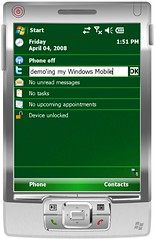 When posting a tweet, the key is speed. I don’t want to wait to launch an app, I don’t want lots of features. I just want something to take my message and post it.
When reading tweets, I don’t mind waiting (e.g. for the list to be gathered).
And on mobile, I don’t really want regular notifications or polling. Following over a hundred people, I’d either hose my phone battery by constantly getting updates, or I’d miss most updates anyway. I just need to be able to see a list of updates when I want.
I went for a Today screen widget for posting, written in C++ to keep it quick and lightweight.
And if you click on the twitter logo, it launches your default browser at the mobile Twitter site http://m.twitter.com/. The best of both worlds 🙂
Download a copy here
To set your username and password, go to the Options dialog for “Twit Today” from the Today screen control panel applet.
Update: There has been some confusion in the comments… this is a ‘Today screen‘ plugin – which means it is for the Today screen that you get on touchscreen devices. It is not a ‘Home screen’ plugin (which are meant for devices without a touchscreen). Apologies to the people whose time I wasted by being unclear!
Update 2: The current version is 1.6 (version is shown in the settings screen where you enter your username and password). If you have an older version than this, please download it again.
Tags: mobile, overtheair, twitter, twittoday, windows mobile, windowsmobile
[…] couple of years ago, I wrote a Windows Mobile app called TwitToday : a Twitter widget for the “Today screen” (the default screen when the phone is on, […]
[…] Twitter for Windows Mobile » […]
[…] TwitToday […]
[…] a free browser that runs on most Windows Mobile devices, offers a number of valuable options. Twittoday: TwitToday is a simple today screen plug-in which allows you to post twitter messages directly from […]
[…] 9.Twittoday […]
[…] 9.Twittoday […]
[…] Twittoday: TwitToday is a simple today screen plug-in which allows you to post twitter messages directly from your Windows Mobile device. […]
[…] Twittoday: TwitToday is a simple today screen plug-in which allows you to post twitter messages directly from your Windows Mobile device. digg_url = 'http://dengkulmlocot.blogspot.com/2010/09/24-free-apps-for-windows-mobile-phone.html'; http://dengkulmlocot.blogspot.com/2010/09/24-free-apps-for-windows-mobile-phone.html […]
Dale, I am keep getting 401 error code. It worked previously until I installed the latest update. I can’t find anything on the internet, other than that it might just be a log in failure. I have re-entered my username and password a milion times, reset the device, but I can’t get it to work. I am using the TytnII
Don – Please see http://wmpoweruser.com/oauth-kills-another-windows-mobile-twitter-clienthtc-peep-is-dead/
Kind regards, D
Dale,
Just heard the bad news about Twitter breaking a lot of the mobile tweeters…I’ve tried them all and yours by far is the best out there, so simple, just perfect. Any chance you’ll be updating it to work again?
Thanks.
[…] TwitToday […]
It’s unlikely, I’m afraid. I dont use Windows Mobile any more, and dont have a Visual Studio license (which you need to build it) on my new computer. Sorry
I have downloaded Twittoday, launched .cab from Windows mobile phone directly but nothing is happened. I have checked it on the Today screen, in Programm menu, in Option’s menu … nothing … 🙁
Could you please advise me how to launch your application?
Hmm … several restarts and it appeared 🙂 But error 401 appeared after I put a message into the line ansd pressed OK button …
HTTP 401 means unauthorised. It’s because (copying from the link posted above):
[…] https://dalelane.co.uk/blog/?p=244 […]
[…] Twitter. Twitter for iPhone – The most Twitter-like experience you will find for your iPhone. TwitToday – Twitter for Windows mobile. Twitxr – Share pictures & status updates from your […]
[…] was the fourth year I’ve been to OTA, and I normally submit some of […]
[…] Twitter for Windows Mobile » […]