Archive for the ‘tech’ Category

How to make a phone call with a T-Mobile Ameo

Tuesday, May 8th, 2007

It’s fair to say that more than a few people have commented that my phone is a bit big, and that it is difficult to make a call with it without looking like a bit of a berk. πŸ™‚

Not any more! If you’ve been following me on twitter, you might have seen me obsessively tracking my latest gadget toy from the U.S – an “LG Style-I” bluetooth handset. It finally arrived today.
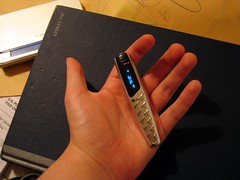
LG Style-IIt’s essentially like a bluetooth headset – except it has buttons, looks like a normal phone and you don’t have to strap it to your ear.

(Maybe it was just Doctor Who which scared me off bluetooth headsets? πŸ˜‰)

If I don’t need to use my phone as a PDA, I can just leave it in the bottom of my bag. I can just have this in my pocket and use it like a regular phone (with the only difference being that it uses the Ameo in my bag for it’s cell signal).

T-Mobile Ameo with LG Style-IThe handset can make or receive calls – the display with show stuff like incoming caller-ID from the phone and as well as being able to dial numbers normally I can still use stuff like the voice command and speed dials. It looks enough like a phone that I imagine most people seeing it will assume it is a mobile. Which is all much more practical when out and about.

There isn’t really a big market for these things… unless you also have a phone the size of a textbook, you probably wont need it. But I still think it’s pretty cool. πŸ™‚

Help choose a brand to promote science to young people

Wednesday, May 2nd, 2007

I’ve mentioned ‘v‘ before – the independent charity that took over the running of Millennium Volunteers project from DfES (and therefore now one of our biggest funders). I’ve also mentioned that I’m not the biggest fan of the ‘v’ brand – aside from being almost impossible to search for, they tend to stick ‘v’ before everything which I find a little clunky.

The branding was created by Love Creative – a design agency in Manchester. (v is currently on page 22 of their portfolio). They’ve done a lot of other high profile work, including work for Red Nose Day, Nike and Umbro.

I mention them because I notice that they’re doing another bit of work, this time for the Science Council, developing a website for young people to promote science education. They’ve come up with six possible names:

  • i can morph
  • we go boing
  • beep
  • made from science
  • bleep
  • ?f

They’re currently running a vote at www.sciencevote.co.uk to help choose the name.

My personal favourite is “Made from science”, but if you want to have your say in the branding used to help encourage the next generation of scientists, then go vote now! πŸ™‚

A fun Second Life glitch

Sunday, April 8th, 2007

I had two windows open – one in front of the other. Second Life was open in one window, and gaim instant messaging in another.

I switched from gaim to Second Life, but thanks to a glitch the gaim window image stayed on top. But instead of just staying on top as a 2D window, gaim ended up getting used as the texture for the moving elements on the Second Life window. In this case, my avatar. So I got to walk around with stylish instant-messaging trousers!

I can only apologise to Alan – who I was chatting to at the time – for posting a picture of me with his name on my butt.

But it amused me. πŸ™‚

T-Mobile Ameos kill tube tickets

Wednesday, April 4th, 2007

I keep my PDA in my inside jacket pocket – so I can get to it quickly. For the same reason, I keep other things there that I need to grab in a hurry.

Like London Underground Travelcards.

Apparently they don’t work so well after sitting next to to T-Mobile Ameo PDAs. Or, to be more precise, the ridiculously strong magnet that is in the base of the Ameo to hold the screen to the keyboard. (See this animation if you are curious about how this works).

I ended up having to ask the nice Underground staff to let me through manually at every station I went through for the rest of the day, because my ticket was trashed.

Whoops.

Slightly worryingly, I had my credit card in there, too. I’m guessing that is probably trashed now as well. (So far, all the shops I’ve used it in since have used the chip rather than the magnetic strip, so I don’t know for sure.)

Lesson of the day – keep my PDA away from magnetic strips… πŸ™‚

RE: T-Mobile Ameo… first impressions

Monday, April 2nd, 2007

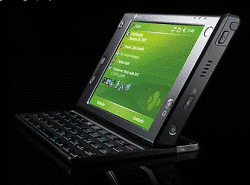
HTC promo photo of my PDAI’ve been using the T-Mobile Ameo for a couple of weeks now – so now I’ve given it a proper try I thought I’d post my conclusions. (And then shut up about it πŸ™‚ )

Feature-wise, the Ameo is hard to argue with – it has pretty much everything that I might want. The question is more about whether it’s a good device to use, particularly considering it’s size. The answer – perhaps somewhat predictably – depends on how you use a mobile device.

(more…)

T-Mobile lets you know when you miss calls

Monday, April 2nd, 2007

I just got a text message letting me know that I missed a phone call this morning. I’m new to T-Mobile (I’ve been with O2 for ages) and didn’t realise that they did this.

From their website:

Phones usually only track your missed calls when your line is busy or you don’t answer – that’s no longer the case now we’ve launched Who Called.

Who Called provides you – via text – with details of the last five unique missed calls you’ve had in the previous three days.

We send you texts with details of calls received while your phone was unreachable (out of coverage or turned off) – providing no voice message has been left.

With O2, if someone phoned me while my phone was out of coverage (not unusual here at Hursley, annoyingly) or switched off, I’d never know unless they left a message – something most people don’t do.

This is quite a neat idea πŸ™‚

Battery tip for keeping smartphones online

Thursday, March 29th, 2007

A quick tip I picked up for getting more out of your battery while using a smartphone away from a power source for a day or two. Set the network type to GSM only – ignoring 3G. If you’re not web browsing and are only relying on connectivity to periodically check your email inboxes, then you won’t notice any real difference. But you’ll get extra hours out of your battery!

In Windows Mobile you can do this from:
Start -> Settings -> Phone -> Band – changing the setting from Auto to GSM.

This particularly makes a difference if you’re travelling (like when I’ve been working this week on the train to London), or are in an area where the 3G coverage isn’t great. This is because having your phone repeatedly flick back and forth between using GPRS and UMTS really chews up your battery life.

When you get to where you are going (and are in an area with a decent 3G connection) you can always switch the setting back to UMTS and get the benefits of the faster connection.

T-Mobile Ameo… first impressions

Thursday, March 22nd, 2007

I’ve been the proud owner of a shiny new T-Mobile Ameo (a phone/PDA based on the HTC Advantage design) for a day now, so thought I’d post my first thoughts on it.

Before I start, it’s worth pointing out a couple of things. Firstly, I’m on holiday this week so I’ve not used it in earnest yet. These are my first impressions from playing with it at home and setting it up. Secondly, this is mainly going to be in terms of a comparison with my last PDA (the O2 XDA Exec – based on the HTC Universal), which I had for about a year and a half, and loved. So this may not be very objective!

(more…)