Archive for the ‘tech’ Category

Bye-bye to ‘UK Traffic Checker’

Wednesday, April 20th, 2011

Until this month, I had an Android app which displayed road traffic problems on a given route.

It was a fairly simple app, but kinda useful and managed to find 33,000 or so users.

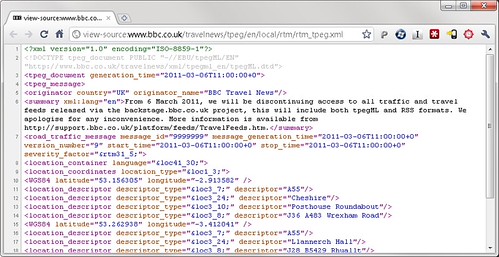
But it’s stopped working. It was using a bunch of travel news feeds from BBC Backstage.

Those feeds now all return:

BBC Travel Feeds

…we will be discontinuing access to all traffic and travel feeds released via the backstage.bbc.co.uk project, this will include both tpegML and RSS formats…

In the short-term, I can’t find a straightforward replacement (a free and open source of feeds for local traffic and travel news) and so I’ve unpublished the app from Android Market. Sorry.

(I have tinkered with writing my own feeds from NTCC data, which is something I’ve played with before. This is technically do-able – I’ve already written a basic PoC to demonstrate, but there are issues – such as I’d need to pay for the hosting of it, and the data only covers motorways and trunk routes unlike what the BBC had. So not sure whether this is a realistic option.)

(more…)

How to make a battery

Sunday, April 17th, 2011

Overview

DSC01488A bit of science fun for Grace. We made a battery out of zinc washers and copper coins.


(more…)

Prototype web app for recording your time

Friday, February 4th, 2011

Something I was working on before Christmas: a web app for recording what you spend your time working on, using a painting metaphor – with your projects as a palette of different paint colours.

The video is quite high resolution, so it’s best viewed in full-screen in the highest resolution supported.

A LOVEFiLM app for Android

Tuesday, November 9th, 2010

4 - LOVEFiLM - your finished photo
A simple Android utility app for a simple idea – adding DVDs to my LOVEFiLM queue while I’m out and about by taking photos of what I want to add.

(If you’ve not heard of LOVEFiLM before, they are an online DVD rental service: you use their website to set up a queue of DVDs you want to watch, they post you some, you watch them and post them back, and they send you some more.)

I love the service, but I never remember to add anything new to my queue. I’ve got a long queue of stuff to watch, but it’s all pretty old – months go by in between me remembering to visit the site.

And most of the time I think “oh, I’d love to watch that” I’m out and about. It could be walking past the Blockbuster Video store, or cinema in town and seeing a movie poster in the window. Or it could be seeing a DVD case in a shop or at a mates house. I think “I should add that to my LOVEFiLM queue when I get home”. And then promptly forget.

8 - LOVEFiLM - main screenSo last week, I started writing a quick Android app to help.

The idea is that whenever I see a movie poster or DVD cover now, I can snap a quick photo of it with my smartphone, then put the phone back in my pocket. Quick, one button press, no typing.

Then in the background, the app will try and work out what DVD I’ve taken a picture of, and then add it to my LOVEFiLM list.

It’s not always super-quick – it can take a minute or two – but, realistically that’s fine. It’s unlikely to make any difference to when LOVEFiLM will send me the DVD if it gets added to my queue now, in ten minutes, or even in a few hours time.

5 - LOVEFiLM - reviewing a problemWorst case scenario, if the app can’t figure out what the picture is, it can prompt me to let me know that it needs some help. The notification will sit in my phone’s status bar until I have some spare time to look at the photo, and manually type in the name of the DVD – which the app will then go and add to my queue.

This is still helpful though – I can trust that the app will somehow add the film to my queue, even if this means prompting me if it needs extra information.

It means I don’t forget to add it, because the app reminds me. And I don’t have to stand around typing in a name while I’m rushing around in town – if I need to do any typing at all, I can do it later when I have some spare time.

I’ve put a walkthrough of screenshots with an explanation of each stage on flickr.

(more…)

Making National Traffic Control data more useful

Sunday, September 12th, 2010

or ‘my hack for Over The Air 2010’
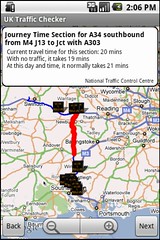
National Traffic Control Centre - on AndroidYesterday was Over The Air 2010 – a very cool event for mobile developers, that really warrants a post to itself, but I’m too tired so that will have to wait for another day.

But while I was there, I had a go at the hack challenge. I’m pleased that there was a fair amount of interest in what I did, so in this post, I want to share some of the technical details.

The hack centred around getting access to (pseudo-)realtime data about UK roads. It turns out that there is an effort to make traffic and road monitoring data available in a consistent, interchangeable format: DATEX II.

The DATEX site has a list of documentation for the traffic data made available for England, Scotland, Sweden, Italy, Spain, Portugal, Netherlands, and regions in France and Germany. For a data geek, this was quite a cool find 🙂

I only had 24 hours to play, so started with the data available for England – covering the motorway and trunk roads. The web page includes a 39-page PDF which documents the data that the National Traffic Control Centre publishes for England.

The nice thing about DATEX II being an agreed standard is that although I spent the evening working with the English traffic data, once the code was done, there wouldn’t be anything to stop me using the same code with the Scottish data too.

They publish a lot of data – more than I realised was being collected, let alone made publicly available. This chimed well with the keynote on Saturday morning by the brilliant Tim Berners-Lee, in which he talked about the importance of publicly available data.

The data includes:

  • current and future planned roadworks
  • current and future planned events expected to affect traffic
  • unplanned events affecting traffic
  • the current message being displayed on variable message signs (the electronic traffic signs that can be set to display text messages like “don’t drink and drive”)
  • the current graphic being displayed on matrix signs (those square electronic displays that can display icons like which motorway lanes are closed)
  • information about traffic on monitored stretches of road

This was an impressive list – is it just me, or is the ability to find out what is currently written on the electronic sign hanging over every major road in the country seriously cool? No? Okay… so I’m a geek. 🙂

But beyond the list, what was impressive was the amount of detail.
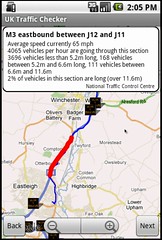
National Traffic Control Centre - on AndroidFor roadworks, you can find out not only where they are, but what type of roadworks they are – e.g. resurfacing, barrier repairs, bridge repairs, etc., what times of day they will be active, when they are expected to finish, the anticipated level of disruption, number of lanes to be closed, and much more.

For events, you can find out the type of event (e.g. if it’s a sports event what type of sport, if it’s an entertainment event what type of entertainment – e.g. boat show), as well as details about times, expected level of disruption, and so on.

For unplanned events, there are codes for a variety of types of events e.g. Spillages are divided into types like chemical, oil, and – unusually – “shed load”. Accidents are categorised into serious, multi-vehicle, vehicle fire, vehicle recovery, overturned vehicle, and so on. Other event codes include animals on road, people on road, obstructions, severe weather like fog, rain, snow, ice, high winds, etc. And loads more. And again, you get all the detail about times, level of disruption and so on.

For the variable message signs, you get the message text itself, the location of the sign, the source of the message (which authority set it), and so on. For the matrix signs, you get the code for the icon being displayed, the location of the sign, the time the message was set, etc.
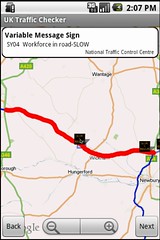
National Traffic Control Centre - on AndroidFor the traffic data, you get data divided into monitored stretches of road. In the England data, there were tens of thousands of these road sections. For each stretch of road, you get:

  • current average travel times to traverse the section
  • the typical travel for this stretch of road for this time and day of the week based on historical profiles
  • the theoretical ideal travel time if there was no traffic
  • the current average vehical flow rates (number of vehicles per hour) divided into the length of vehicle – how many vehicles shorter than 5.2m, how many vehicles between 5.2m and 6.6m in length, how many vehicles between 6.6m and 11.6m, and how many vehicles longer than 11.6m (the doc warns that “The accuracy of the loops when classifying vehicle lengths is 1% so measurements around each breakpoint could fall into adjacent categories” – like that’s a problem!)
  • the current average vehicle speeds on the stretch of road
  • the current average occupancy for the road

Not only was it detailed, but it was up-to-date. Data is updated at two-minute intervals if you pay for a premier account, or ten minute interals for the free standard account.

This was awesome. So much information!

(more…)
Android Market – a follow-up

Thursday, July 15th, 2010

A month ago, I submitted an app to the Android Market app store for the first time, and shared the experience – from compiling the app to it being live in the Market on people’s phones.

I thought I’d follow this up with a quick post on what happens after your app goes live in the Market.

Again, as before, this is aimed at the idle curiosity of people who use mobile app stores, rather than trying to replace the detailed documentation provided for mobile developers.

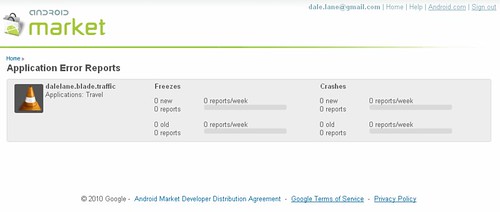
Crash reports

100715-android-2

My favourite part are the Error Reports. As a developer, you can see when your app crashes on people’s phones. You can see how often it happens, how many people it has affected, and how many times it has happened.

I’ve not had any errors (I’m almost disappointed! 😉 ) so the screenshots on the Android developer’s blog are perhaps a better example. You can see that not only do you get told that an error has happened, but (as these are Java apps) you get the stack trace at the point of the error, telling you exactly where the app crashed.

This should make it a million times easier to debug buggy apps – it’s the sort of functionality that I’ve tried to manually build into apps before, but with Android you get it out-of-the-box. This is awesome.

(more…)

UK Traffic Checker now in the Android Market

Monday, June 14th, 2010

Update: (April 2011) The app is no longer available


UK Traffic Checker for AndroidMy last post was a bit of a clue, but I still thought it was worth a mini-announcement that “UK Traffic Checker” is now available in the Android Market.

I wrote about the basic idea for the app when I first hacked it together, but to summarise it’s a mobile app that checks for roadworks or other traffic incidents on UK roads for a specific journey. Tell it two places, it will work out the route between them, and check that route for known problems.

And if you give it your schedule, it can automatically check traffic for you – with support for both one-off and repeating journeys. So if you have a regular commute, you can give it the details and it will check your route to work for you in the morning while you get ready, without you needing to remember to ask.

‘UK Traffic Checker’ in the Market

(more…)

Releasing apps in the Android Market app store

Monday, June 14th, 2010

I’ve just added my first app to the Android Market app store, so I thought I’d write a quick post to share what is involved.

Note: This post isn’t aimed at mobile devs. The process is documented clearly enough that there really isn’t any need. Rather, this was more written at people who are probably never going to write and submit an app to a mobile app store, but who might have an idle curiosity about what is involved getting an app from a developer’s workstation to the app store.

Step 1 – Write the code

click to see full-size version - thanks to PhotobucketThis is really the fun bit 😉

The Android plugin for Eclipse gives you nice integration for publishing.

You can right-click on the project, choose “Export Signed Application Package” and the wizard spits out a signed file ready for publishing.


Step 2 – Register with Android

click to see full-size version - thanks to PhotobucketThis is the painful bit 🙁

You visit the Market site at http://market.android.com/publish/signup and pay your $25 to register with Android as a developer. For me, it worked out to a bit over £17.


(more…)