Posts Tagged ‘mlforkids’

What do people use to access Machine Learning for Kids?

Thursday, April 23rd, 2026

I use Cabin for analytics on Machine Learning for Kids. (If you’re not familiar with them, their blog post on how to do analytics in a way that prioritizes user privacy is worth a read – the approach is simple but elegant. And you can see a demo of what a Cabin dashboard looks like.).

I thought it might be interesting to share what Cabin tells me about who has used Machine Learning for Kids over the last seven days.

What Operating Systems are people using?

Operating System Uniques
Windows 404,873
iOS 132,971
macOS 67,848
Android 55,176
Mac OS 35,743
Chrome OS 23,536
Linux 21,852
Ubuntu 10,780
Chromium OS 8,484
HarmonyOS 408
Raspbian 31
OpenHarmony 17
PlayStation 13
Tizen 10
android 3

At work, I’m mostly surrounded by MacBooks and don’t often see a Windows computer. It’s easy to assume that is normal, so this is a reminder that I’m in a bit of a bubble. Windows is still dominant.

Interesting to see “macOS” and “Mac OS” separate (I was tempted to combine them, but I decided to leave the data I get from Cabin as-is.)

My favourite part of looking at this is wondering who are the thirteen people who visited my site from a PlayStation???

(more…)

How to explain Generative AI in the classroom

Wednesday, January 28th, 2026

Generative AI is fast becoming an everyday tool across almost every field and industry. Teaching children about it should include an understanding of how it works, how to think critically about its risks and limitations, and how to use it effectively. In this post, I’ll share how I’ve been doing this.

My approach is to take students through six projects that give a practical and hands-on introduction to generative AI through Scratch. The projects illustrate how generative AI is used in the real world, build intuitions about how models generate text, show how settings and prompts shape the output, highlight the limits (and risks) of “confidently wrong” answers, and introduce some practical techniques to make AI systems more reliable.

As with the rest of what I’ve done with Machine Learning for Kids, my overall aim is AI literacy through making. Students aren’t just told what language models are – they go through a series of exercises to build, test, break, and improve generative AI systems in Scratch. That hands-on approach helps to make abstract ideas (like “context” or “hallucination”) more visible and memorable.

I’ve long described Scratch as a safe sandbox, and this makes it ideal to experiment with the sorts of generative AI concepts they will encounter in daily tools such as chatbots, writing assistants, translation apps, and search experiences.

Core themes

Across the six projects, students repeatedly encounter three core questions:

1. How does a model decide what to say next?
Students learn that language models generate text one word at a time, guided by patterns in data and the recent conversation (“context”).

2. Why do outputs vary, and how can we steer them?
Students discover how settings and prompting techniques can balance creativity vs reliability, and how “good prompting” is about being clear on the job you want done.

3. When should we not trust a model, and what do we do then?
Students experiment with hallucinations, outdated knowledge, semantic drift, and bias. They practise mitigations to these problems, such as retrieval (adding trusted information) and benchmarking (testing systematically).

All of this is intended to be a (much simplified!) mirror of real-world practice. Professional uses of generative AI combine generation (writing), grounding (bringing in trusted sources), instruction (prompting), and evaluation (testing and comparing). Children can be introduced to all of these aspects through hands-on experiences.

(more…)
Explaining few-shot prompting in Scratch

Tuesday, January 20th, 2026

In this post, I want to share a recent worksheet I wrote for Machine Learning for Kids. It is a hands-on project to give students an insight into an aspect of prompt engineering with language models.

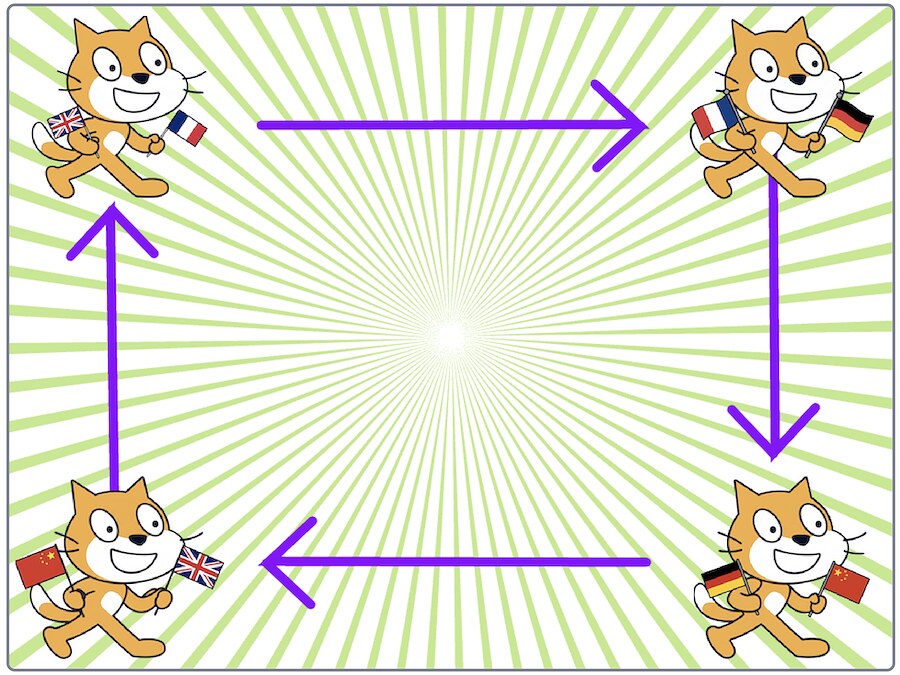
Students create a Scratch project with four sprites.

They start things off by writing an English sentence which goes to their first sprite.

The first sprite waits to be given an English sentence, and uses a language model to translate it into French.

The second sprite waits to be given a French sentence, and uses a language model to translate it into German.

The third sprite waits to be given a German sentence, and uses a language model to translate it into Chinese.

The fourth sprite waits to be given a Chinese sentence, and uses a language model to translate it into English.

This is then received by the first sprite, and the process continues again.


screen recording of the Scratch project on YouTube

Because the translations aren’t 100% perfect, like the famous children’s game, the text passed between the sprites gets further and further from the student’s starting sentence.

I’ve been kicking around this idea for a few months, but it didn’t work well with the groups that I tried the early project incarnations with. I think it’s in a better state now, so I’ve added the worksheet to the site.

The project has given me a chance to introduce a range of different ideas…

(more…)

Explaining role prompting in Scratch

Sunday, January 11th, 2026

In this post, I want to share a recent worksheet I wrote for Machine Learning for Kids. It is a hands-on project to give students an insight into an aspect of prompt engineering with language models.

Students create a Scratch project that lets them have a conversation with a small language model. They try to have the same conversation multiple times, and they set up the Scratch project so that adds a short role instruction to the context at the start (e.g. “Answer like a pirate”).

The instruction changes how the model answers, and students have to try and work out from the responses they get from the model which persona has been selected.


screen recording of the Scratch project on YouTube

By repeating the activity several times, they should notice something important: the same language model gives very different answers to the same questions, just because of a small change in the instructions. This observation is the key lesson here.

(more…)