An unnecessarily deep dive into how Flink commits Kafka consumer offsets.
A pull request of mine was merged into this week. A ridiculous number of sketches and diagrams went into the commits to get the idea straight in my head, so in this post I tidied them up a bit to share.
How consumer offsets are used by Flink
If you run a Flink job that reads from Kafka, you’ve probably seen its consumer group in your Kafka tooling like any other Kafka consumer: committed offsets for each partition, and a lag figure showing how far behind the log end the job is.
Flink doesn’t need to depend on those committed offsets for its own work. The unit of work for a Flink source is a “split”. For Kafka, a split is a partition and the offset to read from (and for a bounded split, the offset to stop reading at). This is stored in Flink state. Each source reader holds a split for every partition it reads, and each split records the next Kafka offset to read.
When Flink takes a checkpoint, each split is saved in the checkpoint, and contains those offsets. If the job fails, or you restart it from a savepoint, the source picks up from the offsets in the checkpoint. That’s how Flink can offer exactly-once processing: the offsets and the rest of the job’s state are captured together, in the same consistent snapshot.
Typically, the Kafka source reader commits the checkpointed offsets to Kafka once a checkpoint has completed. Although that is not necessary for the Flink job, it’s useful for lag dashboards and alerting, in the same way as any other Kafka consumer, and helps to understand how the job is doing.
Lag that wasn’t going away
FLINK-33484 reported a problem with a Flink job consuming a transactional topic with isolation.level=read_committed. The job had read everything on the topic, but the reported lag according to Kafka was stuck at 1, not 0.
A plain Kafka Java consumer reading the same data from the same topic reported no lag. Flink wasn’t committing the right offset.
Every time a record is handed on to the rest of the job, the split’s position was updated:
splitState.setCurrentOffset(consumerRecord.offset() + 1);
The next offset to read is the one after the last record.
That’s the right thing to do for a non-transactional, uncompacted topic, where every offset holds a record.

It’s not always the right thing to do.
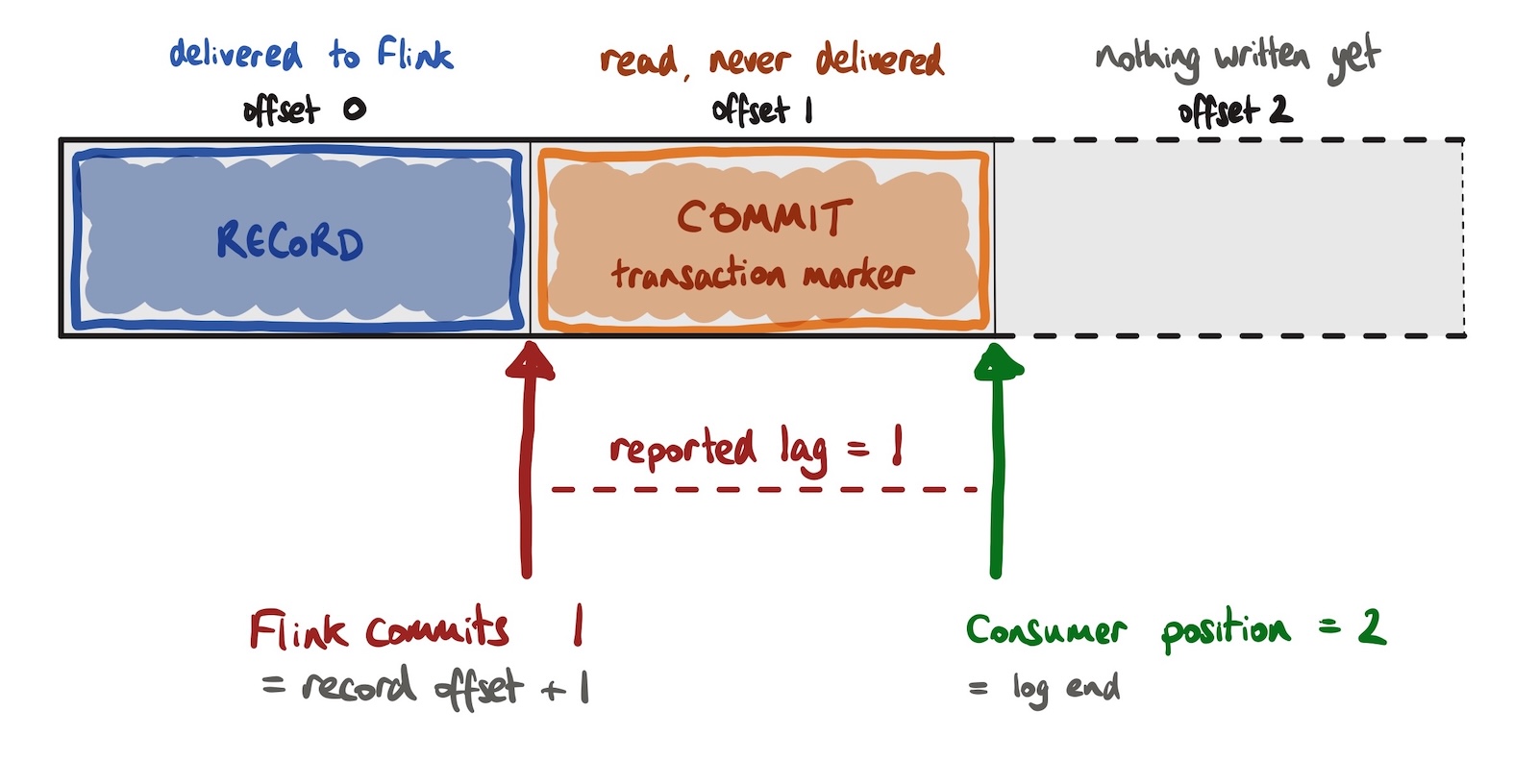
When a Kafka producer commits or aborts a transaction, the broker writes a transaction marker into each partition the transaction touched. That marker takes up an offset in the log like any other entry.

This is handled by the Kafka consumer. Transaction markers aren’t given to the application.
And if the application only asks for committed records (read_committed), records from aborted transactions are skipped in the same way. The consumer reads past them, and its position moves forward, but no record comes out for them.
Imagine a Kafka producer writes a single record in a transaction and commits it:
| offset 0 | record | delivered to Flink |
| offset 1 | commit marker | read by the consumer not delivered to Flink |
The topic partition’s log end offset (and last stable offset) is 2 because that’s where the next entry will be written.
Flink emitted the record at offset 0, and set the split’s current offset to 1 (because it added 1 to the offset it’s emitted).
The Kafka consumer has actually read past the transaction marker, so its position is 2.
But at the next checkpoint, Flink committed an offset of 1.
Any Kafka tooling set up to monitor Kafka consumer progress compared that with a log end of 2, and reported a lag of 1.
On a busy topic, you’d barely notice. The next record arrives, gets emitted, and the committed offset jumps over the marker. The committed offset was always slightly behind, but only until new data arrives.
On a quiet or bursty topic, “until new data arrives” can be a long time. The job was fully caught up, but every checkpoint committed the same stale offset, and Kafka monitoring reported a lag that didn’t exist.
That was FLINK-33484 that I picked up a little while ago.