In this post, I’ll share examples of how writing user-defined functions (UDFs) extends what is possible using built-in Flink SQL functions alone.
I’ll share examples of how UDFs can:
- make complex SQL readable and maintainable
- add algorithmic logic that SQL cannot express
- reshape complex events into simpler streams
- summarise events in domain-specific ways
- enrich events using custom state
- decide when to output results
Extending Flink SQL to…
make complex SQL readable and maintainable
Simplicity and readability is a strength of using SQL for event stream processing. That can feel true while you’re writing your SQL, but maybe a little less so when you’re trying to read someone else’s more complex SQL.
Remember the stream of e-bike location update events I was working with last year? They included the current location of each e-bike. If I add LAG, I can get the current location together with the previous location of each bike.
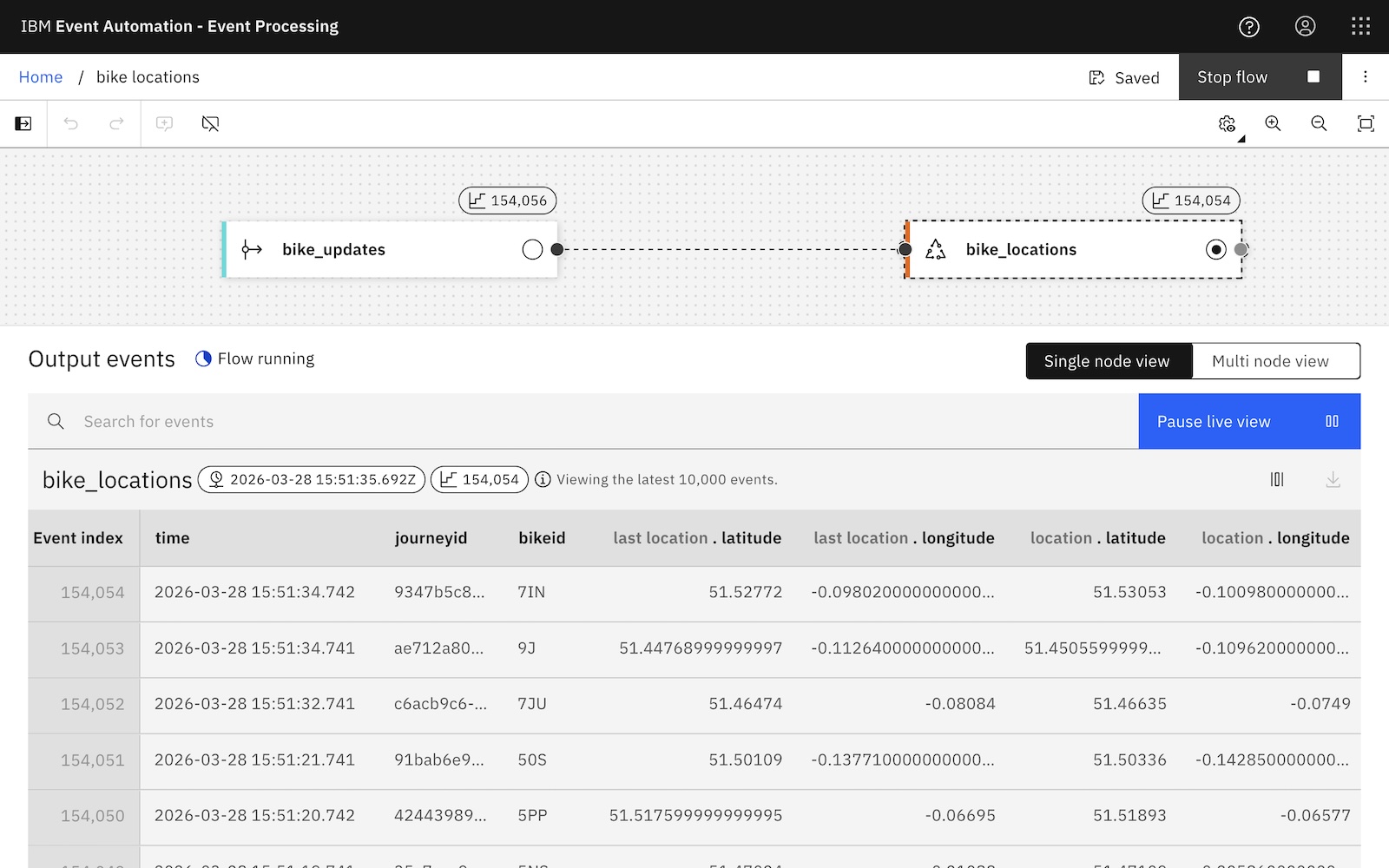
I could use these two locations like this:
SELECT
  bikeid, `last location`, location,
  6371 * 2 *
    ASIN(
      SQRT(
        POWER(
          SIN(RADIANS(location.latitude - `last location`.latitude) / 2),
          2
        )
          +
        COS(RADIANS(`last location`.latitude))
          *
        COS(RADIANS(location.latitude))
          *
        POWER(
          SIN(RADIANS(location.longitude - `last location`.longitude) / 2),
          2
        )
      )
    ) AS dist
FROM
  bike_locations;
My SQL above is estimating the geospatial distance between the two locations. To my (math-phobic?) eyes, the intent of that SQL statement is buried in a series of mathematical functions.
Maybe you’re a trigonometry expert and easily recognise the Haversine formula. Even so, I suspect you’d agree that this SQL is fragile. I could easily imagine bugs being introduced (and difficult to spot!) when you start copy/pasting this a few times across multiple queries for use with different locations.
Compare that with this:
SELECT
  bikeid, `last location`, location,
  GEOSPATIAL_DISTANCE(`last location`.latitude, `last location`.longitude,
                      location.latitude, location.longitude) AS dist
FROM
  bike_locations;
This is doing the same thing, but is immediately clear and readable. The intent behind this query is explicit, rather than needing to be inferred. And I can reuse the logic in multiple streaming queries without risking hard-to-spot copy/paste bugs.
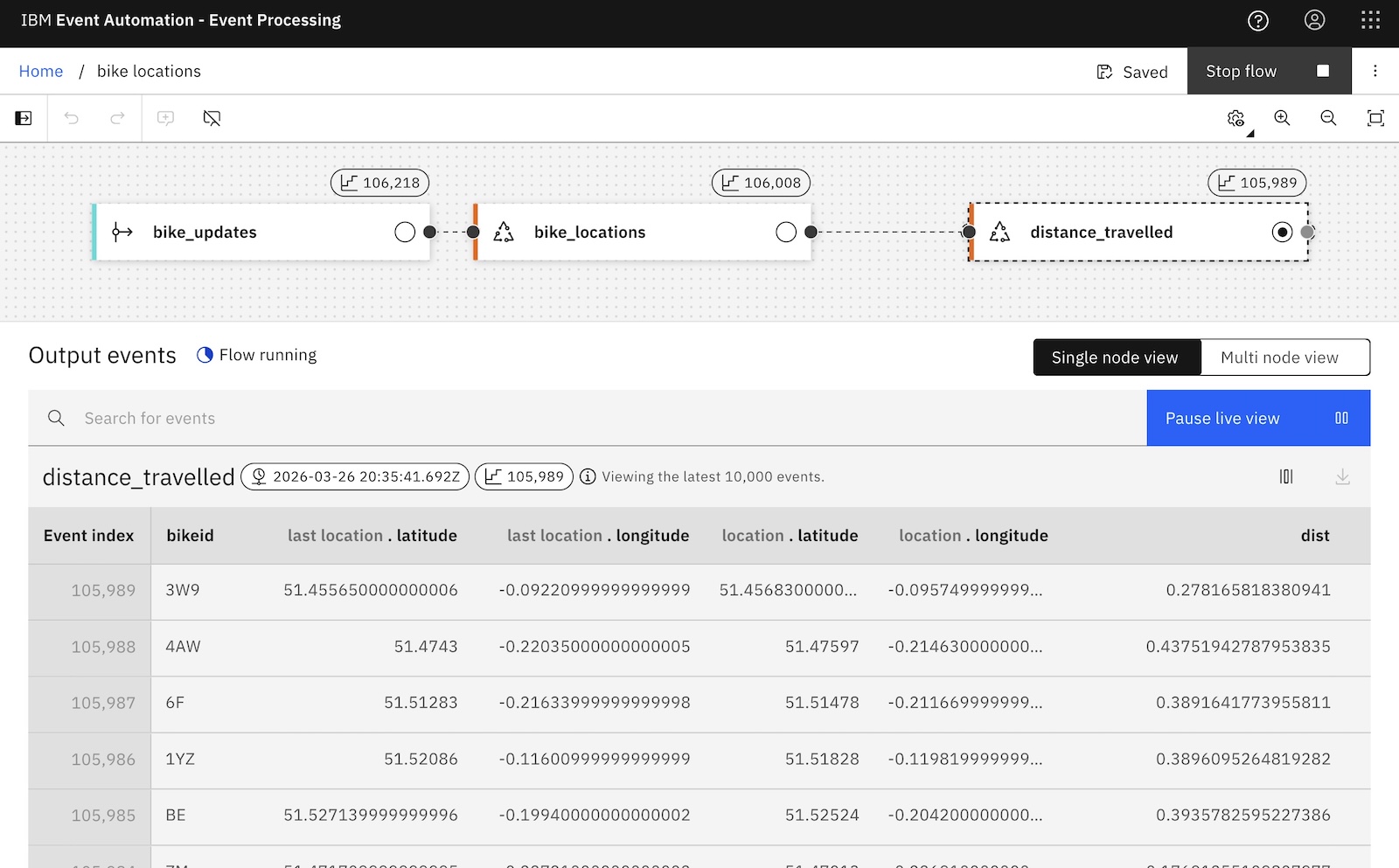
How did I do this?
I moved the Haversine formula into a reusable Java class:
GeospatialDistance.java on github
Then imported that into my SQL as a function:
CREATE FUNCTION GEOSPATIAL_DISTANCE
  AS 'com.ibm.eventautomation.eventprocessing.udfdemos.scalar.GeospatialDistance'
  USING JAR '/opt/ibm/sp-backend/udfs/udfs.jar';
When you’ve got bits of long, dense, complex SQL that is likely to be difficult to read or maintain (especially if you need to use similar variations of that in multiple places), those are good candidates for extracting into functions.
Extending Flink SQL to…
add algorithmic logic that SQL cannot express
Some projects require processing that isn’t feasible to express in SQL. If you need to calculate something that needs an algorithm to describe it (rather than a query expression) built-in SQL alone becomes a constraint.
To give a simple example, you probably know that the last digit of a credit card number is a checksum.
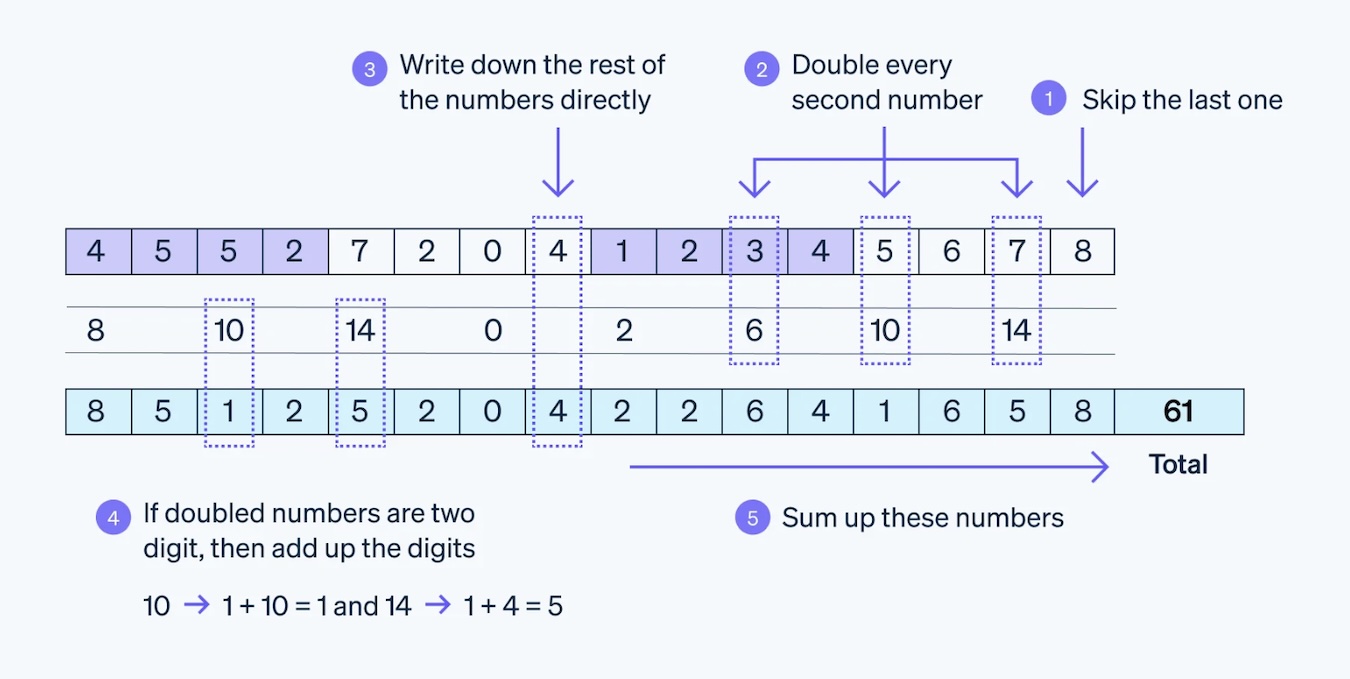
Image source: stripe.com
Computing a checksum is a valid thing to want to do as part of data validation in a stream processing pipeline, but can’t reasonably be expressed using built-in SQL. SQL isn’t a procedural language. It lacks even simple loops.
This checksum algorithm is well suited to putting in a reusable Java function:
CreditCardChecksum.java on github
This can be imported like this:
CREATE FUNCTION CREDIT_CARD_CHECKSUM
  AS 'com.ibm.eventautomation.eventprocessing.udfdemos.scalar.CreditCardChecksum'
  USING JAR '/opt/ibm/sp-backend/udfs/udfs.jar';
That lets you do something like:
SELECT
    accountnum,
    CREDIT_CARD_CHECKSUM(accountnum) AS is_valid,
    event_time
FROM
    transactions;
Like my previous example, clear and readable SQL that describes the business intent of the processing is a benefit.
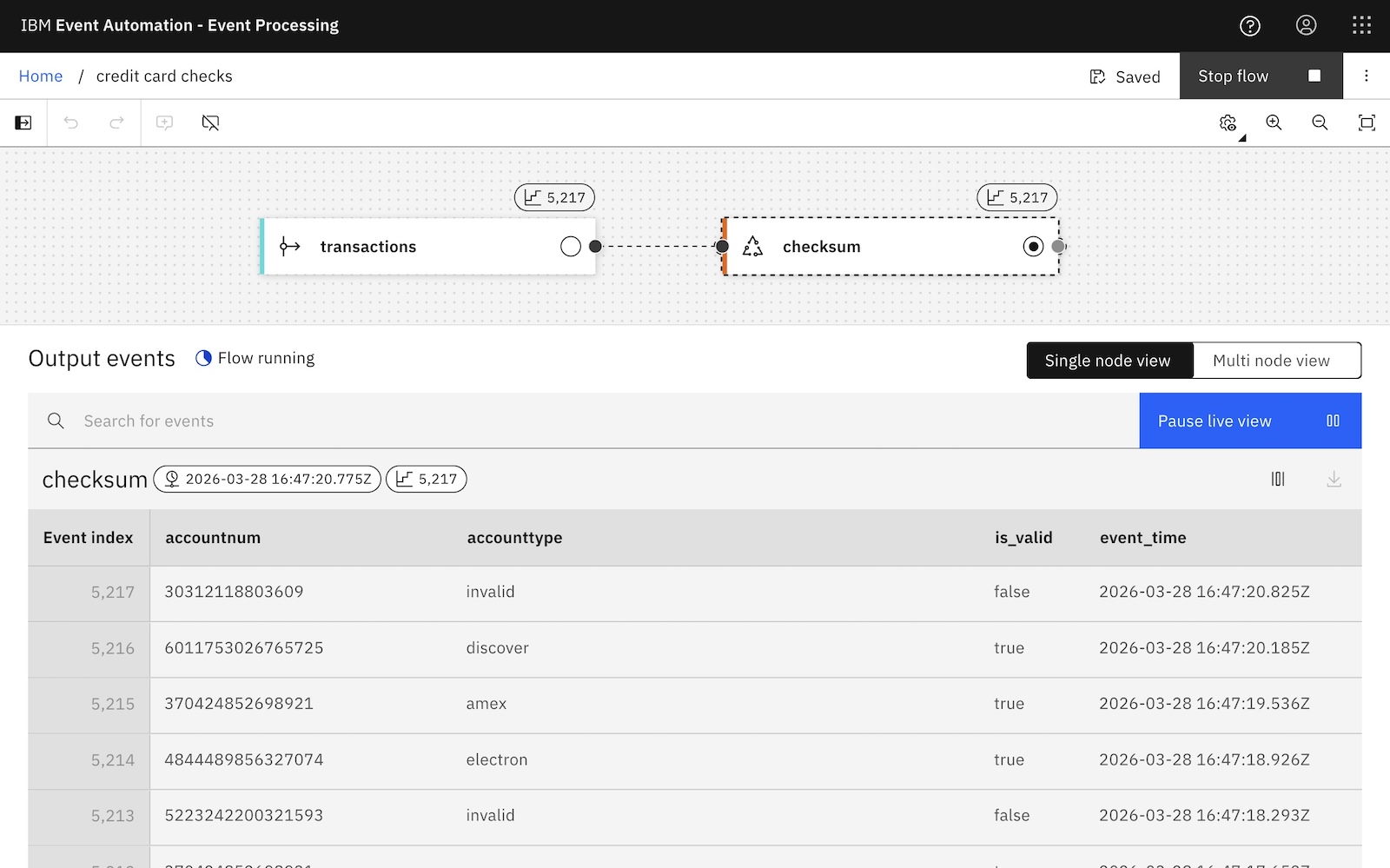
More importantly, in this case, writing a user defined function is letting me do data validation using a type of complex processing that I wouldn’t have been able to do otherwise.
Extending Flink SQL to…
reshape complex events into simpler streams
Sometimes our Kafka events are nested, complex, structured data objects that contain multiple items that each need to be responded to.
A simple example that is possible with built-in SQL is to explode an array into multiple separate events. Imagine an order event that contains an array of products:
{
     ...
     "products": [
         "M Organic-Cotton Relaxed Jeans",
         "L Stretch-Denim Slim Jeans"
         "L Chambray Carpenter Jeans"
     ],
     ...
}
Even though this is just one event to respond to, a logistics pipeline might want to trigger a stock replenishment process for each these products. You can do this using built-in SQL by unpacking the array like this:
SELECT
    ...
    unpacked.product
    ...
FROM
    orders
CROSS JOIN
    UNNEST(orders.products) AS unpacked(product);
But what if your event needs more complex logic to be exploded than just unpacking an array of items?
For example, imagine a hotel booking event:
{
   ...
   "start": "2026-01-15 15:00:00",
   "end":   "2026-01-19 11:00:00",
   ...
}
Maybe you want to emit a separate event for each day, in order to trigger some process for each day that falls within the span described there.
- 2026-01-15 3pm – end of day
- 2026-01-16 all day
- 2026-01-17 all day
- 2026-01-18 all day
- 2026-01-19 until 11am
Sounds simple, but there’s no practical way to describe the logic needed to do that with built-in SQL alone.
It’s easy to implement in a function:
This can be imported similar to before like this:
CREATE FUNCTION DAILY_INTERVALS
  AS 'com.ibm.eventautomation.eventprocessing.udfdemos.table.DailyIntervals'
  USING JAR '/opt/ibm/sp-backend/udfs/udfs.jar';
I can now unpack a timespan into daily interval events as simply as I can unpack an array in built-in SQL:
SELECT
    bookingstart, bookingend,
    start_time, end_time
FROM
    booking_requests
CROSS JOIN
    LATERAL TABLE (
        DAILY_INTERVALS (bookingstart, bookingend)
    );
These separate day-span events can now be used in additional processing or to trigger downstream workflows.
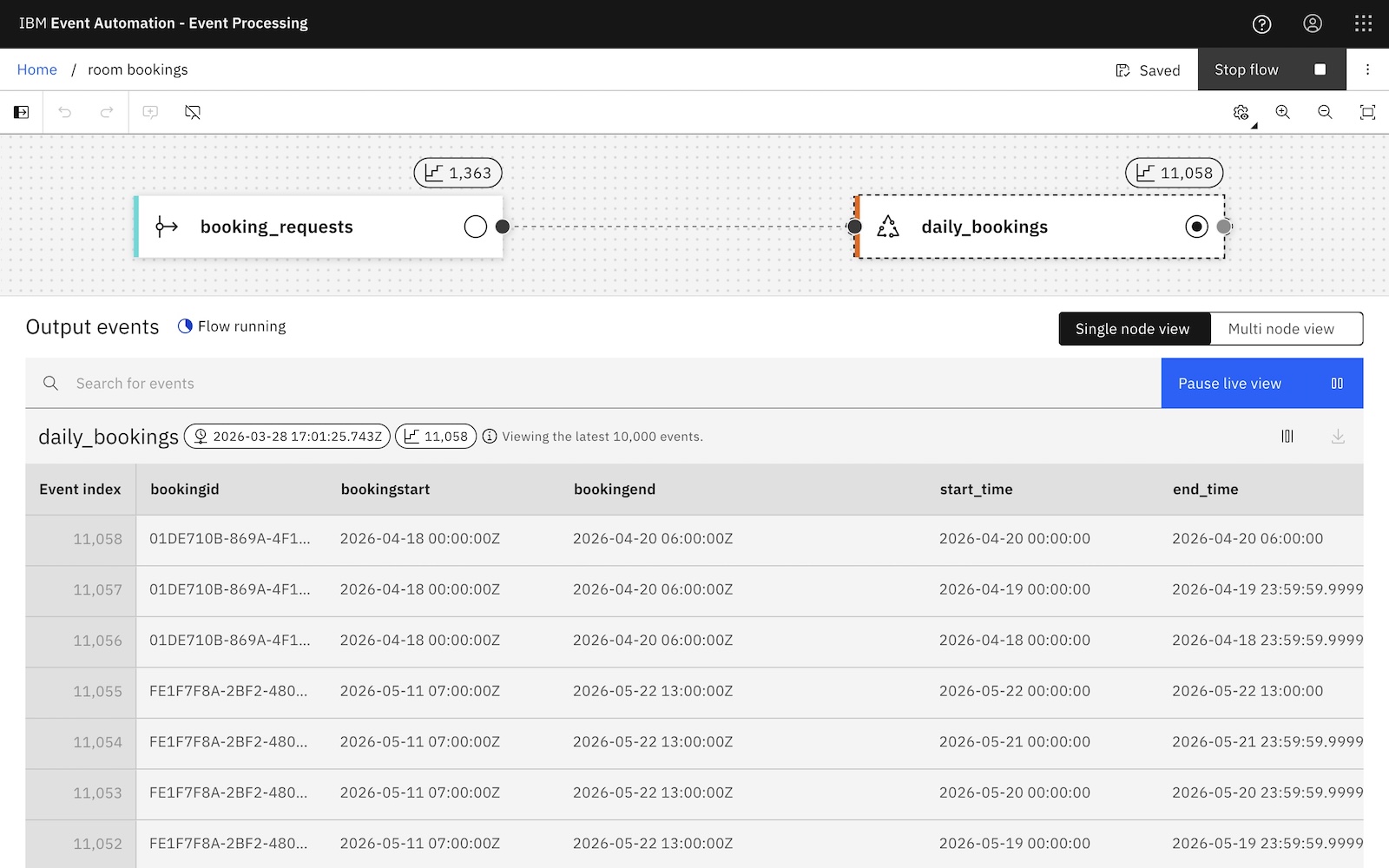
User defined functions can make it easy to normalize complex payloads. Writing a function that contains the logic to extract the business meaning behind the payload lets you turn a single input event into many simple, uniform downstream records.
Extending Flink SQL to…
summarize events in domain-specific ways
Flink SQL has a strong set of aggregate functions. COUNT counts how many times something is found in your events, AVG returns the arithmetic mean for values in your events, SUM adds up values in your events, MAX returns the largest value in your events, and so on. There are lots of functions available, supporting the aggregates you’ll need for most projects.
But what if you need something a bit different?
For example, imagine you’ve got a sensor that emits temperature and humidity readings:
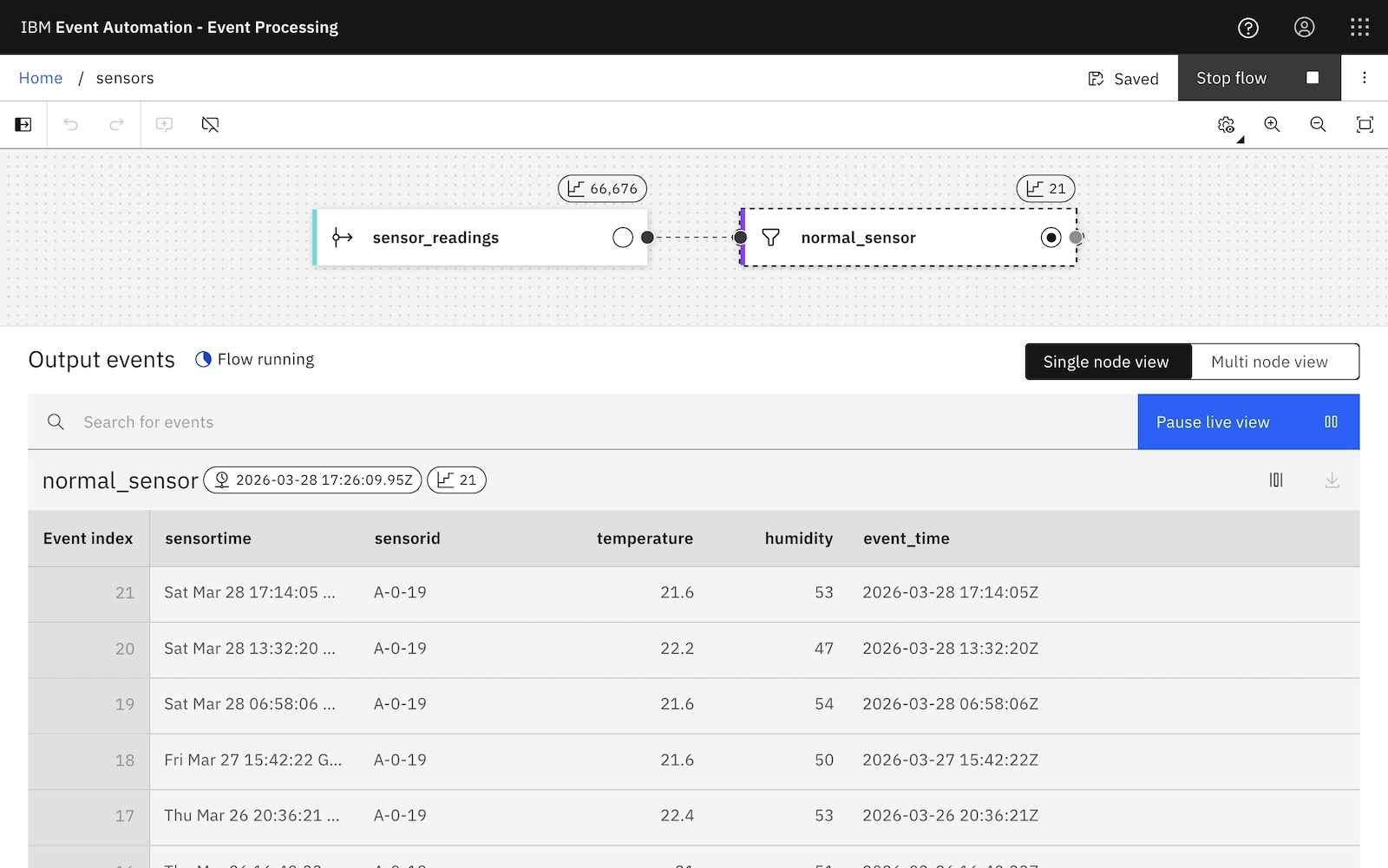
If you want to compute hourly averages, AVG will be fine for a lot of use cases.
SELECT
    window_start, window_end,
    AVG(temperature) AS `average temp`,
    AVG(humidity)    AS `average humidity`
FROM
    TABLE (
        TUMBLE (
            TABLE normal_sensor,
            DESCRIPTOR(event_time),
            INTERVAL '1' HOUR
        )
    )
GROUP BY
    window_start, window_end, window_time;
Imagine this is an unreliable IoT sensor that periodically glitches and emits a false reading.
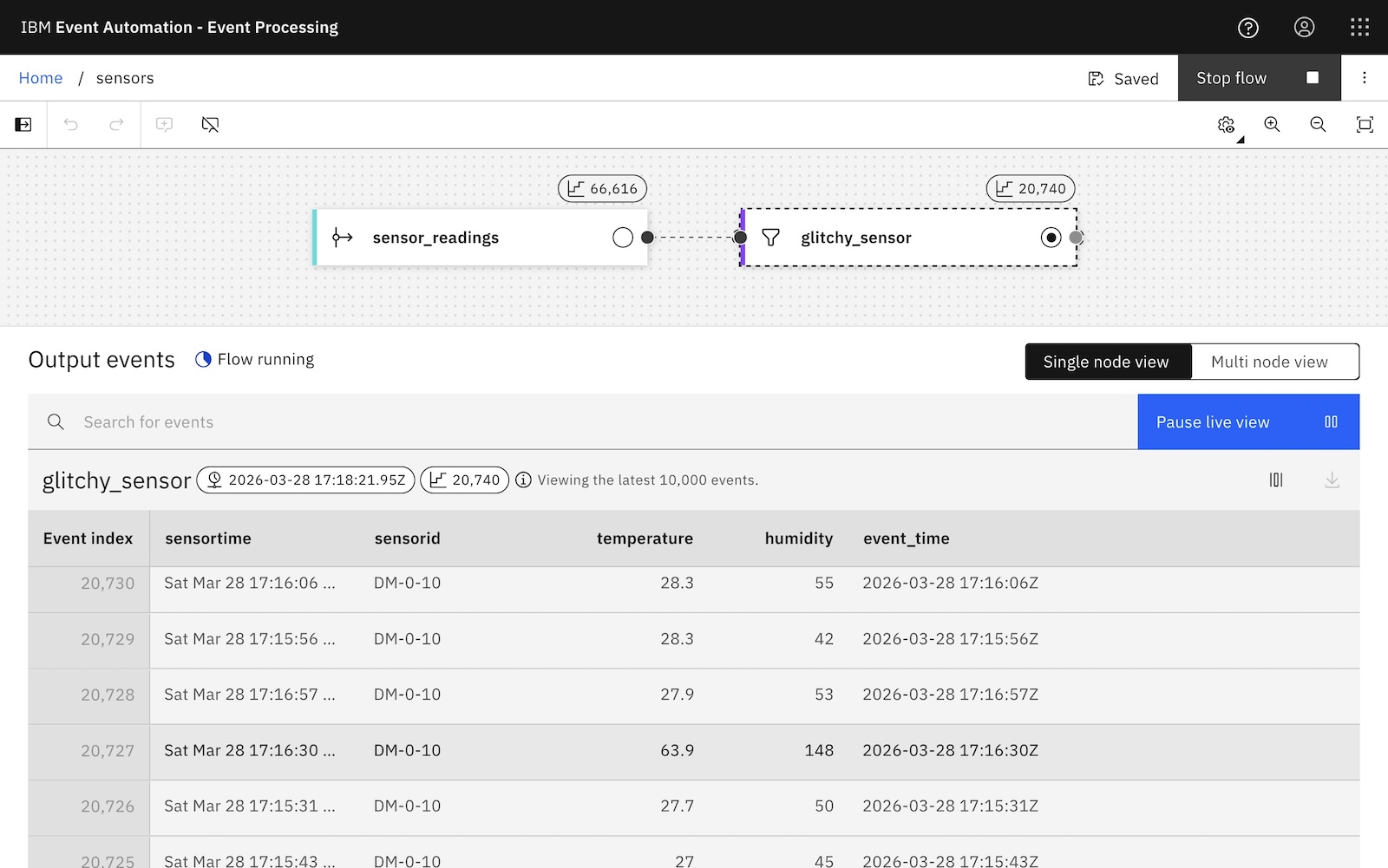
Using mean to get an average temperature and humidity will be sensitive to those outlier readings. What would be a better way to get an idea of the average sensor readings that is less impacted?
There are ways to compute an average when mean isn’t suitable. You’ve probably heard of things like median and mode, but for this example I’m going to use the L1 Medoid. This is where you select an item from a collection that is the most representative of all of the items. (That is, the one with the lowest total sum of absolute distances to other items).
I can import it like this:
CREATE FUNCTION L1_MEDOID
  AS 'com.ibm.eventautomation.eventprocessing.udfdemos.aggregate.L1Medoid'
  USING JAR '/opt/ibm/sp-backend/udfs/udfs.jar';
And use it like this, (leaving the AVG mean in there for comparison purposes):
SELECT
    window_start, window_end,
    AVG(temperature)       AS `average temp`,
    L1_MEDOID(temperature) AS `l1medoid temp`,
    AVG(humidity)          AS `average humidity`,
    L1_MEDOID(humidity)    AS `l1medoid humidity`
FROM
    TABLE (
        TUMBLE (
            TABLE glitchy_sensor,
            DESCRIPTOR(event_time),
            INTERVAL '1' HOUR
        )
    )
GROUP BY
    window_start, window_end, window_time;
This alternative approach to averages could be more useful in some situations.
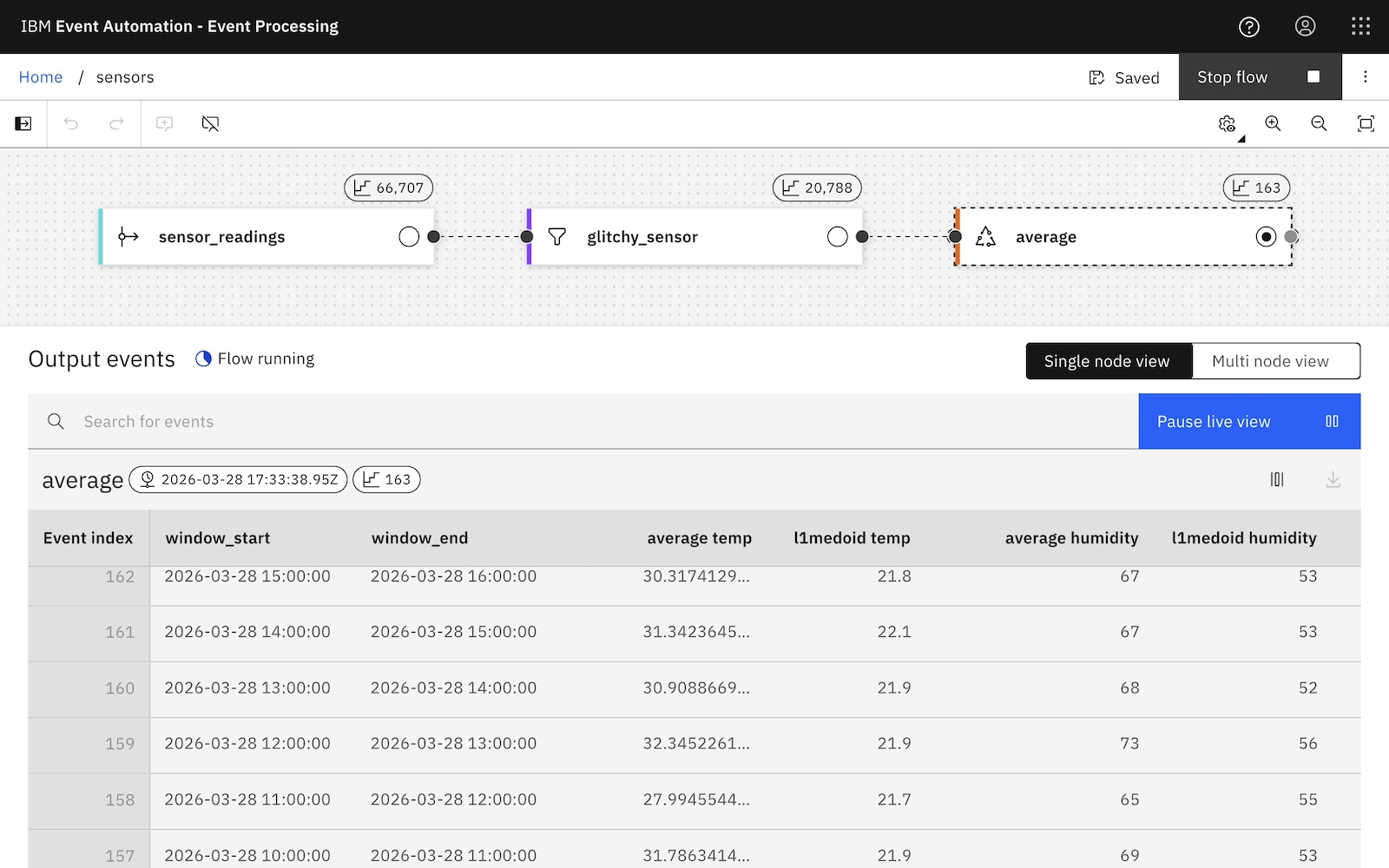
Alternative averages to the mean that you get with the built-in AVG function is one way to get started, but you’re not limited to that. User defined functions are a helpful option any time when you have specific requirements for metrics, KPIs, and roll-ups. More generally, they are useful any time that you want custom reasoning over a time window or group of events.
You can write custom functions to reason at the level of trends, rather than just individual events.
Extending Flink SQL to…
enrich events using custom state
You can take this further with process table functions, which let you implement stateful stream processing such as remembering previous events, and correlating events across time.
For example, I shared some examples of using Flink SQL to process click stream events earlier this year.
Many of the examples I wrote using only built-in SQL used the “sessionid” property in each click event. The sessionid let me group together click events caused by the same user as part of the same session as they clicked around a retail site. My examples using the built-in session window functionality all had to wait until a session was over (i.e. until no click events were observed with the session id for a pre-determined amount of time) before they could emit an output for that session.
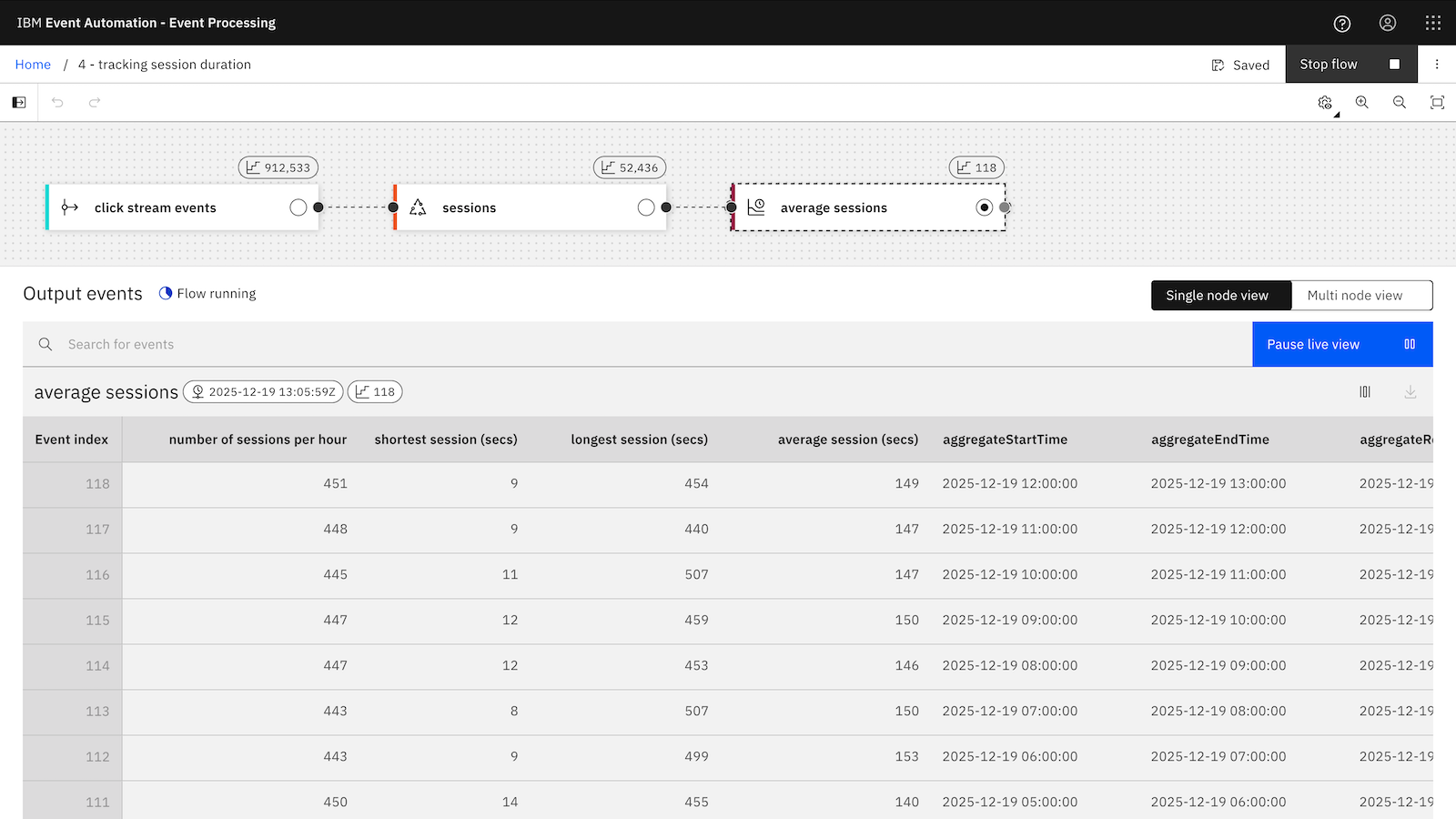
If you want to emit output events about a session while the session is still active, you can write your own custom function for this.
SessionEnricher.java on github
And embed it in your SQL like this:
CREATE FUNCTION SESSION_ENRICHER
  AS 'com.ibm.eventautomation.eventprocessing.udfdemos.ptf.SessionEnricher'
  USING JAR '/opt/ibm/sp-backend/udfs/udfs.jar';
which you could use with
SELECT
    *
FROM
    SESSION_ENRICHER (
        input => TABLE clicks PARTITION BY sessionid,
        on_time => DESCRIPTOR(event_time),
        event_type_field => 'type'
    );
Every click event is being enriched with additional properties saying how long the session has been going so far, and how many of each type of click event has been observed from this user since the session started.
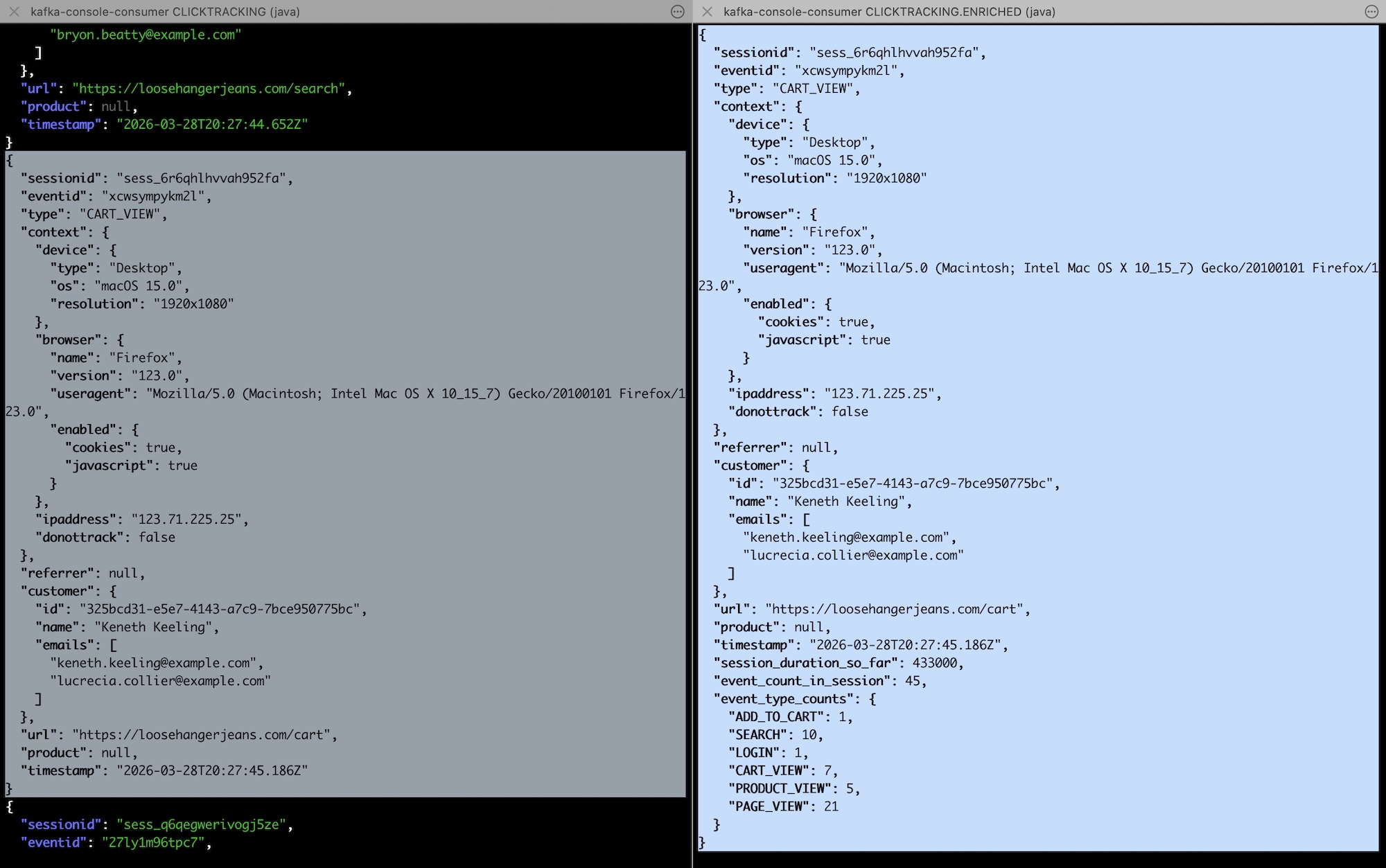
input click event on the left, enriched event with session info on the right
The key here is that writing my own custom function gave me the flexibility to define my own state that maintains the current values I’m interested in for each session. (And it let me emit this immediately without having to wait for a session window to close.)
Process table functions are a hugely powerful and flexible option when extending Flink SQL, as they give you the ability to maintain any custom state you need and (I used just a couple of counts to keep this simple, but you can get more complex) and use this to enrich the events that you process.
Extending Flink SQL to…
decide when to output results
Some stream processing problems shouldn’t be triggered immediately by an incoming event. Perhaps they should be triggered by nothing happening, such as a sensor going quiet or a user that stops clicking. Or perhaps they should be triggered after a delay, such as no update arriving within a deadline.
Built-in Flink SQL only lets you output immediately when an event is received, or when a pre-defined window closes (e.g. an hourly aggregate outputs results at the end of an hour).
Writing your own function lets you define your own notion of timing. You can delay output until a specific point in time, or trigger output only after a custom condition is met.
Your function is able to define when it should output something, not just what it should output.
Debouncing is an example of this kind of logic. For example, I might want to filter out rapid bursts of events, keeping only the latest event in a burst for further processing. In this way, the decision about when to emit an output event is not based on the content of any single input event, but on whether more events arrive shortly afterwards. The output is produced only once the stream has been quiet for long enough.
For this example, when an event is received, I started a ten second timer. If another event with the same ID arrives before the timer expires, the timer is reset. Only once the timer is able to expire is the event emitted.
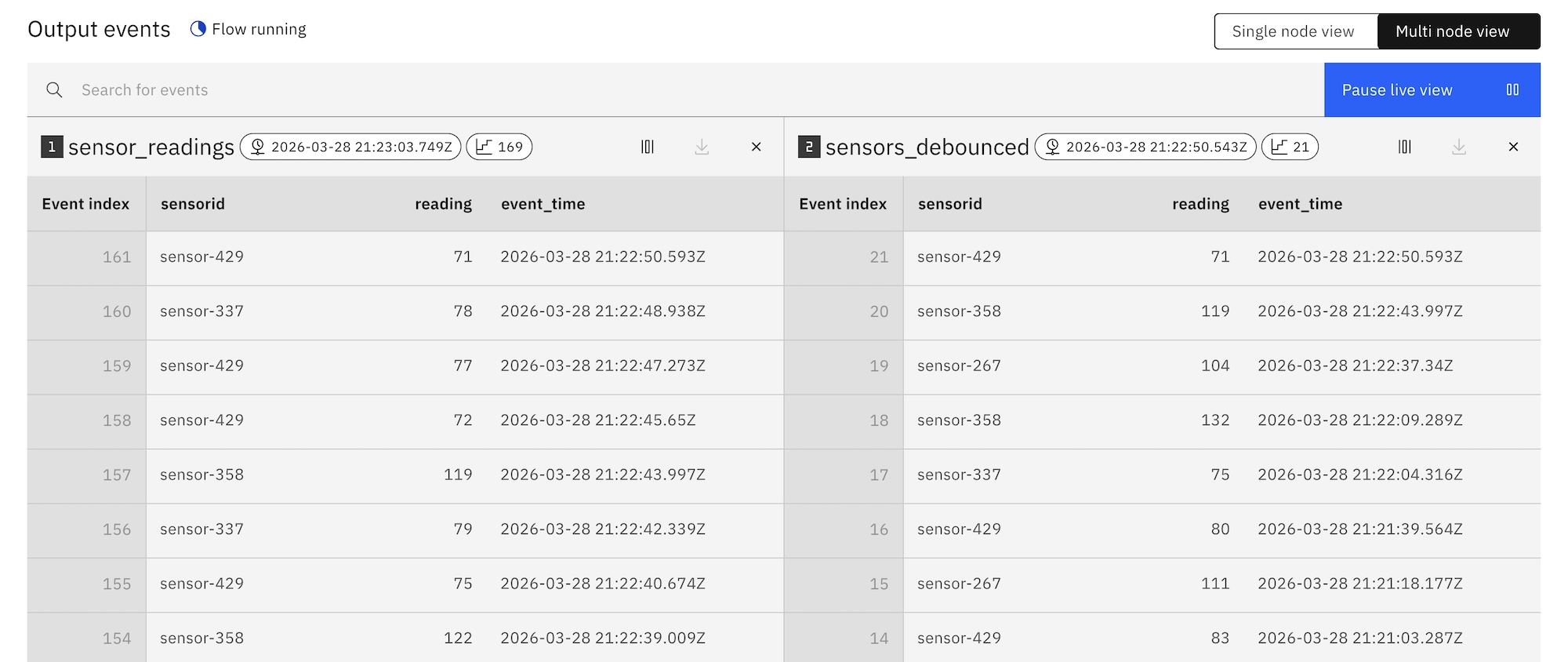
all sensor readings on the left, debounced filtered view on the right
I implemented the function to do that like this:
I import it like this:
CREATE FUNCTION DEBOUNCE
  AS 'com.ibm.eventautomation.eventprocessing.udfdemos.ptf.Debounce'
  USING JAR '/opt/ibm/sp-backend/udfs/udfs.jar';
And could use it like this:
SELECT
    *
FROM
    DEBOUNCE (
        input => TABLE sensorreadings
        PARTITION BY sensorid,
        on_time => DESCRIPTOR(event_time)
    );
Now a noisy stream of events can be filtered down to remove the bursts.
Looking at the impact of the function on a single sensor ID:
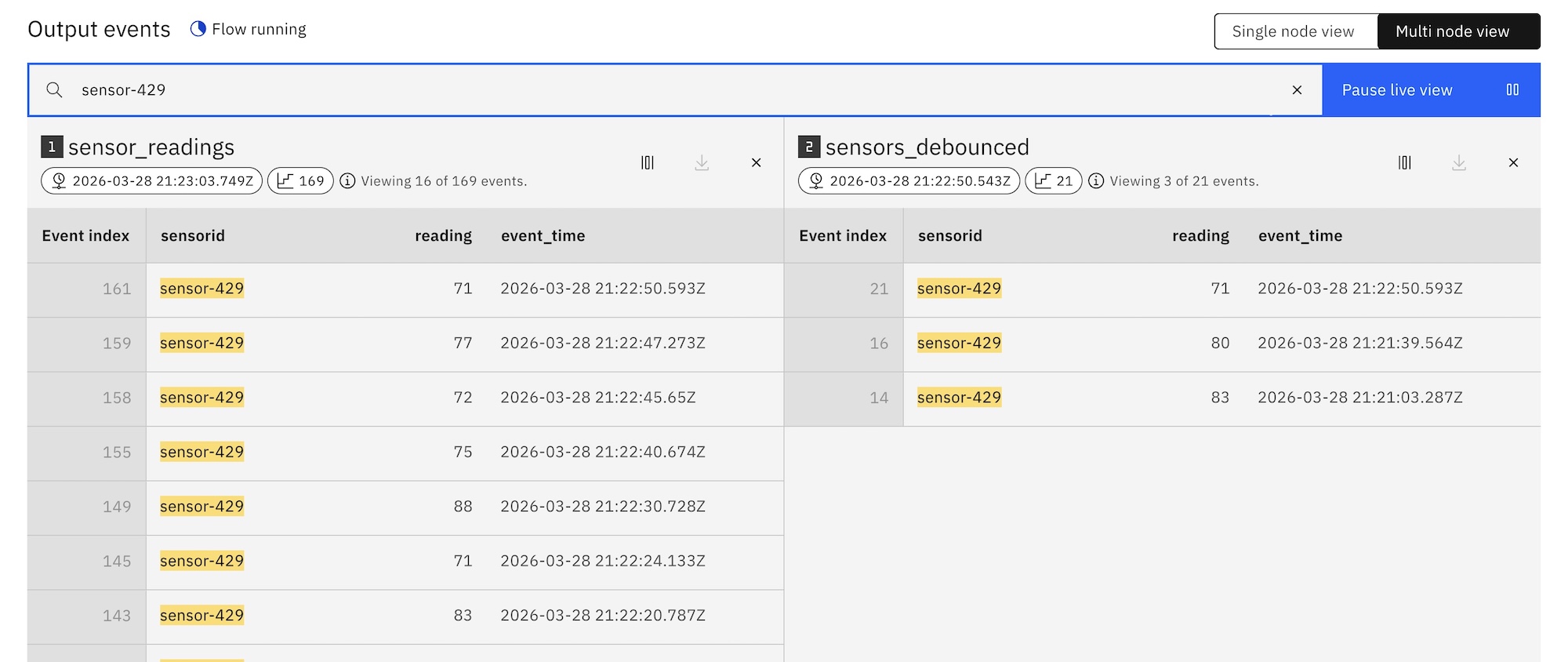
filtering “sensor-429”, all readings on the left, debounced view on the right
My examples earlier in the post react directly to incoming events. Outputs were either immediate or tied to the closing of a window.
You can extend Flink’s time-based logic beyond the windows that you have in built-in SQL (which specify how events are grouped) to custom timers that let you write logic to decide when results are emitted (as well as whether results are emitted at all).
They make it possible to express concepts like timeouts, inactivity, debouncing, and deadlines directly in SQL. This lets you control when to emit, not just what to emit.
Summary
I hope this post has helped show that the built-in functions in Flink SQL are a starting point, not a limitation.
I came up with six simple examples to show that Flink UDFs:
- make complex SQL readable and maintainable
- add algorithmic logic that SQL cannot express
- reshape complex events into simpler streams
- summarise events in domain-specific ways
- enrich events using custom state
- decide when to output results
But there is much more that is possible to do than I could cover in such a short post.
If you’d like to see some more ideas, the github repository MartijnVisser/flink-ptf-examples has nice examples of process table functions that are worth a look, and cover capabilities of the APIs that I haven’t described here.
Trying it out
The source code for the user defined functions I wrote for this post can be found in Github, along with the full SQL that I’ve linked to above.
That repository also has notes on how I set up the Kafka topics that I used to try out the functions.
I used Event Processing to give me a more visual illustration of the functions in action. If you want to reuse any of that, you can use this script to add the UDFs to your instance of Event Processing, and then import the flows that I created.
That isn’t required – any of this can be done with standard open-source Apache Flink.
Tags: apacheflink, flink