Archive for the ‘code’ Category

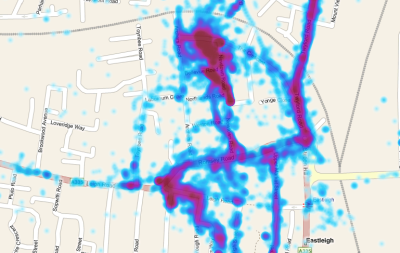
Your Google Latitude history as a heatmap

Sunday, May 8th, 2011

Overview

I made a web tool that draws a heatmap to show where you’ve been if you upload your history file from Google Latitude.

What I made

See a heatmap of where I’ve spent the most time at heatmapforlatitude.appspot.com.

If you like it, you can upload a Latitude history file and make a heatmap of your own.

(more…)

Fighting with WebSockets

Monday, April 18th, 2011

Overview

A long, rambly and very geeky post without a proper ending about some of the challenges I recently had getting WebSockets to work with mobile Safari on the iPhone/iPad.

Background

I wrote last week about a recent project of mine – a proof-of-concept using a custom WebSockets server implementation to push messages to web apps.

A target platform for one of the demos that I wrote to go with this was the iPhone. But it wasn’t as straightforward as I’d hoped. And I’ve ranted enough about it to friends and colleagues and on twitter. About time that I did a bit of moaning here 😉

(more…)

MQTT over WebSockets

Sunday, April 10th, 2011

Overview

Extending WebSphere MQ to include support for WebSockets, allowing messaging to web browsers, including mobile browsers, without any additional client software

Background

I’ve talked about MQTT before – a lightweight messaging protocol that I’ve used both on personal projects and my day job.

From mqtt.org:

It is useful for connections with remote locations where a small code footprint is required and/or network bandwidth is at a premium.

I’ve used it in CurrentCost projects, mobile apps and with small and embedded computers like my Slug.

But in all cases, I’ve needed MQTT client software to talk to the messaging server. Whether writing in C, C#, Java or Python, I’ve needed a client library to get me started, something that knows the sequence of packets that make up the MQTT protocol.

It’d be useful to have a zero-install MQTT client: an MQTT client app delivered over the web, without the user needing to install any additional client libraries, or resort to Java applets.

What this does

One possible way to do this could be WebSockets. Part of HTML5, this is a protocol that describes how to do two-way messaging between web servers and web browsers. And I mean proper two-way communication, including push-notification from the server to the browser, without resorting to hacks or kludges like long polling or hidden iframes.

It’s an emerging protocol, still in draft form, but there are a few implementations around so there are already a few browsers that know how to manage WebSockets.

We’ve been exploring recently how this could work with MQTT – the aim was to build in support for WebSockets into an MQTT messaging server: IBM WebSphere MQ (WMQ).

I’ve mentioned WebSphere MQ before, as back in the dim-and-distant past (well, five or six years ago) I used to be a developer of it.

It’s one of the server implementations that support the MQTT protocol.

By adding support for WebSockets to it, it means that WMQ could send and receive messages to web browsers. It means a web app could be a fully-fledged MQTT client.

(more…)

Using MQTT in Android mobile applications

Tuesday, February 1st, 2011

Overview

How to receive push notifications using MQTT in an Android mobile application

Background

I’ve written before about MQTT as a technology for doing push notifications to mobile. When I wrote that, I gave an example Android project. However, it was the first time I’d ever done Android development, and while it was an okay Java MQTT sample, it was a poor Android sample – I didn’t know anything about how Android works as a platform.

I’ve since written other Android MQTT apps, such as a hackday app for pushing updates from websites to your phone and learnt a lot about how to do it properly. Well… if not properly, at least a little better.

But Google is still directing people to my old, and probably unhelpful, sample. So it’s about time that I share something more useful.

I’ve put the full source for a sample implementation below. (Note that I’m using the Java J2EE client library from ibm.com). Hopefully the comments in it are clear enough, but here are a few of the key points.

(more…)

An API for twitter hashtags for TV programmes

Friday, December 31st, 2010

Overview
Hacking together an API that returns commonly-used hashtags for the programme you’re watching on the TV

Background
tweets on TVLast April, I wrote a quick-and-dirty Python script that displays tweets for a given hashtag on my TV screen so that I could follow the twitter backchannel about a programme that I watched.

Considering that it was a random idea that was hacked together in a few minutes, I’ve used it a lot since then: it’s made watching a bunch of programmes much more entertaining – Eurovision is probably the best example (the commentary on twitter is hysterical), but there are many others.

But I never made any changes to the script since I first wrote it. If I’m watching something on TV that I know has a hashtag, I ssh to my set-top box and run my hashtags script, giving it the hashtag to filter on in the command.

I was thinking – it’d be much better if it was all automatic. It’d be better if my set-top box automatically showed tweets with the hashtag for whatever programme I’m watching.

To do this, I needed some way of knowing what was the right hashtag for the programme currently on a given TV channel. I could’ve hacked this into my existing script, but I thought it might be a feature that people might find other uses for, so instead I’ve made a stand-alone thing, available as a web-service.

What it does
I’ve made a web feed that returns a blob of either JSON or XML. You can get either:

  • the commonly-used hashtag for the programme currently on a specified channel (e.g. “what is the hashtag for the programme that’s on BBC 1 now?”)
  • the next programme on TV that has a commonly-used hashtag (e.g. “what are the next five programmes on TV that have hashtags?”)

(more…)

Programmatically identifying DVDs by their barcodes from Android

Thursday, December 30th, 2010

Overview

A few Android code snipperts for how to identify a DVD by it’s barcode

Background

In November, I wrote a simple Android app that lets me add films to my LOVEFiLM list by taking a photo of a movie poster.

It also works by taking a photo of the front of a DVD case, as the DVD covers are essentially mini-posters. But a few people pointed out that using image recognition for the front of a DVD case is overkill, when DVD cases have a machine-readable barcode printed on them.

So I spent an evening adding the ability to scan barcodes to the app – and now you can add to your LOVEFiLM list either by photos of posters or barcodes.

I thought I’d quickly share how I did it, in case it’s useful to anyone else.

(more…)

Making YouTube (very slightly) more child-safe with a Firefox extension

Tuesday, November 16th, 2010

Kids stuff on YouTubeOur six year old daughter, Grace, has lost interest in kids TV recently – she’s discovered the joys of YouTube!

She can happily spend a half-hour sat in front of the TV on Firefox (our TV set-up is a Linux-based media centre, so it’s proper Firefox with a keyboard and mouse) clicking from video to video.

I’m fine with this. It’s good: she’s getting more familiar with how to use a web browser, getting used to starting the browser, typing “youtube” into the address bar, using the search box to search for what she wants, using the ‘Back’ button to go back to the search results if it’s not what she wanted, and so on. This is all good stuff, let alone the fact that there is a lot of content on YouTube that is actually ideal for kids.

But…

Well, she’s six. Not every video on YouTube is suitable for her. I’m not just talking about the stuff for over-18s. I don’t even want her to come across stuff with, for example, more swearing and violence – such as stuff that you might be happy to show a 12 year old.

The real solution to this is what we do now – she’s doing this in the sitting room on the TV, while we’re in the room watching stuff with her. I’m not saying I want to give her a laptop, send her up to her room, and say “here’s YouTube – off you go, have fun!”.

Even so, I wanted something to help out a little.

(more…)

You need to ask if you want an Android to vibrate

Saturday, November 13th, 2010

I posted a few days ago about a new little app I stuck in the Android Market. An error report appeared from the app in the Market last night that I thought was interesting.

The app does some stuff in the background then when it’s finished, it sticks a notification in the top status bar. In my code, I just use the default notification settings – LED flash, vibrate, etc. And on every Android I’ve tested it on, it’s been fine.

But for one user, it caused the app to crash:

Exception class java.lang.SecurityException

Source method Parcel.readException()

java.lang.RuntimeException: An error occured while executing doInBackground()
at android.os.AsyncTask$3.done(AsyncTask.java:200)
at java.util.concurrent.FutureTask$Sync.innerSetException(FutureTask.java:273)
at java.util.concurrent.FutureTask.setException(FutureTask.java:124)
at java.util.concurrent.FutureTask$Sync.innerRun(FutureTask.java:307)
at java.util.concurrent.FutureTask.run(FutureTask.java:137)
at java.util.concurrent.ThreadPoolExecutor.runWorker(ThreadPoolExecutor.java:1068)
at java.util.concurrent.ThreadPoolExecutor$Worker.run(ThreadPoolExecutor.java:561)
at java.lang.Thread.run(Thread.java:1102)
Caused by: java.lang.SecurityException: Requires VIBRATE permission
at android.os.Parcel.readException(Parcel.java:1247)
at android.os.Parcel.readException(Parcel.java:1235)
at android.app.INotificationManager$Stub$Proxy.enqueueNotificationWithTag(INotificationManager.java:368)
at android.app.NotificationManager.notify(NotificationManager.java:110)
at android.app.NotificationManager.notify(NotificationManager.java:90)
at com.dalelane.lovefilm.data.ImageProcessService.publishUpdateNotification(ImageProcessService.java:281)
at com.dalelane.lovefilm.data.ImageProcessService.access$0(ImageProcessService.java:234)
at com.dalelane.lovefilm.data.ImageProcessService$ImageProcesser.doInBackground(ImageProcessService.java:215)
at com.dalelane.lovefilm.data.ImageProcessService$ImageProcesser.doInBackground(ImageProcessService.java:1)
at android.os.AsyncTask$2.call(AsyncTask.java:185)
at java.util.concurrent.FutureTask$Sync.innerRun(FutureTask.java:305)
... 4 more

(more…)