In this post, I want to share some changes I’ve been making to how I train models in Machine Learning for Kids.
The problem
Many of the machine learning models that students create on the site are trained in the browser using TensorFlow.js. And I’ve mentioned before that I use Sentry to get notified about front-end errors.
In the last couple months, I’ve seen an increased number of Sentry error reports during training of machine learning models. These mostly come from what look like inexpensive Android tablets and older Windows computers.
These have included a wide variety of error messages, such as: “Failed to link vertex and fragment shaders”, “Failed to compile vertex shader”, and “WebGPU device was lost while loading the model”. But in general, they suggested the problem was a lack of resources. It looked like the models that I was helping students train were too large and too complex for the sorts of devices that some students are using.
Ideas I considered for how to train models
I want to describe what I’ve done about this, but first I’ll describe some of the approaches I decided against.
Training in the cloud
When I started Machine Learning for Kids, all the models were trained in the cloud. Over time, most of them have moved to being trained in the browser.
Even as I started down that path, I was worrying about whether students would reliably have hardware that would support this.
So I could revert that decision, and go back to training in the cloud. That would be so much simpler. Doing this means going back to being in control of the environment where models are trained, which is so much simpler than training models on the infinite variety of browsers and devices that schools and code clubs use.
The cost implications of that put me off. The site is used by a lot more students than when I used to do everything in the cloud, so I’d have to significantly scale up the site if I went back to hosting all the model training myself.
Simplifying the models I create
Training a model isn’t a single operation that can only be done in one way: there are many decisions and considerations involved. Some of these are in the model architecture, such as the number of hidden layers, and the number of units in each layer. Some are in how the models are trained, such as the optimizer to use, the number of training epochs, the batch size to use, the learning rate to use, which backend to use (webgl vs cpu), and so on. I could change those decisions to make a simpler model that would more reliably work on constrained devices.
But I’m wary of optimizing the site for inexpensive Android tablets. I can see from my web analytics that most of my users are on desktop or laptop computers, and are able to train models successfully.
The sorts of changes I would have to make to the model training to avoid errors on constrained devices would come at the cost of reducing model accuracy and effectiveness for the majority of users – users who aren’t seeing these errors today.
Adding options!
Instead of hard-coding all of the model decisions, I could add options. I could let users choose the number of epochs, the learning rate, the optimizer, and so on.
But most of my users are aged 6-11. I just give them a single Train new machine learning model button to click on, because it isn’t reasonable to expect them to understand the decisions they’d need to make otherwise.
So what did I choose?
Defining two model approaches
The best compromise seems to be to define two approaches to training models:
- one that optimizes for accuracy
- one that optimizes for resource constraints
Most students can continue with the first approach. Students who only have access to an older and slower computer, or a constrained mobile device, can use the second approach.
For example, when it comes to defining the model architecture, I do something like this (using my image classifier as an example):
if (trainSimplifiedModel) {
  // optimize for resource constraints

  var model = tf.sequential({
    layers : [
      tf.layers.flatten({
        inputShape : modifiedMobilenet.outputs[0].shape.slice(1)
      }),
      tf.layers.dense({
        units : numClasses,
        activation : 'softmax',
        kernelInitializer : 'varianceScaling',
        useBias : false
      })
    ]
  });
  model.compile({
    optimizer : tf.train.sgd(0.001),
    loss : 'categoricalCrossentropy'
  });
}
else {
  // optimize for accuracy

  var model = tf.sequential({
    layers : [
      tf.layers.flatten({
        inputShape : modifiedMobilenet.outputs[0].shape.slice(1)
      }),
      tf.layers.dense({
        units : 100,
        activation : 'relu',
        kernelInitializer : 'varianceScaling',
        useBias : true
      }),
      tf.layers.dense({
        units : numClasses,
        activation : 'softmax',
        kernelInitializer : 'varianceScaling',
        useBias : false
      })
    ]
  });
  model.compile({
    optimizer : tf.train.adam(0.0001),
    loss : 'categoricalCrossentropy'
  });
}
For example, when it comes to training the model, I do something like this (using my sound classifier as an example):
if (trainSimplifiedModel) {
  // optimising for resource-constraints

  if (tinyDataset) {
    config.epochs = 40;
    config.fineTuningEpochs = null;
    config.batchSize = 32;
    config.validationSplit = null;
    config.windowHopRatio = 0.5;
    config.augmentByMixingNoiseRatio = null;
  }
  else if (defaultBehaviour) {
    config.epochs = 25;
    config.fineTuningEpochs = null;
    config.batchSize = 64;
    config.validationSplit = 0.15;
    config.windowHopRatio = 0.5;
    config.augmentByMixingNoiseRatio = null;
  }
  else if (hugeDataset) {
    config.epochs = 20;
    config.fineTuningEpochs = null;
    config.batchSize = 64;
    config.validationSplit = 0.2;
    config.windowHopRatio = 0.5;
    config.augmentByMixingNoiseRatio = null;
  }
}
else {
  // optimising for accuracy

  if (tinyDataset) {
    config.epochs = 80;
    config.fineTuningEpochs = null;
    config.batchSize = 64;
    config.validationSplit = null;
    config.windowHopRatio = 0.25;
    config.augmentByMixingNoiseRatio = null;
  }
  else if (defaultBehaviour) {
    config.epochs = 50;
    config.fineTuningEpochs = 15;
    config.batchSize = 128;
    config.validationSplit = 0.15;
    config.windowHopRatio = 0.25;
    config.augmentByMixingNoiseRatio = 0.3;
  }
  else if (hugeDataset) {
    config.epochs = 40;
    config.fineTuningEpochs = 12;
    config.batchSize = 128;
    config.validationSplit = 0.2;
    config.windowHopRatio = 0.25;
    config.augmentByMixingNoiseRatio = 0.3;
  }
}
This feels like the best of both worlds.
This avoids pushing complexity onto students. It avoids making all students use a model training approach optimized for the lowest common denominator. But it will avoid (I hope!) at least some of the errors that I’m getting reports for.
Ideas I considered for when to train simplified models
But when do I use which approach?
When should I use the larger and more complex models, and when should I limit users to the simpler and less accurate approach?
Again, I’ll describe what I’ve done by explaining my thought process and the ideas I tried along the way.
Fallback after errors
I could get all students to try with the current accuracy-first model approach, and then if that fails silently try again with the simpler smaller model definition.
This has the benefit that students don’t need to be aware of any of this. It hides the complexity from them.
I wasn’t sure I could do this reliably though. Some of the error reports I’ve seen in Sentry suggest that the browser tab gets into an unreliable state once resources are exhausted. I did explore forcing a page refresh on errors that appear to be resource related, and pass some state forward to tell me to use the simpler approach the second time around.
In theory, this sounds okay, but in working on this over Christmas I just couldn’t get this to an experience that I liked.
Detect low-resource devices
I could detect when my code is running on the sort of device that I see resource-related errors from.
It feels difficult to do this reliably though. I don’t think I have enough information to make this prediction effectively.
If I’m too conservative in what I consider a low-resource device, I might not use the simpler model architecture on a device that needs it and fails normally.
If I’m too optimistic in what I consider a low-resource device, I might use the simpler less accurate model architecture on devices that could’ve trained the regular model correctly.
Let the user choose
I could have two Train new machine learning model buttons – one that trains the regular model, the second that trains the smaller simplified model.
And the student could choose the right one to use – perhaps by trying the regular one first, and if that consistently fails with error messages about running out of CPU or memory, they would know to use the simpler button in future.
The thing I don’t like about this is that it adds another decision to all users. Most users are not getting errors when training models. The existing model approach is fine for most students, so making every student choose between two training buttons feels like adding unnecessary friction and complexity.
Offering a choice on low-resource devices
Again, I’ve gone for a compromise.
I’ll have two train model buttons – one with the full model, and one for the smaller, simpler model.
But I’ll only show the second button when I detect low-resource devices.
This feels like the best of both worlds.
Most users will still only see the single Train new machine learning model button as they did before.
Some users on slow, under-resourced mobile devices will see a second Train simplified machine learning model button, and if they get resource errors when trying to train regular models, they can give that a try… and hopefully that will work!
The trade-off here is that some users will see a second button for a simpler model option that they don’t need, and won’t have to use. And they’ll hopefully realise that they can ignore it.
Train simplified machine learning model
So that is what I’ve done.
Most users will not see any difference at all (which is depressing when I consider how much of my Christmas went into working on this!)
If your device has any indicators that I’ve commonly seen Sentry error reports for (e.g. low memory available, mobile device renderers, etc.), then you’ll see an additional button.
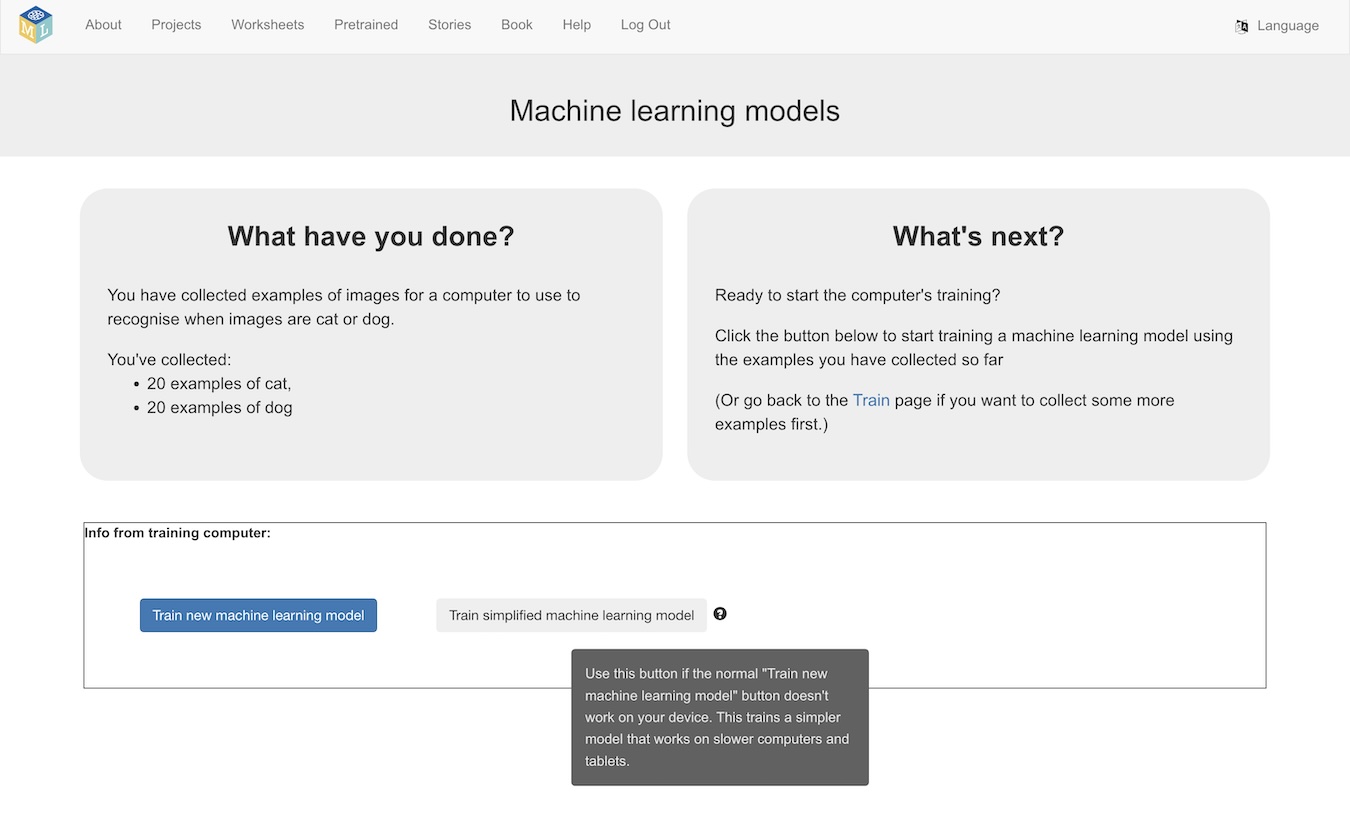
If you use the new Train simplified machine learning model button, you’ll get a reminder notification at the top of the page.
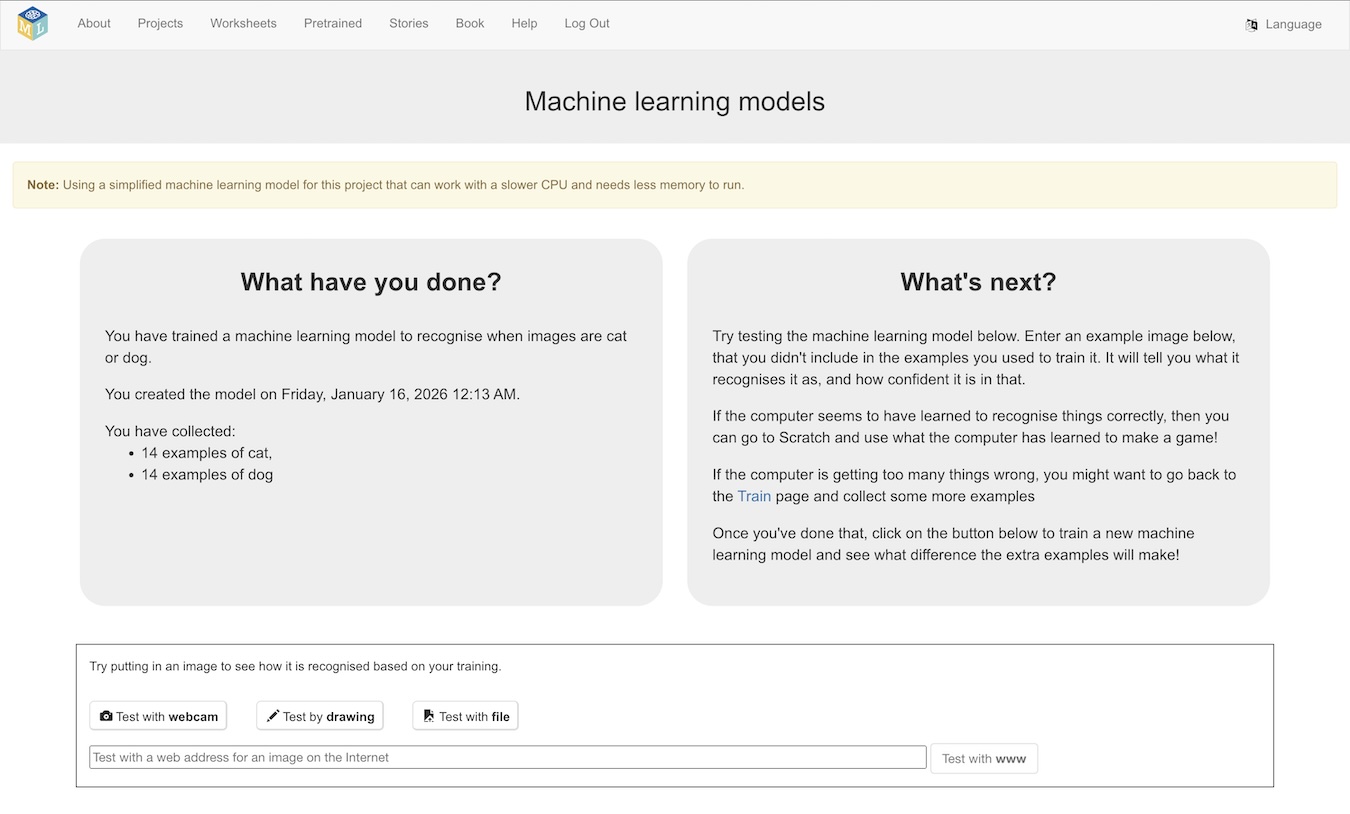
And that’s it… you’ll be using a simplified model approach, that will likely have lower accuracy – but it’s hopefully better than just seeing an error!
Memory vs Speed trade-offs
I’ve generally focused on speed for model training, because I’ve found that students are far more impatient than you’d expect. Training a machine learning model in a couple of minutes might not sound unreasonable, but in a classroom that delay feels like an eon. I’ve aimed for typical projects to train within seconds.
The way I’ve done this is to collect together all of the training examples, and then run them through the training. This means I can reuse the training tensors in all epochs, which is a big time saving.
But… it means you need enough memory to hold all of the training tensors in memory at once. This has caused problems – I saw an increased number of Sentry error reports from students on iPhones and iPads with increasingly ambitious training data sizes. With larger projects, these devices just ran out of memory before training completed.
I’ve started using a different training approach on mobile devices to try and mitigate this. A simplified example of the new approach, for image projects, looks like this:
function createTrainingDataset(traininginfo, getImageDataFn) {
    async function* dataGenerator() {
        for (let i = 0; i < traininginfo.length; i++) {
            const imageInfo = traininginfo[i];

            const imageData = await Promise.resolve(getImageDataFn(imageInfo));
            const xs = tf.tidy(() => baseModel.predict(imageData.data));
            imageData.data.dispose();

            const labelIdx = modelClasses.indexOf(imageData.metadata.label);
            const ys = tf.tidy(() =>
                tf.oneHot(tf.tensor1d([labelIdx]).toInt(), modelNumClasses)
            );


            yield { xs, ys };
        }
    }

    return tf.data.generator(dataGenerator).batch(BATCH_SIZE);
}

async function createTrainingData(traininginfo, getImageDataFn) {
    let xs;
    let ys;

    for (let i = 0; i < traininginfo.length; i++) {
        const imageInfo = traininginfo[i];

        const imageData = await Promise.resolve(getImageDataFn(imageInfo));
        const xval = tf.tidy(() => baseModel.predict(imageData.data));

        const labelIdx = modelClasses.indexOf(imageData.metadata.label);
        const yval = tf.tidy(() =>
            tf.oneHot(tf.tensor1d([labelIdx]).toInt(), modelNumClasses)
        );

        if (i === 0) {
            xs = xval;
            ys = yval;
        }
        else {
            const oldxs = xs;
            xs = oldxs.concat(xval, 0);

            const oldys = ys;
            ys = oldys.concat(yval, 0);
        }
    }

    return { xs, ys };
}


if (useStreamingDataset) {
    const dataset = createTrainingDataset(traininginfo, getImageDataFn);
    transferModel.fitDataset(dataset, trainingConfig);
}
else {
    createTrainingData(traininginfo, getImageDataFn)
        .then((data) => {
            transferModel.fit(data.xs, data.ys, trainingConfig);
        });
}
The idea here is to use a streaming approach during training: preparing a batch of training tensors at a time, as needed during the training process, and disposing them afterwards. This means that the device only needs to hold one batch of training examples in memory at a time, which reduces the memory footprint a lot.
The downside is that training takes much longer this way, because discarding the tensors once they’re used forces me to recreate the training examples for every epoch.
This was a tricky decision to make – as extending training times to a minute or two is not a great fit with classroom use. For now, I’ve limited this streaming approach to mobile devices only, and kept to my collect-all-the-training-examples-first approach everywhere else.
Where I’m doing this
I’m doing this for projects to:
- recognise images
- recognise sounds
I don’t need to do it for these project types, because I still train these in the cloud:
- recognise text
- recognise numbers
Projects to predict numbers (regression) are much lighter-weight. I’ve seen hardly any errors from these that suggest they’re due to resource constraints, so I’ve not made any changes to the model for them. Maybe I’ll revisit this, but it didn’t feel as urgent as image and sound classifiers where I was seeing many error reports.
For projects to generate text, I already had a different approach, which is to offer a variety of different sized models to choose from.
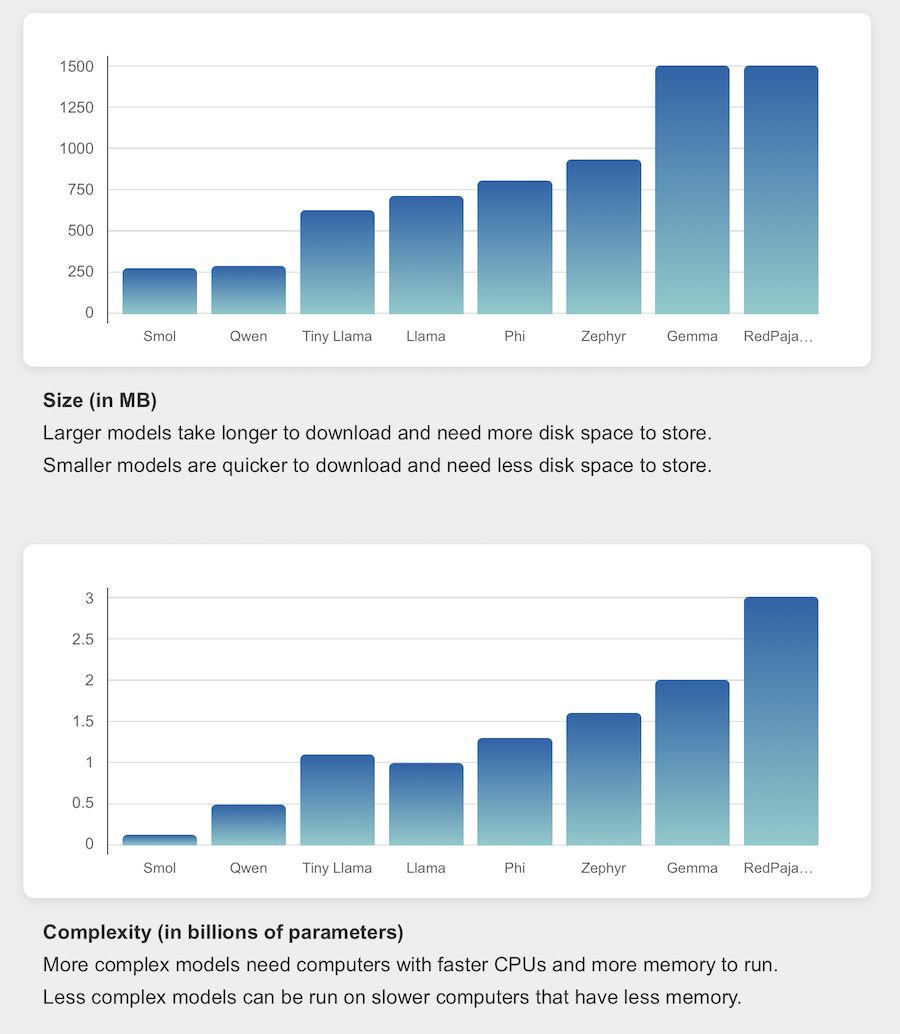
Now I’m watching the Sentry error reports to see whether all of this has helped at all!
Tags: mlforkids-tech