I didn’t really know what a voicebox was beyond knowing that Ned on South Park used one.
But it’s half-term week, so Grace and I tried to make our own out of straws, tape and a balloon. And it sort of worked!
Here’s how it worked…
I didn’t really know what a voicebox was beyond knowing that Ned on South Park used one.
But it’s half-term week, so Grace and I tried to make our own out of straws, tape and a balloon. And it sort of worked!
Here’s how it worked…
A few years ago, I wrote a post about how you can make a font based on a sample of your own handwriting.
I did it to help Grace, at the time aged three, to make a font of her writing as part of a present for Amy.
Graham suggested doing this every year, and as it turns out, that is what I ended up doing.
It’ll be a nice thing to have when she’s older – a record of what her writing used to be like. And it’s fascinating to see how her handwriting develops year-on-year.
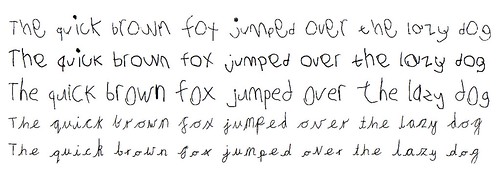
We’ve got a few of them now, so time to share how it looks so far.
 It’s been about a year since the computer system IBM Watson entered a TV quiz show against two of the best people to play the game, and won.
You knew that already, right? If not, skip reading this and go watch some of the footage instead. It’ll be more interesting.
But what has been done with Watson since?
Watson still makes the news even if not as much as during Jeopardy!. And with updates on twitter, facebook and YouTube there’s a lot of info out there about the project.
With all those updates, it’d be useful to bring some of it together into an overview of what sort of work has been taking place in the last year.

Or, “what happens when we’re in the park with a digital camera and some time to kill”. 🙂
Overview
Using Java Reflection to generate a list of REST endpoints defined in JAX-RS code

Background – JAX-RS
I’ve been working on a project that uses JAX-RS – the Java API for RESTful web services. If you don’t know JAX-RS, you write web services in Java using annotations to specify what REST endpoint a Java method implements.
For example, you can use @Path annotations on a class to define the root URI for methods in the class, and then use annotations like @GET, @Produces(MediaType.APPLICATION_JSON) and @Path on the individual class methods to define the endpoints that they implement.
The problem?
Reading from code to the web service is straightforward enough. By which I mean, if I’m looking at a Java method, it’s easy enough to look at it and know what endpoint it is implementing.
Going the other way can be a little trickier.
Once a project gets bigger, you can have REST endpoints spread around a large number of classes. And methods can inherit attributes from other classes than the one they’re in, through annotations like @Parent.
What if I’m using one of the project’s REST APIs, and want to look at the source for the method that’s handling it, whether to extend it or fix a bug? How can I remember which method in which class is responsible for the REST endpoint I’m using?
Using Reflection
Documentation is one way. As I develop the code, maintain a list of the mapping of Java methods to web services endpoints. And keep that up-to-date as I make any changes to the code.
But that’s very manual, and doesn’t seem very smart.
This got me thinking yesterday evening. I’d not used Java Reflection before, but thought it must be possible to work it out from the Java annotations in the same way that my JAX-RS provider must.
So I spent a bit of time trying it out and thought it might be useful to share what I came up with. It’s not terribly elegant or efficient. It’s the result of a few hours tinkering. But it shows the basic idea, and that seems useful enough to warrant sharing.
Imagine using the Internet as a blind person.
As an occasional web-developer, I had some awareness of the importance of accessibility for the web, but to be honest it was pretty superficial. You just add ALT tags to your images, make sure you can tab between all the controls on the page, and a screen-reader will sort out the rest, right?
I went to an event in London a couple of weeks ago, where the reality was brought home to me.
Screen-readers are not as intelligent or as helpful as I’d assumed. They just read out everything on the page.
Imagine a typical modern web app… for example, facebook. Start reading everything on the page, from the top left of the page, and carry on until you reach the bottom right. Imagine what that might be like.
The best analogy I can think of is to try and picture the worst possible automated phone menu experience. The sort of one where they read you a long list of almost-unintelligible options: “for blah-blah-blah, press 1, for blather-blather-blather, press 2, for something-or-other, press 3 …. for something-else-vague, press 9 …”
None of the options seem like an exact match for the task that you have in mind, and by the time you’ve got to the end, you can’t remember whether the option that sounded sort of vaguely similar was option 3 or option 4…
Imagine that for a web page. Apparently, a screen-reader can take three or four minutes to read out the contents of a typical web page today. Can you imagine an automated phone system that spent four minutes listing your options, then expected you to try and choose which one you wanted?
That’s the experience that many blind people face when trying to use modern web apps that we take for granted.
ALT tags are all well and good, but making a web page accessible isn’t the same as making it usable.
So… as geeks with a passion for technology and an interest in making the web useful to all, what can we do?
The I’ve-been-blogging-for-five-years-but-am-still-paranoid-about-work-related-posts-being-misrepresented disclaimer:
I do work for IBM as a developer on Watson but that role doesn’t extend to this blog. My responsibilities for Watson are limited to writing code… so any ramblings here are my personal views, and not necessarily representative of IBM’s positions, strategy or opinions.
The first time most people saw or heard of Watson was on “America’s favourite quiz show”, Jeopardy!
And that association seems to have stuck. For the moment, at least, Watson’s identity seems to bound up with Jeopardy’s. It’s “the computer system that won on Jeopardy!”
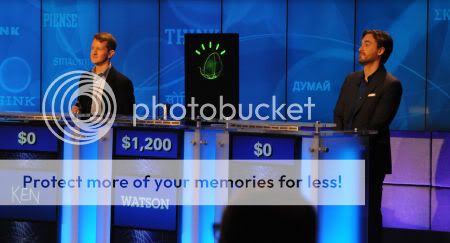
I’m not sure that’s entirely a good thing.
Jeopardy! was a great demonstration of Watson’s capabilities in a lot of ways. It showed the breakthroughs in interpreting natural language, the breakthroughs in coming up with evidence and rationale and identifying the level of confidence in it’s answer’s, and the power of machine learning systems.
But… it does make it easy to misunderstand the future potential of the technology.