Archive for the ‘code’ Category

Accessing authenticated Google App Engine services from a .NET CF client

Monday, August 24th, 2009

Google App Engine (GAE) gives you an easy way to build and host web applications for free.

For any address you specify in your GAE app, you can require users to be authenticated. For example, if you have this in your app.yaml:

- url: /authme
  script: myAuthenticatedService.py
  login: required

When a user goes to http://yourapp.appspot.com/authme in their browser, they get taken first to a google.com logon page and promtped for their google username and password.

Only if they authenticate correctly will Google pass them back to your page, and let them access your /authme page.

(This is kinda nice, because as a GAE app developer, you shouldn’t need to see the user’s password. Although, I guess most users won’t make a distinction between typing in their username and password into the google.com login page and into a login form on an appspot.com page.)

If you are writing browser-delivered apps, this is all fine and works as described. This is slightly trickier if you are writing a web service that you want to be accessed by a client app. I wanted to access a GAE web service from a mobile client – this is how I’m doing it.

(more…)

Stripping out MIME headers

Tuesday, August 18th, 2009

A couple of years ago, I wrote a small plugin for Outlook Mobile (the version of Outlook that you get on Windows Mobile phones) to help me triage my emails.

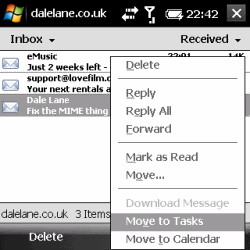
The idea was to make it quicker to process my email from my phone, by adding a couple of context menu items to emails that let you create a new To Do item in Outlook Tasks, or a new diary entry in Outlook Calendar.

So if someone sends you an email asking you to do something, with one tap you can create a new To Do list item, pre-filling it with information from the email.

And if someone sends you an email about an event or meeting you need to go to, with one tap you can create a new Calendar item, prefilling it with information from the email.

(more…)

Where did your electricity come from?

Monday, August 17th, 2009

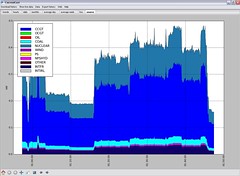
Where did my electricity come from?It’s been a while since I posted about CurrentCost stuff, so time to share another little idea.

Last night I made a start on adding a new graph type to my CurrentCost application.

Instead of only displaying how much electricity you’ve used, the new graph displays the split of how that electricity was generated.

Realtime figures for the “energy mix” of ratios of different generation methods used in the UK National Grid are available in an XML feed that updates every five minutes.

(more…)

Authenticating with an OAuth 1.0a provider from .NET CF

Friday, August 14th, 2009

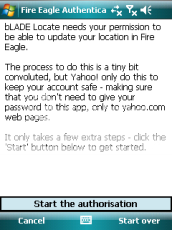
Last night, I shared my first stab at a mobile Fire Eagle client: a Windows Mobile application which posts location updates to the Yahoo! Fire Eagle service.

A couple of the bits of code were fiddly, and are worth sharing.

In this post, I’ll outline how I perform the code behind the OAuth authentication I described in my last post. Hopefully, this might help anyone else wanting to do something similar.


(more…)

A Fire Eagle updater for Windows Mobile

Thursday, August 13th, 2009

I wrote a Fire Eagle web service at Open Hack London a few months ago – that gave a nice, mobile-friendly way to share your current location, as stored in Fire Eagle.

Last week, I finally got round to updating my Fire Eagle Guest Pass web service to use the newer OAuth 1.0a.

This got me thinking that I haven’t used it very much since writing it in May… because while it let me share where Fire Eagle thinks I am, I didn’t have an easy mobile-friendly way to tell Fire Eagle where I am in the first place! 🙂

So while I had “how to do OAuth” fresh in my mind, I thought I’d start writing a quick mobile Fire Eagle client.

I wrote it in C# for Windows Mobile. There are a few interesting points in the code that deserve their own blog posts, but first I wanted to quickly show what I’ve got working so far.

(more…)

What programme was on Channel 4…?

Tuesday, July 28th, 2009

I posted yesterday about my quick play with the BBC Web API for programme schedules. I wanted to be able to programmatically find out what programme was on a particular channel at a given time.

The problem with the quick code I came up with was that it only gets me BBC channels. What if I want to know what was on a non-BBC channel?

Andrew pointed me at the Radio Times website, which makes programme schedule data available in XMLTV format.

And Dom pointed me at a neat Python library for parsing XMLTV data.

(more…)

What programme was on BBC1 at…?

Monday, July 27th, 2009

After my absence, I thought I’d come back with something quick and fun – the result of half an hour’s playing with a new (to me) API.

The problem that I wanted to look into was: What programme was on TV on a given channel at a given time?

And how can I find this out programmatically?

The first thing that I came across was the getProgrammes service in the beta BBC Web API.

As I expect from the forward-thinking BBC, it’s pretty awesome: a simple API that gives you an XML document containing the programmes schedule for the specified time window.

The documentation on the BBC site is pretty self-explanatory. It gives all the information you need to start playing with the API – either using the form on the BBC page, or by sending it a few requests using wget.

(more…)

Improvements to TwitToday

Wednesday, June 10th, 2009

I’ve been doing too much Java at work recently, so in the interest of keeping my hand in with some low-level C++, I picked up the code for my mobile twitter client, TwitToday, again.

I originally wrote it at a hackday, but I’ve since come back to tweak it a couple of times to get it to spawn background worker threads, add SIP on-screen keyboard support, and improve support for sending special and accented characters.

After another evening of tweaking, I’ve added a few new minor features:

Transparent text box

When not in use, the text box is now transparent. When it has focus, it is coloured in white as usual.

A few people commented that a bright white text box could dominate a dark Today screen too much, so this is hopefully a nice aesthetic improvement.

I did this by creating a custom windows procedure for the text box.

The windows procedure needed to handle a couple of events:

Handling WM_PAINT by using SetBkMode to make the text box TRANSPARENT

Handling WM_ERASEBKGND by using TODAYM_DRAWWATERMARK to draw the background over the text control’s rectangle.

(more…)