Something I was working on before Christmas: a web app for recording what you spend your time working on, using a painting metaphor – with your projects as a palette of different paint colours.
The video is quite high resolution, so it’s best viewed in full-screen in the highest resolution supported.
How to receive push notifications using MQTT in an Android mobile application
Background
I’ve written before about MQTT as a technology for doing push notifications to mobile. When I wrote that, I gave an example Android project. However, it was the first time I’d ever done Android development, and while it was an okay Java MQTT sample, it was a poor Android sample – I didn’t know anything about how Android works as a platform.
I’ve since written other Android MQTT apps, such as a hackday app for pushing updates from websites to your phone and learnt a lot about how to do it properly. Well… if not properly, at least a little better.
But Google is still directing people to my old, and probably unhelpful, sample. So it’s about time that I share something more useful.
I’ve put the full source for a sample implementation below. (Note that I’m using the Java J2EE client library from ibm.com). Hopefully the comments in it are clear enough, but here are a few of the key points.
Considering that it was a random idea that was hacked together in a few minutes, I’ve used it a lot since then: it’s made watching a bunch of programmes much more entertaining – Eurovision is probably the best example (the commentary on twitter is hysterical), but there are many others.
But I never made any changes to the script since I first wrote it. If I’m watching something on TV that I know has a hashtag, I ssh to my set-top box and run my hashtags script, giving it the hashtag to filter on in the command.
I was thinking – it’d be much better if it was all automatic. It’d be better if my set-top box automatically showed tweets with the hashtag for whatever programme I’m watching.
To do this, I needed some way of knowing what was the right hashtag for the programme currently on a given TV channel. I could’ve hacked this into my existing script, but I thought it might be a feature that people might find other uses for, so instead I’ve made a stand-alone thing, available as a web-service.
What it does
I’ve made a web feed that returns a blob of either JSON or XML. You can get either:
the commonly-used hashtag for the programme currently on a specified channel (e.g. “what is the hashtag for the programme that’s on BBC 1 now?”)
the next programme on TV that has a commonly-used hashtag (e.g. “what are the next five programmes on TV that have hashtags?”)
It also works by taking a photo of the front of a DVD case, as the DVD covers are essentially mini-posters. But a few people pointed out that using image recognition for the front of a DVD case is overkill, when DVD cases have a machine-readable barcode printed on them.
So I spent an evening adding the ability to scan barcodes to the app – and now you can add to your LOVEFiLM list either by photos of posters or barcodes.
I thought I’d quickly share how I did it, in case it’s useful to anyone else.
This is a video that my (at the time) five year old, Grace, made last summer.
It was in the school holidays when I was looking for things that would keep her occupied for a couple of days – and I suggested that she might want to do some filming. She decided to make a documentary about the town where we live.
I would have posted this at the time, but it all got a little out of hand and ended up over twenty minutes long – which made it too long for me to upload to YouTube. But today, my YouTube account got approved for posting longer videos, so I thought that (even if five or six months late!) it’d still be worth sharing.
Grace was, unsurprisingly, in charge of everything – acting as presenter, director, narrator, location scout, and all-around bossy boots. My job was to point the camera where I was told in the bits where she wanted to talk. 🙂
It was all filmed using a normal digital stills camera that happens to let you record video clips. So the quality isn’t great (the microphone in particular doesn’t handle the wind well!).
Our six year old daughter, Grace, has lost interest in kids TV recently – she’s discovered the joys of YouTube!
She can happily spend a half-hour sat in front of the TV on Firefox (our TV set-up is a Linux-based media centre, so it’s proper Firefox with a keyboard and mouse) clicking from video to video.
I’m fine with this. It’s good: she’s getting more familiar with how to use a web browser, getting used to starting the browser, typing “youtube” into the address bar, using the search box to search for what she wants, using the ‘Back’ button to go back to the search results if it’s not what she wanted, and so on. This is all good stuff, let alone the fact that there is a lot of content on YouTube that is actually ideal for kids.
But…
Well, she’s six. Not every video on YouTube is suitable for her. I’m not just talking about the stuff for over-18s. I don’t even want her to come across stuff with, for example, more swearing and violence – such as stuff that you might be happy to show a 12 year old.
The real solution to this is what we do now – she’s doing this in the sitting room on the TV, while we’re in the room watching stuff with her. I’m not saying I want to give her a laptop, send her up to her room, and say “here’s YouTube – off you go, have fun!”.
The app does some stuff in the background then when it’s finished, it sticks a notification in the top status bar. In my code, I just use the default notification settings – LED flash, vibrate, etc. And on every Android I’ve tested it on, it’s been fine.
But for one user, it caused the app to crash:
Exception class java.lang.SecurityException

Source method Parcel.readException()

java.lang.RuntimeException: An error occured while executing doInBackground()
at android.os.AsyncTask$3.done(AsyncTask.java:200)
at java.util.concurrent.FutureTask$Sync.innerSetException(FutureTask.java:273)
at java.util.concurrent.FutureTask.setException(FutureTask.java:124)
at java.util.concurrent.FutureTask$Sync.innerRun(FutureTask.java:307)
at java.util.concurrent.FutureTask.run(FutureTask.java:137)
at java.util.concurrent.ThreadPoolExecutor.runWorker(ThreadPoolExecutor.java:1068)
at java.util.concurrent.ThreadPoolExecutor$Worker.run(ThreadPoolExecutor.java:561)
at java.lang.Thread.run(Thread.java:1102)
Caused by: java.lang.SecurityException: Requires VIBRATE permission
at android.os.Parcel.readException(Parcel.java:1247)
at android.os.Parcel.readException(Parcel.java:1235)
at android.app.INotificationManager$Stub$Proxy.enqueueNotificationWithTag(INotificationManager.java:368)
at android.app.NotificationManager.notify(NotificationManager.java:110)
at android.app.NotificationManager.notify(NotificationManager.java:90)
at com.dalelane.lovefilm.data.ImageProcessService.publishUpdateNotification(ImageProcessService.java:281)
at com.dalelane.lovefilm.data.ImageProcessService.access$0(ImageProcessService.java:234)
at com.dalelane.lovefilm.data.ImageProcessService$ImageProcesser.doInBackground(ImageProcessService.java:215)
at com.dalelane.lovefilm.data.ImageProcessService$ImageProcesser.doInBackground(ImageProcessService.java:1)
at android.os.AsyncTask$2.call(AsyncTask.java:185)
at java.util.concurrent.FutureTask$Sync.innerRun(FutureTask.java:305)
... 4 more
A simple Android utility app for a simple idea – adding DVDs to my LOVEFiLM queue while I’m out and about by taking photos of what I want to add.
(If you’ve not heard of LOVEFiLM before, they are an online DVD rental service: you use their website to set up a queue of DVDs you want to watch, they post you some, you watch them and post them back, and they send you some more.)
I love the service, but I never remember to add anything new to my queue. I’ve got a long queue of stuff to watch, but it’s all pretty old – months go by in between me remembering to visit the site.
And most of the time I think “oh, I’d love to watch that” I’m out and about. It could be walking past the Blockbuster Video store, or cinema in town and seeing a movie poster in the window. Or it could be seeing a DVD case in a shop or at a mates house. I think “I should add that to my LOVEFiLM queue when I get home”. And then promptly forget.
So last week, I started writing a quick Android app to help.
The idea is that whenever I see a movie poster or DVD cover now, I can snap a quick photo of it with my smartphone, then put the phone back in my pocket. Quick, one button press, no typing.
Then in the background, the app will try and work out what DVD I’ve taken a picture of, and then add it to my LOVEFiLM list.
It’s not always super-quick – it can take a minute or two – but, realistically that’s fine. It’s unlikely to make any difference to when LOVEFiLM will send me the DVD if it gets added to my queue now, in ten minutes, or even in a few hours time.
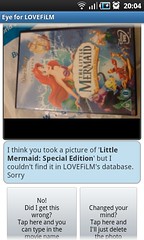
Worst case scenario, if the app can’t figure out what the picture is, it can prompt me to let me know that it needs some help. The notification will sit in my phone’s status bar until I have some spare time to look at the photo, and manually type in the name of the DVD – which the app will then go and add to my queue.
This is still helpful though – I can trust that the app will somehow add the film to my queue, even if this means prompting me if it needs extra information.
It means I don’t forget to add it, because the app reminds me. And I don’t have to stand around typing in a name while I’m rushing around in town – if I need to do any typing at all, I can do it later when I have some spare time.