Archive for the ‘tech’ Category

Browser syncing – mobile to desktop

Saturday, April 5th, 2008

Completing the loop for my browser sync hack for Over The Air – this time, syncing back the browser history from your mobile browser when you get back to your desktop computer.

When you connect your mobile to your computer, the URL history of Pocket Internet Explorer is queried and the most recent item is opened on the desktop using your default web browser.

This was a little tricky to implement and needed me to cobble a few bits and pieces together:

  • A C# service running on the desktop that uses RAPIManager to trap and handle device connection events
    On connection, the service uses RAPI to invoke a process on the mobile…
  • The process on the mobile is something that I wrote in C++ to query the PIE cache – using the FindFirstUrlCacheEntry / FindNextUrlCacheEntry API. The URL retrieved is written to a file on the mobile.
  • The C# service on the desktop transfers the file containing the URL from the mobile, and uses Process.Start to launch it in the desktop’s default web browser

It’s a little icky… but it seems to work!
Browser syncing – desktop to mobile

Saturday, April 5th, 2008

Third of the random ideas for Over The Air hacks – a browser sync for Windows Mobile.

The aim was to let you transfer your browser history from desktop to a Windows Mobile PDA, so when you leave your desk, you can pick up where you left off in whatever you were doing online.

I’ve written the hack as a Firefox extension, and it currently has two modes:

  • Always on
    Every web page you view in Firefox gets opened on the mobile browser in the background without you noticing. When you disconnect your mobile from the computer, you not only have the most recent page all ready for you in your mobile browser, but you also have a mirror of the Firefox history – so clicking ‘Back’ on your mobile browser will take you back to the previous page you were viewing with desktop Firefox.
  • Single sync
    Take the current page you are viewing in Firefox, and open it on your mobile browser

The toggle to start/stop the ‘always on’ mode, and the switch to perform a single sync are both provided as toolbar buttons.

Install the Firefox extension here

(more…)

Data Capture widget for Windows Mobile

Friday, April 4th, 2008

Second of the random ideas for Over The Air hacks – a Data Capture widget for Windows Mobile.

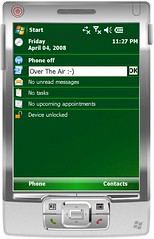
Data Capture widget for Windows MobileScribble a note or capture an idea without waiting for a second or two for an app to be launched!

Enter some text in the box, then tap OK. The text will be appended to a file or Note (of your choice – specify the path it should write to in ‘Options’).

If you tap on the icon, the notes app (of your choice – again, specifying the path to it in ‘Options’) will be launched to the page the widget writes to.

Create an “incoming” or “to be sorted” note or page, and add to it throughout the day. When you’re ready, launch the notes app and go through and process what you’ve collected.

Very GTD. 🙂

It’s a lightweight C++ app, reusing a lot of the code from the Twitter client I posted about earlier.

Download a copy here
To specify paths, go to the Options dialog for “bLADE Wiki Today” from the Today screen control panel applet.

Over The Air – ideastorming

Friday, April 4th, 2008

It’s ridiculously early. And I’m awake. And on a train.

Unusually, I don’t mind too much, because I’m heading to ‘Over The Air‘ – a mobile development event in London. Yay 🙂

Looking at the schedule, there are lots of interesting talks that I want to go to. Too many… in several places there are two or three talks I want to go to at the same time. 🙁

Also on the agenda is a development competition. It’ll probably work out to somewhere between 8 and 12 hours to hack something together (depending on how many talks I go to and how much sleep I want to get!)

Between paternity leave and the joys of coming back to work after a five week break, I’ve not had time to think about what I might create.

So I’m using the train journey to come up with a few ideas – and this is as good a place as any to ideastorm.

Here we go… Bear in mind that it’s early and I’ve not had any coffee yet!

(more…)

Making an offline copy of a wiki

Saturday, February 9th, 2008

We use a Confluence wiki for one of the projects that I work on. Wikis can be a fantastic tool for collaboration, and this wiki is a single place where we can share information and our progress.

But we’ve been having problems with the reliability of the wiki – it is unavailable at times, and can be painfully slow at others. Key information that I need is in that wiki, and when the wiki goes down it can be difficult and frustrating.

Yesterday, I had a play with wget to try and download an offline copy of the wiki to use as a backup for when it isn’t working or is going painfully slow.

I’ve put the steps I took here, in case they will be useful for others.

(more…)

Thinking out loud: PowerShell support for DB2?

Thursday, January 31st, 2008

My PowerShell library for WebSphere MQ has been out for a month or so now, and it seems to have been well-received. I’ve seen a surprising amount of blog posts and news articles about it, the download stats for the SupportPac are very encouraging, and I’m getting a steady (if slowly growing) stream of emails with requests for help and new features.

There is still more to finish with the WMQ library – the biggest piece of outstanding work is adding support for z/OS queue managers, but there are a few other bits and pieces to do as well.

But even so – with my usual attention span of an easily distracted child, I’m starting to look at what I might try next.

I’m thinking a PowerShell extension for DB2 might be a good next step.

Why?

  • Like WebSphere MQ, the prospect of writing it is made much easier by the fact that there is already a .NET API and support for building C# applications for DB2
  • Database administration seems to lend itself quite well to PowerShell’s object-oriented nature. Using Select, Where, et al. still reminds me of SQL pretty much every time I type it
  • I know very little about DB2, and it’d be a chance to learn something new

Okay, so my third reason sounds a little weak, but on a personal level, it’s a consideration.

But would there be a demand for supporting DB2 administration using PowerShell? I don’t know… I’ve not heard anyone ask for it, and other than a post on a developerWorks forum, I haven’t been able to find much of a call for it.

Still, it’s an interesting idea.

Feeling sorry for the Kindle (or “eReader rocks”)

Thursday, January 3rd, 2008

Using the HTC Advantage as an eBook readerBefore Christmas, Amazon brought out a new device – an eBook reader called the Kindle. And, it seemed like the blogosphere pretty much lined up to take turns bashing it.

A shame, really. Because I was quite excited by the whole thing.

I’ve been a fan of eBooks for years now, but they’ve never seemed to have very wide appeal. And with a company as big and mainstream as Amazon pushing them now, I thought this might be time that someone took the case for eBooks to the masses.

Doesn’t seem to be working too well, so far.

Other than what I’ve read in reviews, I don’t know the actual device itself. But some of the features look similar to what I use already, and I’m surprised more positive stuff isn’t being said about them.

So I thought I’d use my first attempt at a video(-ish) blog post to make the case for eBooks, looking at one of my favourites of the Kindle’s features as I use them on my e-book reader.

(more…)

Mobile computing… using USB keys

Wednesday, December 19th, 2007

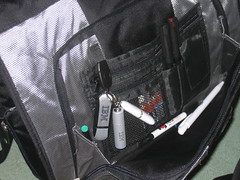
071219-bagIt’s probably not a big shock to those who know me if I say that I have an interest in mobile computing.

But since getting a 1 GB USB key as a Thanks! Award last week, I’ve been playing with some alternative approaches to mobile computing that’s a bit different to my usual PDA, smartphone or laptop.

I’ve been setting up my USB keys for use when I want to do some work that isn’t best suited to a Treo, HTC Advantage or EEE PC. There’s nothing very new here, but I thought it might be interesting to share.

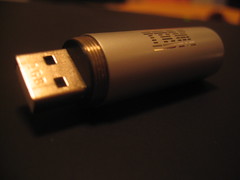
071219-usbkeyUbuntu on a USB stick

I’ve put Ubuntu (“Gutsy Gibbon”) on the 1 GB USB stick. It means I have a bootable drive with a full Linux installation that I can use on pretty much any computer. I’ve set up the preferences the way I like to work, and installed the apps I normally like to use for coding, Internet, and office work. Other than the (admittedly important) need for a processor, memory, keyboard, monitor and so on… it’s a full computer you can put in your pocket.

(more…)