Addressing concerns over location sharing

May 12th, 2009

I wrote a quick post on Sunday morning about the mobile location sharing hack I wrote at Open Hack London. My post tried to explain the tech behind it, but I wanted to follow it up with a post to explain my thinking around the social innovation in the idea.

Sharing your location with your friends. People have been talking about this for ages, but recently it’s started to hit the mainstream.

More and more mobile phones are coming with GPS. For the ones that don’t, systems like Skyhook and Google Maps for Mobile are getting smarter at using GSM Cell IDs and WiFi access point addresses to work out where you are.
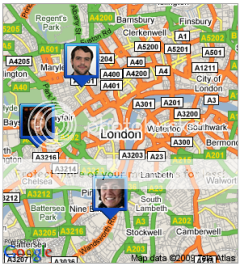
The reaction to this stuff finally arriving for the masses hasn’t all been positive, though. The response to the UK launch of Google Latitude – Google’s mobile application for sharing your location with friends from your Google contact list – is a good example.

A threat to privacy?

Privacy International said that “…Google has created an unnecessary danger to the privacy and security of users…”. They argued that it was too easy for Latitude to be “…enabled by a second party without a userÒ€ℒs knowledge or consent…” and that once enabled it could remain undetected for a long time, with massive potential for abuse.
Liberal Democrat MPs Tom Brake and my local MP Chris Huhne submitted an Early Day Motion to Parliament arguing that Latitude “…could substantially endanger user privacy…” and that “…Google has created an unnecessary danger to user privacy…”.

Tom Brake followed this up with the now widely reported quote that “Google Latitude poses an insidious threat to our hard-won liberties“.

I personally think this was unnecessarily alarmist, but at any rate, it is clear that the model of granting ongoing access to your location (until / unless you revoke it) worries some people.
Read the rest of this entry »

Why I’m giving up on brightkite (for now)

May 11th, 2009

A common simple approach to identifying a user’s location is to give them a text box, and ask them to type in where they are.

It’s not that easy, as I was reminded last night.

I’ve been using brightkite for some time now – a web service for sharing your location.

The mobile site m.brightkite.com lets you update your location from your phone.

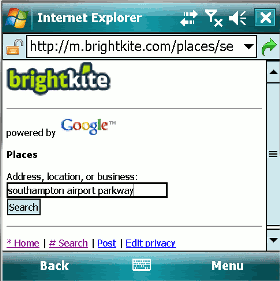
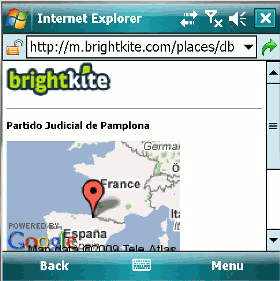
I tried updating my location last night from Southampton Airport Parkway train station while waiting for my train home from Open Hack London.

I typed “Southampton Airport Parkway”.

When brightkite isn’t sure where you mean, it offers a list to choose from.

If it thinks it knows where you mean, it shows that one alone.

Brightkite decided that I meant…

Partido Judicial de Pamplona.

In Spain.

Erm… not quite.

Read the rest of this entry »

Fire Eagle Guest Pass

May 10th, 2009

Imagine you are in a town or city. Perhaps one which you are unfamiliar with.

You’ve arranged to meet someone, and want to help them find you.

They’re not a close friend or family member, so you don’t want to sign up with something like Google Latitude which feels like quite a long-term thing for people who want to always be able to see where you are.

You don’t want to have to ask them to sign up for some new service like Fire Eagle just to find you.

Maybe they’re a client coming to meet you for a meeting. You want to help them find you, but you’re not sure that you want them to be able to see where you go after the meeting, or what pub you go to that evening.

This is the sort of thing that “Fire Eagle Guest Pass” – my hack entry for Open Hack London 2009 – was written for.

I’ve put together a few pictures to explain what it does on slideshare. They’re not exactly fine art, but hopefully they explain the idea πŸ™‚

Read the rest of this entry »

Pretty CurrentCost graphing from Pachube

April 28th, 2009

Last Saturday was the second HomeCamp. This week has been very busy at work, so I’ve not had the chance to pull together a proper post about it yet, but in the meantime I thought I’d share a little Pachube tip that Usman demonstrated at the event.

I’ve been putting the live readings from my CurrentCost meter into Pachube as an input feed for several months now, but not really had much use for it, other than as an easy way to check my CurrentCost data from my mobile.

Usman showed us an app that lets you get a neat Google chart visualisation of a Pachube feed in just a few clicks:

It’s very simple – go to apps.pachube.com/google_viz, give it the ID of your pachube feed, and it generates the short snippet of code necessary to create the Google chart.

It takes no time at all, and really shows the power of being able to easily pipe together different stuff through pachube.

Working with young people – opportunities worth looking at

April 8th, 2009

I am a volunteer mentor with On The Level: a Rethink project providing mentoring to young people leaving care, to ease their transition from being “looked after” to living independently.

The nature of the role means it’s something that I rarely blog or tweet about. However, we have monthly training sessions that sometimes cover interesting topics that can be shared, such as how youth mental health services work and drugs awareness training.

Tonight, one of the things that came up was an overview of some of the other youth mentoring projects in the area. I’d heard good things about them before, and it was interesting to hear more about them.
I thought it was worth sharing an overview of two projects in particular that sounds like they are worth looking at. If you live in the Southampton / Winchester area, maybe one of these would be a fun way for you to help make a difference in a young person’s life?

Read the rest of this entry »

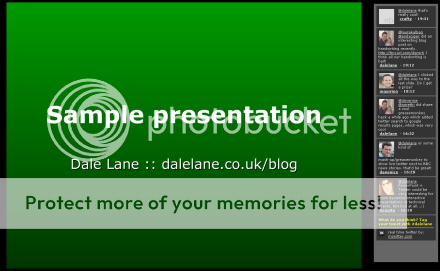
Presenting with the Twitter backchannel

April 3rd, 2009

I went to Bath for openMIC this week (part conference, part barcamp – a brilliant and informative day on innovation in mobile).

The first half was made up of traditional conference-style presentations, and during one of these presentations, I noticed tweets with the #openMIC hashtag become particularly active: feedback that the presenter was missing.

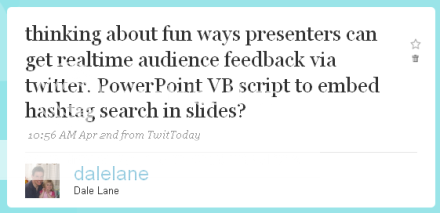
I wondered about ways that the presenter could have got that feedback before finishing his talk…

thinking about fun ways presenters can get realtime audience feedback via twitter. PowerPoint VB script to embed hashtag search in slides?

This isn’t a new idea: I’ve heard of large US tech conferences where the backchannel is displayed on a second screen or projector next to the presenter’s slides. But I rarely get the chance to present where there is the facility for projecting to two screens at once.

So I got thinking about how a compromise could work: embedding a live twitter search somewhere within a presentation.

I had a bit of free time this afternoon to play with the idea a little more. As is sadly often my way, my first few ideas were needlessly overcomplicated: using macros, VBScript or something like that to try and get data from the web and embed it within my slides.

Fiddly. And prone to a number of fundamental issues, such as trying to avoid reloading the twitter search every time you change slide.

But then I had a flash of what, for want of a better word, I shall call ‘genius’. πŸ˜‰

Instead of fighting to embed a website within a presentation, what about embedding a presentation within a webpage?

A little bit of playing around with code, and I managed to pull a quick proof-of-concept together.

Read the rest of this entry »

ScriptFu – scripting with Gimp

April 1st, 2009

I wrote on Sunday about my first attempt to use Gimp to script some image manipulation stuff I wanted to do – specifically, combining multiple images into a single, multi-layered image.

A few people have asked me for more info about how to do this, so I thought I’d share my script here. Gimp is an open-source image editor, but it also comes with a batch mode where you can run it’s functions from a script. The scripting language for Gimp is called ScriptFu, and is a Lisp-type language. I’ve not done anything in Lisp since learning Scheme at University… so it felt a little odd at first.

This was my first attempt at writing in ScriptFu, so it’s worth pointing that I’m not an expert, and what I’ve written might not be elegant or the “right” way to do it. But I did manage to get something working in a few hours of playing with it.

To start with, a few tips from how I got started:

The doc – The documentation on scripting at docs.gimp.org is fantastic, and got me off to a quick start. It includes enough snippets and samples that I could see the sort of thing I’d need to do.

Gimp’s PDB – If you launch Gimp, go to Help -> Procedure Browser. It starts up a very neat searchable API doc for all of the Gimp functions. Even when I didn’t know the name of functions I needed, typing a quick guess (e.g. “layer”) into here would show me a few sensibly-named options, and show me the full API info for them all.

Photobucket

Read the rest of this entry »

Creating multi-layered screenshots (a BarCamp London hack)

March 29th, 2009

I’m on a slow (gah, engineering works!) train back from an awesome BarCampLondon. I’ve got a ton of notes from so many fascinating talks and sessions, but not quite sure how to share them… they would make for the world’s longest blog post!

But as I have a little time to kill, I thought I’d quickly share a little hack that I pulled together overnight. An old idea, but a fun one – and it’s amazing what beer and interesting people will do for your creativity. πŸ™‚

The hack is a little Windows utility to capture more useful screenshots.

By way of background, when you press the “Print Screen” button, it copies an image of your desktop to the clipboard. Very useful. But it has limitations.

What if a window you want to see in the screenshot image is obscured by another window? Or minimised entirely? That information is lost.

Not with my hack! πŸ™‚

My tool captures “interactive” multi-layered screenshots – a picture of each window is captured separately on it’s own layer. This creates a screenshot that (even after you’ve taken the screenshot) will let you move windows around, hide/restore windows, and change the z-order of windows.

It creates a sort of simulation-like snapshot of what your desktop was like at the time.

Read the rest of this entry »