Our Mashed 08 hack: CurrentCost Live

June 23rd, 2008

Yesterday was the end of Mashed 08 – the annual London hackday from BBC Backstage.

I saw last week that there was going to be a “social responsibility” category in the hack challenge, and decided that a CurrentCost hack was in order!

Together with Rich, we spent a day trying to hack together a competitive challenge based around CurrentCost, encouraging people to reduce their home electricity usage by making it into a game they can play with their friends.

Here are a few notes based on the presentation I gave at the end.

Read the rest of this entry »

Haven’t we aged well?

June 23rd, 2008

I’ll write a proper post about Mashed08 once I’ve caught up with work, but in the meantime I wanted to quickly share a couple of pics.

Sylvester McCoy was on stage as compere for the presentation of our hacks, and each of us who presented got to meet him briefly for a pic. This was actually the second time I’ve met him – fourteen years ago, I got to meet him with a couple of others from my school when we won an award for an environmental project at school.

There’s a nice symmetry there… meeting him aged 14 to collect a prize for a environmental project, then aged 28 to collect a prize for a project to help people reduce home electricity usage. Wonder what will happen when I’m 42? 🙂

Before (December 1994)
meeting Doctor Who

After (June 2008)
meeting Doctor Who again!

Tweaking the CurrentCost app

June 16th, 2008

tweaking the CurrentCost GUI

I spent a bit of tonight tweaking last night’s CurrentCost app.

Not a lot to say about it, as it’s more or less the same as it was last night…

Read the rest of this entry »

CurrentCost – getting the history into Windows

June 15th, 2008

The CurrentCost meter has been ignored of late as I’ve been a bit busy with other things. Tonight, I started playing with it again.

The plan
The more geeky amongst us have connected the CurrentCost to a server of some sort. By connecting it to something that’s always on, we can collect a history one reading at a time. But what about people without a server? How can they collect history?

As Rich highlighted in his post on the CurrentCost XML output, the CurrentCost meter maintains some running totals in flash memory, and these are included with updates for every reading from the device.

It maintains:

  • totals for each two-hour block for the last day
  • totals for each day for the last 31 days
  • totals for each month for the last 12 months
  • totals for each year for the last 4 years

This means that if you store and aggregate these history totals, you can connect the meter to a computer periodically and still get reasonable CurrentCost readings history.

  • connect at least once every 26 hours to maintain the two-hourly history
  • connect at least once every 31 days to maintain the daily history
  • connect at least once a year to maintain the monthly history
  • connect at least once every four years to maintain the yearly history

Okay, so the two-hourly history might be a bit much, but the others all seem reasonable, even for non-geeks!

So, the plan is to write a simple Windows application that a user could periodically link to a laptop or computer that will collect CurrentCost readings and aggregate them into history data. And ideally then display them in a pretty way

(Not my plan, incidentally, but rather one that I nicked from Andy. Still, if you’re gonna nick ideas, there are worse places to start… 🙂 )

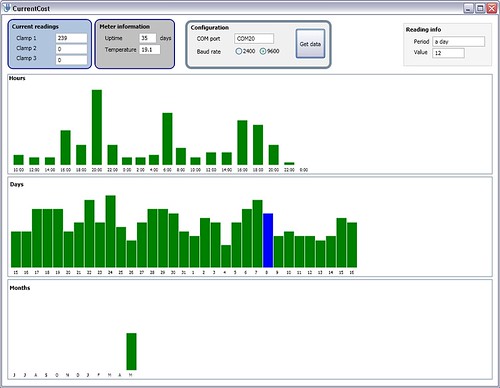
This is what I’ve got so far…

the start of a CurrentCost GUI

Read the rest of this entry »

Apps I install on my phones

June 8th, 2008

I noticed a thread running on Jason Langridge’s blog about “What are the first 10 applications you install on your phone?“, and thought I’d join in.

As always, conciseness is not my strong point – instead of trying to figure out which would be the first ten apps I’d install, I’ve ended up listing all the Windows Mobile apps I use regularly. (Ah well, if nothing else, it’ll be useful to have all the links in one place the next time I have to hard-reset one of my devices!)

I’ve tried to sort the list roughly in order of how much I use the apps.

Read the rest of this entry »

A change is as good as a holiday

June 8th, 2008

I started a new project at work this week. I can’t say too much about it publicly, but wanted to write a quick post mainly because I’m quite excited, and also to mention why I’m not gonna have time to play with many other things for the next month or so!

I’ve been seconded to one of our Services teams, so it’s a short break from my normal life of product development. It’s a secondment for a specific project – developing a messaging library for a customer that will run on their own real-time embedded operating system.

I spent most of this week trying to finish or handover my WPS work, so I’ve hardly started on the new project. But it’s already fascinating. Working in C on a customer’s proprietary platform with some extreme resource constraints (in both memory and operating system functions!) is a fun holiday from my life in development of an application written mostly in Java that runs on mainframes. And it’s definitely closer to the sort of work I want to do in my career, so the opportunity to do this as my day job for a couple of months is awesome.

Celio Redfly

June 4th, 2008

Today is a good day – a new gadget arrived today. 🙂

It’s a Celio Redfly.

Why?
I’m gonna try and make the case for the Redfly. This could be a futile effort – to be honest, they’re after a fairly narrow niche of the market, and if this is your sort of thing, you probably already know what it is. But here goes!

IBM Thinkpad - from plakboek's photos on FlickrIf you want to work (keep in touch, access the Internet, refer to notes and documents, etc.), you can get a computer.

Brill.

IBM Thinkpad - from plakboek's photos on Flickr Treo 650What if you also want to work when you’re not at your computer?

Get a computer and a smartphone/PDA to carry with you when you’re out and about.

Sync the two so you can access the same information whichever one you’re using.

IBM Thinkpad - from plakboek's photos on Flickr HTC AdvantageWhat if you want to work when you’re not at your computer, but the teeny tiny screen on a smartphone/PDA isn’t big enough?

Get a really big-ass smartphone / PDA with a huge screen and sync that with your computer instead!

IBM Thinkpad - from plakboek's photos on Flickr Treo 650 Asus EEE PC at StarbucksWhat if you want to work when you’re not at your computer, but don’t want to try and make calls on a phone roughly the size and weight of your first car?

Get a computer, a regular smartphone for quick tasks like looking stuff up on the go, and a mini-laptop/UMPC like an EEE PC for when you want to do more involved work that needs a bigger screen.

IBM Thinkpad - from plakboek's photos on Flickr Treo 650 Celio RedflyThe problem with that is that syncing two devices is bad enough. Keeping three in sync is just a major headache.

Sure there are some workarounds, like working off USB memory sticks or keeping everything online, but these aren’t ideal.

Enter the Redfly from Celio.

Celio Redfly and an EEE PCIt looks like a laptop, and is virtually the same size as the EEE PC.

But it’s a dumb terminal without it’s own processor or storage – it pairs with a smartphone (by USB or Bluetooth) and runs from there. It’s basically the same as plugging a monitor and keyboard into your laptop – you’re still using your laptop, just with more comfortable peripherals.

With the Redfly, you’re still using your smartphone, just from the keyboard and display of the Redfly.

I’ve only had a little time to play with it tonight, so here are my first impressions:

Read the rest of this entry »

CurrentCost hacking – starting to identify appliance power usage

June 3rd, 2008

I needed a break from work tonight, so went back to playing with the CurrentCost meter – a chance to try a few new things.

The objective
I want to make a start on identifying how much electricity different things in my house use. To begin, I’m going to start with a very manual user-driven approach:

Subscribe to updates from the CurrentCost meter, and when a significant change in usage occurs, ask me what I’ve just switched on or off, and collect that information to build up a record of how much electricity different devices use.

How?
It’s already quite late, so I just wanted to hack a quick first version together. I decided to write it as a small Java app.

As I’ve mentioned before, I’m publishing the CurrentCost readings to a small broker running on my home server. The plan was to write a Java application that uses MQTT to subscribe to updates from the broker.

Why? Because I’ve not used Java on the Slug before, or with MQTT. (Is that not a good enough reason? 🙂 )

I’ve written it as a command-line app, because it’s a quick way to run it from different devices around the house. (That is, by cheating 🙂 I’m actually running the app on the home server, using PuTTY / PocketPuTTY / SSH etc. to run it from my ThinkPad, PDAs, mobile, EEE PC, etc.).

Read the rest of this entry »