CurrentCost – getting the history into Windows

June 15th, 2008

The CurrentCost meter has been ignored of late as I’ve been a bit busy with other things. Tonight, I started playing with it again.

The plan
The more geeky amongst us have connected the CurrentCost to a server of some sort. By connecting it to something that’s always on, we can collect a history one reading at a time. But what about people without a server? How can they collect history?

As Rich highlighted in his post on the CurrentCost XML output, the CurrentCost meter maintains some running totals in flash memory, and these are included with updates for every reading from the device.

It maintains:

  • totals for each two-hour block for the last day
  • totals for each day for the last 31 days
  • totals for each month for the last 12 months
  • totals for each year for the last 4 years

This means that if you store and aggregate these history totals, you can connect the meter to a computer periodically and still get reasonable CurrentCost readings history.

  • connect at least once every 26 hours to maintain the two-hourly history
  • connect at least once every 31 days to maintain the daily history
  • connect at least once a year to maintain the monthly history
  • connect at least once every four years to maintain the yearly history

Okay, so the two-hourly history might be a bit much, but the others all seem reasonable, even for non-geeks!

So, the plan is to write a simple Windows application that a user could periodically link to a laptop or computer that will collect CurrentCost readings and aggregate them into history data. And ideally then display them in a pretty way

(Not my plan, incidentally, but rather one that I nicked from Andy. Still, if you’re gonna nick ideas, there are worse places to start… 🙂 )

This is what I’ve got so far…
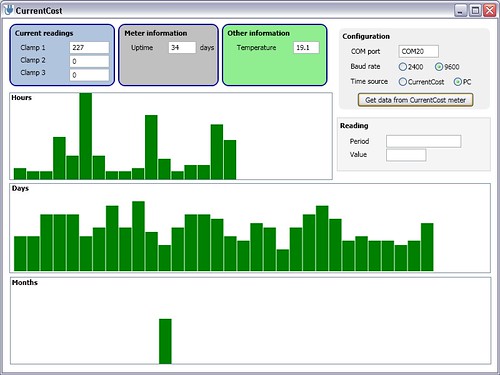
the start of a CurrentCost GUI

Read the rest of this entry »

Apps I install on my phones

June 8th, 2008

I noticed a thread running on Jason Langridge’s blog about “What are the first 10 applications you install on your phone?“, and thought I’d join in.

As always, conciseness is not my strong point – instead of trying to figure out which would be the first ten apps I’d install, I’ve ended up listing all the Windows Mobile apps I use regularly. (Ah well, if nothing else, it’ll be useful to have all the links in one place the next time I have to hard-reset one of my devices!)

I’ve tried to sort the list roughly in order of how much I use the apps.

Read the rest of this entry »

A change is as good as a holiday

June 8th, 2008

I started a new project at work this week. I can’t say too much about it publicly, but wanted to write a quick post mainly because I’m quite excited, and also to mention why I’m not gonna have time to play with many other things for the next month or so!

I’ve been seconded to one of our Services teams, so it’s a short break from my normal life of product development. It’s a secondment for a specific project – developing a messaging library for a customer that will run on their own real-time embedded operating system.

I spent most of this week trying to finish or handover my WPS work, so I’ve hardly started on the new project. But it’s already fascinating. Working in C on a customer’s proprietary platform with some extreme resource constraints (in both memory and operating system functions!) is a fun holiday from my life in development of an application written mostly in Java that runs on mainframes. And it’s definitely closer to the sort of work I want to do in my career, so the opportunity to do this as my day job for a couple of months is awesome.

Celio Redfly

June 4th, 2008

Today is a good day – a new gadget arrived today. 🙂

It’s a Celio Redfly.

Why?
I’m gonna try and make the case for the Redfly. This could be a futile effort – to be honest, they’re after a fairly narrow niche of the market, and if this is your sort of thing, you probably already know what it is. But here goes!

IBM Thinkpad - from plakboek's photos on FlickrIf you want to work (keep in touch, access the Internet, refer to notes and documents, etc.), you can get a computer.

Brill.

IBM Thinkpad - from plakboek's photos on Flickr Treo 650What if you also want to work when you’re not at your computer?

Get a computer and a smartphone/PDA to carry with you when you’re out and about.

Sync the two so you can access the same information whichever one you’re using.

IBM Thinkpad - from plakboek's photos on Flickr HTC AdvantageWhat if you want to work when you’re not at your computer, but the teeny tiny screen on a smartphone/PDA isn’t big enough?

Get a really big-ass smartphone / PDA with a huge screen and sync that with your computer instead!

IBM Thinkpad - from plakboek's photos on Flickr Treo 650 Asus EEE PC at StarbucksWhat if you want to work when you’re not at your computer, but don’t want to try and make calls on a phone roughly the size and weight of your first car?

Get a computer, a regular smartphone for quick tasks like looking stuff up on the go, and a mini-laptop/UMPC like an EEE PC for when you want to do more involved work that needs a bigger screen.

IBM Thinkpad - from plakboek's photos on Flickr Treo 650 Celio RedflyThe problem with that is that syncing two devices is bad enough. Keeping three in sync is just a major headache.

Sure there are some workarounds, like working off USB memory sticks or keeping everything online, but these aren’t ideal.

Enter the Redfly from Celio.

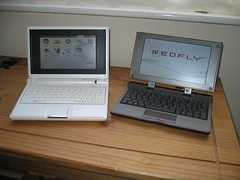
Celio Redfly and an EEE PCIt looks like a laptop, and is virtually the same size as the EEE PC.

But it’s a dumb terminal without it’s own processor or storage – it pairs with a smartphone (by USB or Bluetooth) and runs from there. It’s basically the same as plugging a monitor and keyboard into your laptop – you’re still using your laptop, just with more comfortable peripherals.

With the Redfly, you’re still using your smartphone, just from the keyboard and display of the Redfly.

I’ve only had a little time to play with it tonight, so here are my first impressions:

Read the rest of this entry »

CurrentCost hacking – starting to identify appliance power usage

June 3rd, 2008

I needed a break from work tonight, so went back to playing with the CurrentCost meter – a chance to try a few new things.

The objective
I want to make a start on identifying how much electricity different things in my house use. To begin, I’m going to start with a very manual user-driven approach:

Subscribe to updates from the CurrentCost meter, and when a significant change in usage occurs, ask me what I’ve just switched on or off, and collect that information to build up a record of how much electricity different devices use.

How?
It’s already quite late, so I just wanted to hack a quick first version together. I decided to write it as a small Java app.

As I’ve mentioned before, I’m publishing the CurrentCost readings to a small broker running on my home server. The plan was to write a Java application that uses MQTT to subscribe to updates from the broker.

Why? Because I’ve not used Java on the Slug before, or with MQTT. (Is that not a good enough reason? 🙂 )

I’ve written it as a command-line app, because it’s a quick way to run it from different devices around the house. (That is, by cheating 🙂 I’m actually running the app on the home server, using PuTTY / PocketPuTTY / SSH etc. to run it from my ThinkPad, PDAs, mobile, EEE PC, etc.).

Read the rest of this entry »

Back at work… gradually

June 1st, 2008

Hurrah – after a two and a half weeks being stuck at home, the doc tells me that my back is well enough for me to go back to work tomorrow.

I’m not fully recovered – the estimate for that is still 6 – 8 weeks, so I’m been warned to take it easy for a few weeks. In particular, he made it very clear that I must get up and stretch my legs regularly, as prolonged periods sitting could set my recovery back.

screenshotUnfortunately, I know I have a habit of being a bit single-minded (some might say “obsessive” 😉 ) while I’m working, and often lose track of time. So I’ve thrown together a 35-line program to help make sure I don’t overdo it.

It will automatically lock my ThinkPad after 40 minutes, resetting the timer each time I unlock the ThinkPad again.

Read the rest of this entry »

Capturing Bluetooth events in Windows Mobile

May 30th, 2008

I wrote on Sunday about writing Bluetooth code for Windows Mobile for a location-based reminder app I hacked together.

At the time, I wrote about two main approaches for finding nearby Bluetooth devices:

  • searching for discoverable devices
  • registering for notifications for when paired devices connect and
    disconnect

For the location-based reminder app, I went with the first approach, and played with how to search for discoverable devices.

This afternoon, I tried out the other way – writing an app that registers with the OS for connect and disconnect notifications from paired devices.

Read the rest of this entry »

A daily CurrentCost “bill”

May 28th, 2008

As I’ve finally got my home server capturing the electric meter readings from the CurrentCost, I thought it’d be good to try doing something with it.

I want to start with something a bit different to graphs, because there’s already been a lot of cool work done in different graphing approaches.

As I wrote yesterday, I’ve got a MySQL database that is storing the watt reading from the electric meter captured once every six seconds.

I wondered whether it makes sense to try and turn these figures into a financial cost. It might be interesting (and useful as a behaviour-altering thing) if we could get a “bill” from the CurrentCost meter each day that told us how much we spent on electricity the last day.

+=============================================+
  Your CurrentCost bill for 2008-5-27

     Electricity usage   4.9802 units
      Cost ==           £0.4874

     Standing charge    £0.1582
   ---------------------------------------
     TOTAL COST FOR 2008-5-27 : £  0.65
+=============================================+

I’m not entirely sure of my maths here, but I thought it could be interesting to give it a try.

Read the rest of this entry »