Like last year, we went to Devon for a week before Easter. And like last year, I used it as a chance to walk, forget work, and catch up on books, games, and movies.
I played…









I read…



I watched…








Like last year, we went to Devon for a week before Easter. And like last year, I used it as a chance to walk, forget work, and catch up on books, games, and movies.
In this post, I’ll share examples of how writing user-defined functions (UDFs) extends what is possible using built-in Flink SQL functions alone.
I’ll share examples of how UDFs can:
IBM TechCon is an annual online technical event for engineers, creators, and integration specialists.
One of our sessions for this year was AI patterns in event-driven architectures:
You already have Kafka topics sending valuable event data through your systems. You’ve heard about the increasing adoption and promise of AI technologies. But how do these worlds overlap?
We’ll explain the ways that you can take your Kafka topics and use them not just for integration and analytics, but also to drive AI and ML — things like real-time anomaly detection, prediction models, personalization, decision pipelines, and more.
In this session, we’ll explain the four main patterns for how your existing Kafka topics (and the streams of events on them) can be leveraged as the foundation for AI/ML. We’ll show multiple technology approaches to implement each pattern – rather than convince you to use any single specific tool, help you understand the high level patterns, and how can you get started with them.
session recording on video.ibm.com
This was adapted from a talk I gave at Current last year.
I got to go to a fancy convention centre in New Orleans for that talk, but I gave this one from a poorly-lit meeting room in my office… so in that respect at least, this one was less fun! 😉
But it’s a topic I find super interesting, so I am always pleased to have another chance to share my thoughts.
IBM TechCon is an annual online technical event for engineers, creators, and integration specialists.
One of our sessions for this year was an introduction to Monitoring your Event Driven Architecture:
This session will give you an insight into the life of an Event Automation administrator, responsible for a busy event-driven system where teams have been creating a variety of Kafka topics, integrations, stream processing apps, connectors, and much more. We’ll highlight the importance of metrics and monitoring for event driven architectures and introduce you to the tools that are available to help.
We’ll do this by showing you an event-driven environment where things have gotten out of hand. In our fictional scenario, users are being impacted by things like poorly configured topics, poorly written applications, poorly managed connectors, poorly configured stream processors…
In this session, we’ll walk you through to bring control to the chaos. We’ll step through how to get an insight into what is happening, find out where the problems are, and put controls in place to mitigate their impact.
session recording on video.ibm.com
It was an introduction for beginners, that you could sum up as a 40-minute plea for people to monitor their Kafka clusters and applications! Essentially, we set up a handful of naive and broken applications, and walked through how metrics and monitoring show you where the problems are hiding.
Watch it to be persuaded that metrics are important.
Or to watch how Matt had to jump in and help me when an Apple Magic Mouse decide it didn’t like scrolling any more, and I needed to get to things at the bottom of web pages!
Or just to marvel at how glamourous our offices are. 😉
IBM TechCon is an annual online technical event for engineers, creators, and integration specialists.
One of our sessions for this year was Deploying an Apache Flink job into production:
You’ve maybe seen the low-code canvas in Event Processing or the simple expressiveness of Flink SQL, and how easy they make it to author event stream processing. A business user who understands the data in the event stream can easily describe the patterns they’re interested in or the insights they want to look for. But what comes next?
In this session, we’ll walk through the ops tasks involved in taking that event processing flow, and deploying it into Kubernetes as a Flink application ready for production.
We’ll outline the steps that are needed and describe the main decisions you need to make. This includes the sorts of values you will want to monitor to make sure that your Flink application continues to run correctly.
It was a live walk-through of the steps involved in deploying Flink jobs in Kubernetes. I used Event Processing to create the Flink job that I used for the demos, because low-code UI’s are easier to follow in a presentation, but most of what I showed is applicable however you’ve created your Flink job – and was a high-level introduction to using the Flink Kubernetes Operator.
In this post, I’ll share examples of how to process JSON data in a Kafka Connect pipeline, and explain the schema format that Kafka uses to describe JSON events.
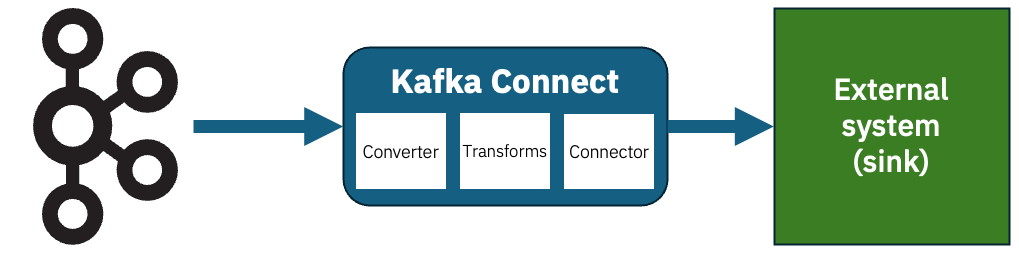
Kafka Connect sink connectors let you send the events on your Kafka topics to external systems. I’ve talked about this before, but to recap the structure looks a bit like this:
Imagine that you have this JSON event on a Kafka topic.
{
    "id": 12345678,
    "message": "Hello World",
    "isDemo": true
}
How should you configure Kafka Connect to send that somewhere?
It depends…
Generative AI is fast becoming an everyday tool across almost every field and industry. Teaching children about it should include an understanding of how it works, how to think critically about its risks and limitations, and how to use it effectively. In this post, I’ll share how I’ve been doing this.
My approach is to take students through six projects that give a practical and hands-on introduction to generative AI through Scratch. The projects illustrate how generative AI is used in the real world, build intuitions about how models generate text, show how settings and prompts shape the output, highlight the limits (and risks) of “confidently wrong” answers, and introduce some practical techniques to make AI systems more reliable.

As with the rest of what I’ve done with Machine Learning for Kids, my overall aim is AI literacy through making. Students aren’t just told what language models are – they go through a series of exercises to build, test, break, and improve generative AI systems in Scratch. That hands-on approach helps to make abstract ideas (like “context” or “hallucination”) more visible and memorable.
I’ve long described Scratch as a safe sandbox, and this makes it ideal to experiment with the sorts of generative AI concepts they will encounter in daily tools such as chatbots, writing assistants, translation apps, and search experiences.
Across the six projects, students repeatedly encounter three core questions:
1. How does a model decide what to say next?
Students learn that language models generate text one word at a time, guided by patterns in data and the recent conversation (“context”).
2. Why do outputs vary, and how can we steer them?
Students discover how settings and prompting techniques can balance creativity vs reliability, and how “good prompting” is about being clear on the job you want done.
3. When should we not trust a model, and what do we do then?
Students experiment with hallucinations, outdated knowledge, semantic drift, and bias. They practise mitigations to these problems, such as retrieval (adding trusted information) and benchmarking (testing systematically).
All of this is intended to be a (much simplified!) mirror of real-world practice. Professional uses of generative AI combine generation (writing), grounding (bringing in trusted sources), instruction (prompting), and evaluation (testing and comparing). Children can be introduced to all of these aspects through hands-on experiences.
In this post, I want to share a recent worksheet I wrote for Machine Learning for Kids. It is a hands-on project to give students an insight into an aspect of prompt engineering with language models.
Students create a Scratch project with four sprites.
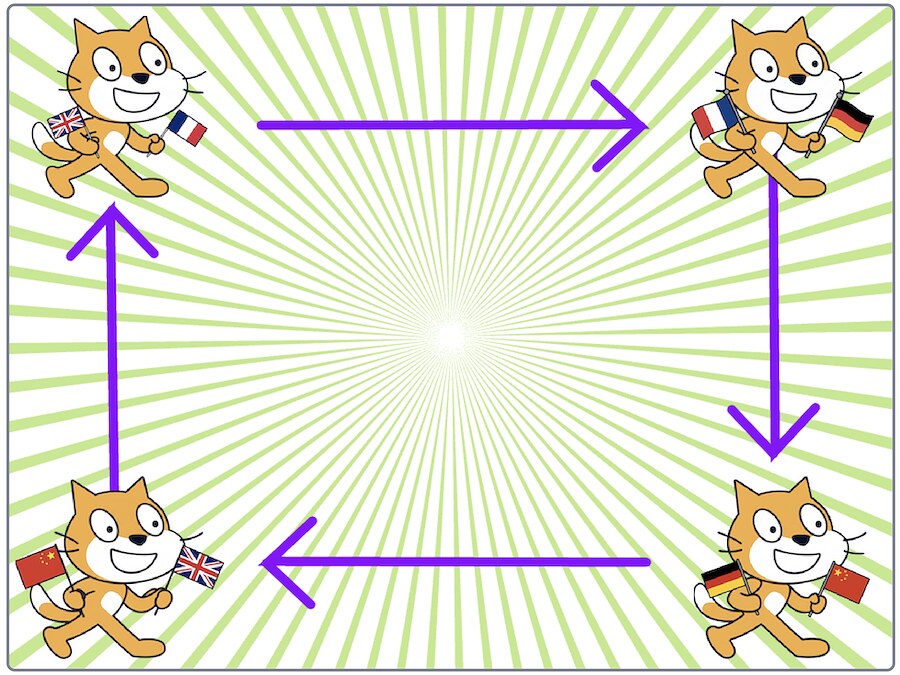
They start things off by writing an English sentence which goes to their first sprite.
The first sprite waits to be given an English sentence, and uses a language model to translate it into French.
The second sprite waits to be given a French sentence, and uses a language model to translate it into German.
The third sprite waits to be given a German sentence, and uses a language model to translate it into Chinese.
The fourth sprite waits to be given a Chinese sentence, and uses a language model to translate it into English.
This is then received by the first sprite, and the process continues again.
screen recording of the Scratch project on YouTube
Because the translations aren’t 100% perfect, like the famous children’s game, the text passed between the sprites gets further and further from the student’s starting sentence.
I’ve been kicking around this idea for a few months, but it didn’t work well with the groups that I tried the early project incarnations with. I think it’s in a better state now, so I’ve added the worksheet to the site.
The project has given me a chance to introduce a range of different ideas…