Archive for the ‘tech’ Category

Google Developer Day London

Wednesday, September 17th, 2008

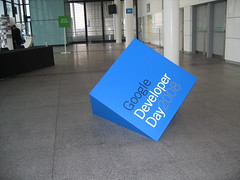
falling through the floorIt’s been a very geeky week – only a couple of days after BathCamp, I was in London yesterday for Google Developer Day.

I was saying only a couple of days ago that I really need to get my head around some of the options out there for web developers, so this was well timed.

I learnt about web development tools and online APIs, talked a lot about where mobile development is going, and got to wander around Wembley Stadium. All in all, it was a good day. 🙂
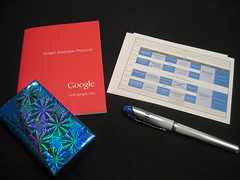
ooh - a present!The underlying theme for the talks throughout the day was showing how Google are trying to make the web ‘better’.

The messages were grouped into four key areas:

  • “client” – making the browser more powerful – through Chrome, and Gears
  • “cloud” – making the cloud more powerful – through the various APIs they make available
  • “connectivity” – making web apps more powerful – through web development tools like GWT, and Android for mobile
  • “social” web – making the web more social – through OpenSocial

I made a ton of notes throughout the day. Rather than write the world’s longest blog post, I’ve picked out a few interesting bits.

(more…)

BathCamp

Sunday, September 14th, 2008

I’m home from BathCamp – the Bath barcamp. I don’t have a lot to say about it, but wanted to post a quick thanks to all of the organisers.

This was my first barcamp outside London. I mainly went because Bath is my old Uni town, and any excuse to go back is always good. But I’m really glad I went – and will definitely be looking out for more non-London developer events.

A few random thoughts from my sleepy brain…

del.icio.us pecha kucha: ten seconds to describe each of the last ten pages that you’ve saved in del.icio.us. Similar to delicious.salted.com but driven by a Python script, we took turns to give it our del.icio.us username, and each of our last ten saved webpages were opened in turn and displayed on a big screen. Very neat idea, and one that I will have to steal at some point. It makes for a fascinating geeky ice-breaker.

(more…)

CurrentCost @ BathCamp

Saturday, September 13th, 2008

I’ve uploaded the slides I used for my CurrentCost talk to SlideShare.

CurrentCost

View SlideShare presentation or Upload your own. (tags: bathcamp08 bathcamp)

They probably wont make much sense without my rambling to go with them, so I’ll try and add some notes to them at some point.

A netbook ahead of it’s time

Saturday, August 2nd, 2008

Psion Netbook (left) and EEE PC (right)
I had assumed that “netbook” was a recent term that grew out of the evolution of UMPCs, MIDs, origami and EEE PC clones. And in my defence, the wikipedia article for “Netbook” says:

The term netbook was introduced by Intel in February 2008 to describe a category of small-sized, low-cost, light weight, lean function subnotebooks optimized for Internet access and core computing functions

I didn’t realise that the term has been around for a while though, until I came across an eight or nine year old bit of mobile tech history in Roo’s old office – a Psion Netbook.

Netbooks: Then and nowI’ve had a couple of Psions before (a Siena and a Series 5), but I’d never heard of the Netbook before.

It’s a similar size to my EEE PC, although a little heavier. It has a decent-sized keyboard, a 7.7″ 640×480 colour backlit screen, Opera 3.62 (with support for HTML 3.2), a Java 1.1.8 runtime, and a bunch of PIM-type apps. No bluetooth or WiFi, but it does have RS232 and infrared.

I’ve got no idea what is gonna happen to it – I will ask if I can have it, although to be honest this is largely for geek nostalgia, as I’m not sure what I’d practically do with it. 🙂

Apps I install on my phones

Sunday, June 8th, 2008

I noticed a thread running on Jason Langridge’s blog about “What are the first 10 applications you install on your phone?“, and thought I’d join in.

As always, conciseness is not my strong point – instead of trying to figure out which would be the first ten apps I’d install, I’ve ended up listing all the Windows Mobile apps I use regularly. (Ah well, if nothing else, it’ll be useful to have all the links in one place the next time I have to hard-reset one of my devices!)

I’ve tried to sort the list roughly in order of how much I use the apps.

(more…)

Celio Redfly

Wednesday, June 4th, 2008

Today is a good day – a new gadget arrived today. 🙂

It’s a Celio Redfly.

Why?
I’m gonna try and make the case for the Redfly. This could be a futile effort – to be honest, they’re after a fairly narrow niche of the market, and if this is your sort of thing, you probably already know what it is. But here goes!

IBM Thinkpad - from plakboek's photos on FlickrIf you want to work (keep in touch, access the Internet, refer to notes and documents, etc.), you can get a computer.

Brill.

IBM Thinkpad - from plakboek's photos on Flickr Treo 650What if you also want to work when you’re not at your computer?

Get a computer and a smartphone/PDA to carry with you when you’re out and about.

Sync the two so you can access the same information whichever one you’re using.

IBM Thinkpad - from plakboek's photos on Flickr HTC AdvantageWhat if you want to work when you’re not at your computer, but the teeny tiny screen on a smartphone/PDA isn’t big enough?

Get a really big-ass smartphone / PDA with a huge screen and sync that with your computer instead!

IBM Thinkpad - from plakboek's photos on Flickr Treo 650 Asus EEE PC at StarbucksWhat if you want to work when you’re not at your computer, but don’t want to try and make calls on a phone roughly the size and weight of your first car?

Get a computer, a regular smartphone for quick tasks like looking stuff up on the go, and a mini-laptop/UMPC like an EEE PC for when you want to do more involved work that needs a bigger screen.

IBM Thinkpad - from plakboek's photos on Flickr Treo 650 Celio RedflyThe problem with that is that syncing two devices is bad enough. Keeping three in sync is just a major headache.

Sure there are some workarounds, like working off USB memory sticks or keeping everything online, but these aren’t ideal.

Enter the Redfly from Celio.

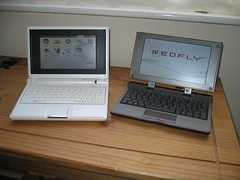
Celio Redfly and an EEE PCIt looks like a laptop, and is virtually the same size as the EEE PC.

But it’s a dumb terminal without it’s own processor or storage – it pairs with a smartphone (by USB or Bluetooth) and runs from there. It’s basically the same as plugging a monitor and keyboard into your laptop – you’re still using your laptop, just with more comfortable peripherals.

With the Redfly, you’re still using your smartphone, just from the keyboard and display of the Redfly.

I’ve only had a little time to play with it tonight, so here are my first impressions:

(more…)

Accessing MySQL from Perl on SlugOS

Tuesday, May 27th, 2008

I’ve written about my CurrentCost meter that I’m using to monitor my home electricity usage, and the small home server that I’ve set up to collect the data.

Yesterday, I decided to make a start on collecting the data. My plan was to copy what Nick had done and create a MySQL database to store the info, with a table to store a timestamp and the watt reading from the CurrentCost meter.

CREATE TABLE currentcostdl (  
    time TIMESTAMP DEFAULT CURRENT_TIMESTAMP,  
    power FLOAT NOT NULL,  
    primary key(time));

I started with Nick’s Python scripts, but didn’t get very far.

The server, a NSLU-2 (or “slug”) is running SlugOS.

The problem was that there is no python-mysqldb package in the SlugOS repositories. I did try downloading the source for it from sourceforge to build it myself, but struggled to get the dependencies I needed to make it – urllib in particular was a big pain.

I also tried the debian package but again dependencies on SlugOS got in the way.

So I gave up on that and decided to do it myself using Perl – Perl and MySQL had to be easier, right?

Erm… not so much 🙂

(more…)

My new home server – a NSLU-2

Wednesday, May 21st, 2008

I finished putting together my latest gadget this afternoon – a mini home server made from a Linksys NSLU-2 NAS device and a portable USB harddrive.

Why did I want it?

Do I really need an excuse? 🙂

Now I have a full, albeit small, Linux server at home, I’m sure I can think of some fun things to do with it. But as I wrote last week, the catalyst that pushed me to doing this now was wanting something to collect data from my new CurrentCost electricity meter.

It needed to be cheap, small, and low-powered – no point having a server running all the time to monitor my home’s electricity usage if it makes a significant dent in my electricity usage all by itself!

What did I buy?

A NSLU-2 – a network storage link for USB 2.0 disk drives, by Linksys. This is a small NAS device that lets you make a USB harddrive available on a network. The firmware in it comes with enough software to create a network share for any portable USB harddrives or USB flash memory key that you plug in.

It’s a neat little gadget, but what makes it special is that it is very easy to flash the firmware and replace it with a full Linux distro. Plug in your USB harddrive, and you have a Linux server with as much space as you might want.

Oh – and for some reason, people call them “slugs”.

(more…)