Google Latitude is starting to get very interesting. The new dashboard lets you see some graphs of how much time you spend at work, home, and out and about, and a list of your most visited places.
You can also see a Google Map with your 500 latest updates added as pushpins.
I had a random idea while looking at it this evening – why don’t they let you see all your updates on a map, in a heatmap that shows where you’ve been?
Naturally, once I had the idea, I had to give it a quick try.
From the Google Latitude dashboard, you can export your history of location updates as a KML file. I downloaded my history, and wrote a short, hacky Python script to parse it, and generate a heat map to overlay on a Google map.
In this post, I’ll show the sorts of results it can generate, and share my script, in case any other Latitude users fancy giving it a go.
I wrote this week about my new Android app, which checks for road traffic problems affecting UK routes. I mentioned that it wasn’t ready for release yet, because there are a few admin issues that I need to sort.
One of the problems is in how I get the routing data.
The app relies on comparing the locations of traffic problems with the user’s route.
Getting the location of traffic problems isn’t too hard as there are feeds from the Highways Agency and the BBC that offer that.
But getting a detailed description of a route between two places, in a format that I can use to compare against the traffic problems, proved harder.
I’ve been travelling a lot for work recently. Most of it has been by car, and on a few occasions, I’ve run into traffic problems that have made me late.
This got me thinking about what I could do to make things easier.
There are websites with traffic info – such as the Highways Agency or motoring organisations like the AA and RAC. They show travel information for a particular region, or the UK as a whole.
But that’s not really enough.
For one thing, I have to remember to check. I’m not a morning person – particularly when I need to get up at 5am so I can drive for hours. Any approach that relies on me remembering to do something isn’t off to a great start.
And it’s too manual. They show me all of the traffic problems, and it’s up to me to manually work out which of them might affect my route. There is too much noise, with too many traffic reports for places that are nowhere near me, or where I want to go. It’s up to me to filter that out.
At any rate, I don’t want to boot up a computer at 5am, so an AJAX-heavy website that doesn’t work on mobiles isn’t an ideal fit anyway.
My ideal approach would be:
mobile
My mobile phone is already my alarm clock. It’s the only screen I look at when I get up in the morning, so this is the ideal place to get traffic info.
automatic
My mobile knows when I’m going to go somewhere, and where I’m planning to go. It shouldn’t need me to manually check every day – it should check for me automatically, and alert me if it finds any problems.
relevant
Showing me every traffic problem is too much. My mobile knows where I am, and where I’m going. I only want to see problems that are on (or perhaps very near) my route. Anything else should be filtered out, leaving me with just the updates relevant to me.
I went looking for a mobile app that does this, but didn’t have any luck. There are a couple of Android apps with UK traffic information (one from the RAC, the other by the brilliantSimon Judge).
They at least get the traffic info into a mobile-friendly format. But they still show you every traffic problem, and only when you remember to check. I couldn’t find anything that meets all three of my needs.
So I’ve written one.
It’s basic looking… and perhaps a little rough around the edges. But it’s a start.
You enter in routes – which is a start and an end location. This can be a town or city name, a full address, or a postcode.
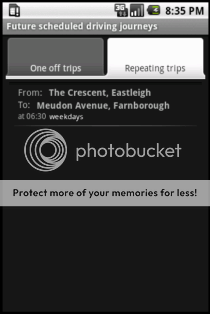
From there, you can either check the traffic now, or schedule the app to check at a later date and time. For regular journeys, you can describe a repeating pattern – so for example, I can tell it to check my route to work every weekday morning at 7am, and my route home every weekday evening at 4.45pm.
The app works out the route, and compares it with known traffic problems.
This can be done in the background, so it doesn’t matter if your phone is switched off when it’s time to check, or if you’re using another app.
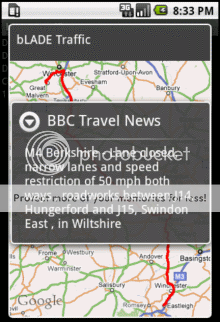
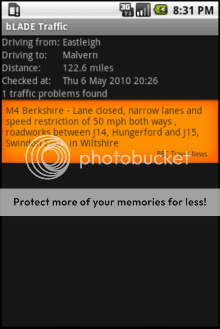
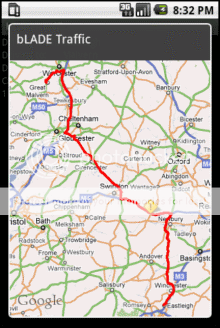
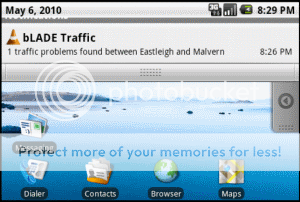
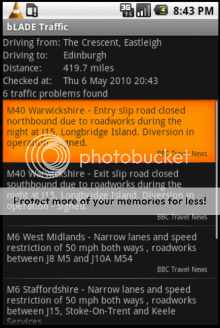
If it finds any matches, it puts a warning in the notifications bar. Tapping on this can take you to a list of the problem descriptions, or an interactive map with both the route and the traffic problems marked on it.
It’s pretty neat, even if I say so myself. 🙂
And it’s something that I can see myself using.
So why am I not making it available for others now? I’ll leave that for another post…
My flight home at the weekend was cancelled, and we’ve been given a new flight on the 29th – turning our 7 day break into an eighteen day holiday.
For the unplanned 11 days, our package holiday operator – easyjet – is putting us up in a series of nice full-board hotels, and providing a coach to transport us between them.
I’m very grateful – we’d saved for a couple of years to pay for the original week as it is. I wouldn’t have been able to afford extending the holiday.
But I’m also curious. Why are they doing this? Do they have to?
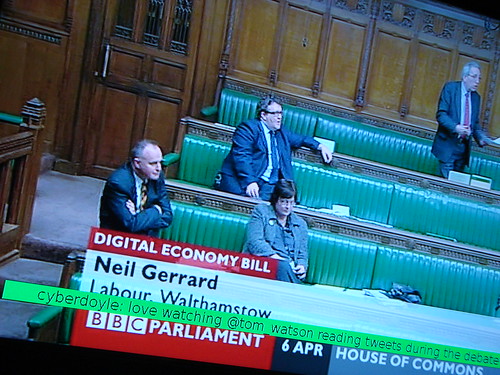
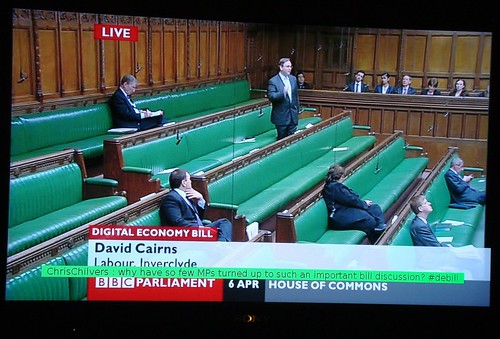
As a lot of other people, I’m watching the debate of the Digital Economy Bill on BBC Parliament tonight. I’m also trying to follow along with some of the #debill back-channel on twitter.
With such a heated and interesting commentary on twitter, it reminded me of Roo’s “Second screen” idea of having tweets with a specific hashtag next to the TV during live TV events, when following the twitter backchannel during ‘The Apprentice’.
Unfortunately, I don’t have a spare laptop kicking around to show tweets on. But I do have a hackable TV. 🙂
With that in mind, in just a few minutes I hacked together the following script to flash up tweets with the #debill tag on the TV:
# run me using:
#       python twittertv.py debill 1

import twython
import subprocess
import sys
from time import sleep

twitterKeyword = sys.argv[1]
twitterSearchRateLimitMins = int(sys.argv[2])

twitter = twython.core.setup()

showOnTVCommand = ['svdrpsend', 'mesg', 'messagetodisplay']

lasttweetid = 1

while True:
    search_results = twitter.searchTwitter(twitterKeyword, since_id=lasttweetid, show_user=True)

    numtweets = len(search_results["results"])
    for tweetnum in reversed(range(0, numtweets)):
        lasttweetid = search_results["results"][tweetnum]["id"]

        user = search_results["results"][tweetnum]["from_user"]
        tweet = search_results["results"][tweetnum]["text"]
        showOnTVCommand[2] = user + " : " + tweet

        subprocess.Popen(showOnTVCommand)
        sleep(20)

    sleep(twitterSearchRateLimitMins * 60)
It’s a quick-and-dirty hack, but I wanted to get something that would work before the debate was finished. 🙂
Charity and politics are often closely linked. Not least because the Government is a huge funder of charities.
I don’t need to go far to find an example. Look at the finances of my charity, Solent Youth Action. Our single biggest funder by far, was started by, and receives a lot of funding from, central Government. Even a lot of our other funders, whether local councils or NHS trusts, are influenced by central government policy.
The point is, as a charity our future can be affected by politics. And with an election coming up, it’s a particularly popular time to look ahead and wonder about what politicians might decide to do in relation to the “Third Sector“.
To help with this, Community Action Hampshire and the SCA Institute of Social Enterprise organised an event on the 12th March for charity directors and trustees to hear directly from the three main political parties on “The Third Sector and the Next Government”.
The format was pretty straightforward. Three MPs – one from Labour, one from the Conservatives and one Liberal Democrat – were each given time to make a short speech, followed by time for Q&A. Once they all had a turn, there was a general Q&A for the three of them as a panel.
I enjoyed the event, and thought it might be interesting to share some of what I heard.
(or “looking at the limitations of the Android home screen widgets framework”)
A couple of years ago, I wrote a Windows Mobile app called TwitToday : a Twitter widget for the “Today screen” (the default screen when the phone is on, with all apps closed or minimised).
The rationale was that it was useful to have a way to post a tweet quickly when you don’t want to have to wait for a full-blown client to start.
Or if you don’t want to incur the battery or memory cost of leaving a client running all the time.
Android has a “Home screen”, which is similar to the Today screen on Windows Mobile. And it has support for widgets. This led several people to ask me why I never ported TwitToday to Android.
The short answer is that I did try, but the current state of the widgets framework made it impossible.
I tried to write a TwitToday widget back when the Android widgets framework was first introduced in Android 1.5.
It all started quite well:
I wrote the Android Service that would carry out the background task of posting a tweet. No problems there – it worked fine.
I wrote the widget XML to define the GUI. This is what you can see running in the screenshot. And it works… sort of. It has a text box that you can type up to 140 characters into. And if you press the button, it causes a chunk of code to get invoked.
The problem came when I tried to link the two together: to get the Service that posts tweets to obtain the String from the text box in my widget.
This isn’t possible. Android’s widget framework as it currently stands is geared around displaying information to the user, not collecting user input.
Whether it’s slipped somewhere in or under the sofa, or been hidden by the kids, I’m often at a loss to find it.
A mobile phone, on the other hand, is rarely too far from my hand 🙂
So I’ve hacked together a quick app to put a TV remote control interface on my phone. It’s definitely a quick-and-dirty chunk of code, but it does now mean that I can work my TV from my mobile if I can’t find the real remote.
On the off-chance that this is useful to other vdr users, I wanted to share how I did it.
 I wrote this week about
  There are websites with traffic info – such as the
  My ideal approach would be:
 I went looking for a mobile app that does this, but didn’t have any luck. There are a couple of Android apps with UK traffic information (one from the
  The app works out the route, and compares it with known traffic problems.
  If it finds any matches, it puts a warning in the notifications bar. Tapping on this can take you to a list of the problem descriptions, or an interactive map with both the route and the traffic problems marked on it.