Your data. Mobile. (a hackday hack)

November 12th, 2009

screenshot stored on PhotobucketWhat do the following have in common?

Weather Channel Max – an iPhone weather app. StockWatch – an iPhone stock prices app. CNN Mobile – an iPhone news app. FlightTrack – an iPhone flight updates app. Tweetie – an iPhone twitter app.

They are all apps which provide users with updates to their phone when some information changes. The information in question is different. But they’re all ways for users to get information that they are interested in, while they are on the move.

Having a dedicated hard-coded app for each type of data is great for information that a large number of people are interested in.

For example, there are enough people who are interested in the weather that it’s worth having an app dedicated to it.

But what if you want updates for information that isn’t so widely needed? What about niche interests?

We’re all different. There is going to be something that you’re interested in that not everyone else is. Or at least a particular set of interests that noone else exactly shares.

People’s needs and interests are almost infinitely varied, so we can’t come up with enough applications to meet everyone’s unique needs. Particularly for more esoteric topics, which are too long tail to each justify a specific mobile app.

For these situations, we need something generic that individual users can customise.

This was an idea I played with on the last IBM HackDay. I managed to get a proof-of-concept working on the day, but not had the chance to share it before now.

What I tried to create was:

  • a generic mobile application – something that can display an arbitrary number of bits of information
  • a browser extension approach – some way that a user can pick any bit of any webpage, adding it to their list of information that will be pushed to their mobile

I’ve recorded a video of it running. (Difficult to see without full-screen – sorry!)

To summarise, the steps involved are:

  1. User visits a webpage at their computer
  2. User highlights a portion of the page, and uses a Firefox extension to register this with my notifications server
  3. The notifications server informs the mobile app of the new topic of interest
  4. The notifications server continues to monitor the webpage
  5. When the highlighted portion of the webpage changes, the updated contents are pushed to the phone
  6. The mobile app notifies the user of the change
Read the rest of this entry »

Augmented reality for Hursley

November 6th, 2009

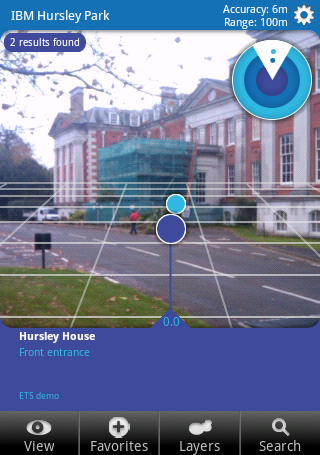
screenshot : click for better resolution imageOne of the themes at openMIC this week was augmented reality, and a topic that came up a couple of times was Layar.

Layar is a mobile app for Android and iPhone that lets you display location-based information overlaid on a real-time camera view.

For example, the screen normally shows a viewfinder-like view from your mobile’s camera.

Search for “coffee” and a bunch of markers appear on the view, showing you where the nearest coffee shops are.

As you move the phone around, the markers follow the approximate location of the places they are showing you.

That’s assuming you want to search ‘Google Local’, but that’s not the only option. Location data is provided through “layars”, and there are layars available for location-tagged Wikipedia articles, Flickr photos, brightkite users, and more.

The interesting thing talked about at openMIC was the Layar API which lets anyone create a new Layar with their own information.

So I decided to spend a quiet Friday afternoon in the office creating a Layar for around Hursley. 🙂

This means a phone with the Layar browser installed can browse and search for points of interest around the site.

It was really very easy, so I’ll quickly outline the steps involved.

Read the rest of this entry »

Palm Pre

October 31st, 2009

I’ve had the Palm Pre for nearly a week now, so I thought that it was worth a quick post!

If you want to save yourself reading the rest of the post, I can summarise it for you here: the Pre is an awesome, pocket-sized piece of loveliness.

I love it. 🙂

I should probably qualify this, though – I am a longtime Palm fan… having previously bought a Palm Pilot, Palm IIIx, Sony Clie UX50 (which ran Palm OS), Palm Treo 650, Palm Treo 750 and Palm Treo Pro.

And if they hadn’t killed the Foleo before launch, I was gonna get that, too.

I was always going to want the Pre. But it really has met my expectations. It’s the device I wanted them to produce so I could justify my Palm devotion to the naysayers who were only recently predicting Palm’s demise.

There are already a ton of Pre reviews out there, so I probably shouldn’t duplicate too much of what has already been said. But there are so many things to highlight…

Read the rest of this entry »

Bye bye, Outlook

October 29th, 2009

As a major GTD nerd, it’s a temptation to constantly tweak and tinker with my personal productivity systems.

But I normally resist. This week, I’ve had a major overhaul, so thought I’d share what I’ve been doing and some of my reasons why.

I should mention that I nicked a lot of these ideas from Gareth, so big thanks to Gareth!

Why the change?

There were a number of reasons that motivated this.

Part of it was because I’m switching from mainly using Windows Mobile phones to my new shiny Palm Pre.

Part of it was a desire to move my main workstation from Windows XP to Ubuntu, after seeing so many friends and colleagues rave about it, hearing an inspiring talk on Linux from Bob Sutor, and getting so much abuse from people I’m too polite to name 😉

Read the rest of this entry »

Pushing, pulling, or leaving the door open

October 24th, 2009

This weekend is barcamplondon, so another chance for me to ramble incoherently about a technical topic of my choice. 🙂

My presentation started as a bit of a cop-out. I was ill last week and weekend when I was planning to prepare a new presentation, so I decided to give the same talk I did at Over The Air last month and hope that I didn’t get any of the same attendees.

But then I started tweaking it to suit the different audience. Over The Air is an event for mobile developers, so my presentation was pretty much aimed at mobile devs, which wasn’t quite right for a general event like barcamplondon.

Then I started updating it to reflect the feedback I got, both on the day at Over The Air, and through comments and tweets since.

My talk at OTA was a technical “Introduction to MQTT” session.

My presentation for barcamplondon became a broader look at mobile apps that rely on data from the Internet, and the challenges and choices facing mobile app developers who write them.

And I think it’s better for it. I hope it didn’t come across as pimping MQTT. I still talked about MQTT, but this time it was to use it as an example of one of a broader set of choices:

The aim of the talk was to discuss the pros and cons of each approach.

Read the rest of this entry »

Tracking my location on TV

October 21st, 2009

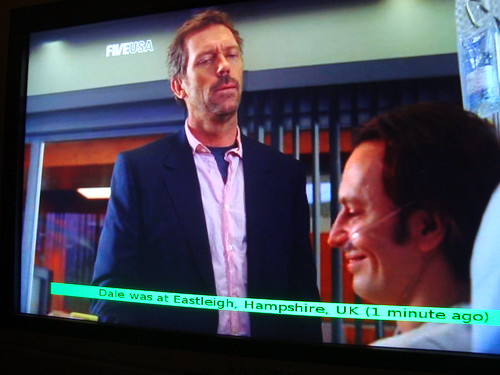
Location tracking on TV

This is what you see if you press the “Find Dale” button on my TV remote control.

(Well, actually the “Teletext” button… cos I wasn’t using it, and there isn’t another button that makes any more sense!)

The on-screen-display adds a message at the bottom of the screen for a few seconds, saying my last recorded location and when I was there.

People following me on twitter may have noticed me talking about setting up a new home media server: a small Linux server that has become our Freeview box, PVR, home photo album, and music server.

And now it’s set up, it is surprisingly easy to do amazingly useful, and not-at-all annoying things like this! 😉

In my defence, I stopped just short of making the script poll for my location and display an on-screen message whenever my location changes. Which would’ve been very cool, but probably drive my family nuts. So I compromised with a script that runs when you press a button on the remote.

Read the rest of this entry »

Mobile Widgets – the new hotness?

October 21st, 2009

Over The Air was a month ago now, so this post has been sat in draft for way too long. But I thought it was still worth quickly sharing something noticeable from the event.

By way of quick background for those who aren’t familiar with it, it is an event for mobile developers – a couple of days filled with talks and presentations on all things mobile.

And this year, the big thing seemed to be widgets. There were a lot of talks on widgets. So many, in fact that you could choose a session in every time slot that was about widgets.

Read the rest of this entry »

Writing an offline wiki client

October 10th, 2009

Friday was the seventh IBM Hack Day, and I again got the chance to spend a day playing with some random ideas.

As Hack Days go, I had a surprisingly productive day! I had four ideas on the day:

  • two mobile hacks (both of which I wrote a chunk of code for),
  • a twitter hack (which never got off the scribbled diagram stage, but it’s an idea I definitely want to come back to), and
  • a hack to extend an IBM product (which I created an alpha version of)

In this post, I’ll describe what I did for the last of these ideas: writing a client app for the wiki that comes with IBM’s Lotus Connections.

The idea

In the same way that I am writing this post in an offline blogging client, I wanted the same for using wikis: read and make changes to a wiki while offline, with changes uploaded to the online wiki the next time you are online.

This wasn’t a new idea. In fact, I tried it at IBM HackDay 4 back in 2007 but the wiki we used at work at the time had no API access for retrieving or updating wiki pages. So I sort of gave up and forgot about the idea.

But now I use Lotus Connections wikis at work. And Lotus Connections does have an API – an AtomPub API that gives you feeds to know when pages are changed, and a way to publish changes.

So I decided to revisit the idea.

The “finished” (ish) hack

It’s still very rough around the edges (this was a HackDay – I wrote the client code in under a day!) but it already shows the basic idea.

Offline wiki client

The top left view shows the list of your wikis.

Clicking on this fills the list below – a list of pages in the selected wiki. Clicking on a page in that list opens the contents of the page in the main view on the right.

Read the rest of this entry »